
MT4 FXブローカー
高評価のMT4 FXブローカーで、シームレスなFX取引を体験しましょう。当社のMetaTrader 4プラットフォームは、強力な分析ツール、高速約定、使いやすい操作性を兼ね備え、安心して取引できるようサポートします。口座を開設し、トレーダーがMT4 FXブローカーとしてTIOmarketsを選ぶ理由をご確認ください。
取引にはリスクが伴います
MT4 FXブローカーにTIOmarketsが選ばれる理由
MetaTrader 4(MT4)は、世界で最も人気のあるリテール向け取引プラットフォームの一つです。専任のMT4 FXブローカーとしてTIOmarketsをご利用いただくことで、市場を効果的に取引するために必要なものをすべて提供します:
MT4取引プラットフォームの機能
MT4プラットフォームは、取引体験を向上させるために設計された包括的な取引ツールを提供します:
- ✓取引機会の可能性を見極めるための30種類以上の内蔵テクニカル指標
- ✓1分足から月足まで、完全な市場分析のための複数のチャート時間軸
- ✓チャンスが訪れた際に即時約定できるワンクリック取引
- ✓取引スタイルや好みに合わせてカスタマイズ可能なインターフェース
- ✓エキスパートアドバイザー(EA)による自動売買機能
競争力のある取引条件
当社のMT4 FXブローカーサービスは、以下を含むあらゆる市場環境で効率的に取引できるようにします:
- ✓タイトなスプレッド - Raw spread口座では、0.0 pipsからFX取引が可能です。
- ✓高速約定 - 最小限のスリッページで、ミリ秒単位の迅速かつ効率的な注文執行を体験
- ✓ゼロコミッションオプション - 取引手数料がかからない口座を選択
- ✓最低入金額が低い - Standard口座ならわずか$20から取引を開始
- ✓30% ロイヤルティ入金ボーナス - 入金のたびに追加マージンで取引力を強化
さまざまな取引スタイルに合わせて設計された価格設定
登録後にStandard口座が自動的に作成されます 同じユーザープロフィールのままRaw口座とVIP Black口座をいつでも開設できます
標準
手数料無料の変動スプレッド取引口座
1.1
$0
無制限まで
¥3,000
生
変動スプレッドと低手数料で取引
0.0
$6
最大 1:500
¥37,000
VIPブラック
低変動スプレッドと手数料無料の取引
0.3
$0
最大 1:500
¥150,000
取引にはリスクが伴います
MT4取引プラットフォームの利用環境
複数デバイスに対応した当社のMT4 FXブローカー・プラットフォームでいつでもどこでも市場にアクセス:
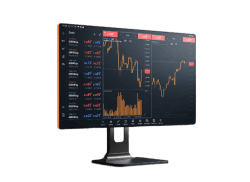
デスクトップ版MT4
WindowsまたはMac向けのフル機能MT4デスクトップアプリをダウンロードして取引と分析ツール一式を利用できます
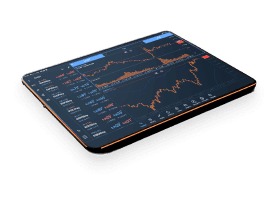
Web版MT4
ソフトウェアをダウンロードせずにブラウザから直接取引できます どのパソコンからでも外出先での取引に最適
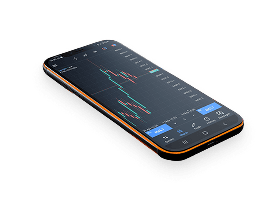
MT4モバイル取引アプリ
iOSおよびAndroid向けのTIOmarkets MT4モバイルアプリで市場との接続を維持 スマートフォンやタブレットからポジションの監視取引の実行市場分析が行えます
MT4 プラットフォームの比較
機能/メリット
インストールが必要
対応OS
取引注文
テクニカル指標&オブジェクト
チャート種類&時間足
アルゴリズム取引(EA&MQL5)
コピートレード
リアルタイム市場データ
金融ニュース&アラート
ワンクリック取引
ストラテジーテスター/バックテスト
VPS(仮想専用サーバー)
アクセシビリティ
セキュリティ
デスクトップ
はい
Windows, macOS
全注文タイプ(成行、指値、逆指値、トレーリングストップ)
30種類のインジケーター、24種類のグラフィカルオブジェクト + カスタムインジケーター
9つの時間足、複数のチャート種類(ローソク足、バーなど...)
はい
はい
はい
はい
はい
はい
はい
デスクトップPC
高い(ローカルインストール)
Web
いいえ
最新ブラウザ対応の任意のデバイス
フルセット
インジケーター30種、描画オブジェクト24種
9種類の時間足、3種類のチャートタイプ
いいえ
いいえ
はい
制限あり
はい
いいえ
いいえ
インターネットブラウザがあるあらゆるデバイス
暗号化された安全なWebデータ
モバイル
はい(アプリのダウンロード)
iOS, Android
フルセット
インジケーター30種、描画オブジェクト24種
9種類の時間足、3種類のチャートタイプ
制限あり(EAは稼働不可)
いいえ
はい
はい
はい
いいえ
いいえ
スマートフォン&タブレット
暗号化された安全なWebデータ
MT4 で取引する主なメリット
比類のない信頼性
MetaTrader 4 は 2005 年のリリース以来、FX取引における業界標準としての地位を確立してきました。安定性とパフォーマンスの実績により、初心者からプロのトレーダーまで幅広く支持されています。
強力なテクニカル分析
プラットフォームの包括的なチャート機能とテクニカル指標により、詳細な市場分析が可能です:
- ✓複数のチャートレイアウトを作成
- ✓さまざまなテクニカル分析を適用
- ✓エントリー/エグジットの候補ポイントを特定
- ✓取引戦略を開発・テスト
自動売買機能
MT4 の最も強力な機能の一つは、エキスパートアドバイザー(EA)による自動売買をサポートしている点です:
- ✓事前にプログラムされた取引戦略を実行
- ✓感情に左右される取引判断を排除
- ✓画面から離れていても 24/5 取引
- ✓過去データで戦略をバックテスト
グローバルなコミュニティとリソース
MT4 のFXブローカーとして、私たちは幅広いリソースのエコシステムへあなたをつなげます:
- ✓数千のカスタムインジケーターと EA
- ✓戦略共有のための活発なコミュニティフォーラム
- ✓MT4 取引に特化した教育リソース
- ✓定期的なプラットフォーム更新と改善
MT4 のFXブローカーで取引を開始
仕組みはこうだ

ステップ 1
登録する
プロフィールを完成させてアカウントを作成してください。ほんの数分で完了します。

ステップ 2
確認する
本人確認書類と住所証明書をアップロードしてください。これは出金前に必要です。

ステップ 3
基金
便利な国内外の方法から選び、即時に入金できます

ステップ 4
貿易
プラットフォームをダウンロードし、アカウントに資金を送金し、ログインして取引を開始してください。
取引にはリスクが伴います
安心して入出金してください
口座への入金は便利で安全です














一部の方法では即時かつ無料で入金できます。処理時間は国や方法により異なる場合があります。出金依頼は通常1営業日以内に処理され、入金時と同じ方法で返金されます。
もっと詳しく知るさあ、始めましょうか?
170か国以上で開設された270,000+の口座に加わり、トレーダーが信頼できる取引パートナーとしてTIOmarketsを選ぶ理由をご確認ください。
Based on 48 reviews

James Laplante
I switched after lots of slippage on another brokers platform So far i...
5ヶ月前
Read more reviews >Roy Isaac
VIPブラックのスプレッドは、私のような転売屋にとって非常に良いですね👍
6ヶ月前
Candice Garten
The platform is intuitive and provides clear trading data. Suppo...
7ヶ月前
取引にはリスクが伴います
よくあるご質問
MT4 FXブローカーとしてTIOmarketsを選ぶべき理由は?
TIOmarkets は、競争力のある取引条件、柔軟なレバレッジオプション、そしてスタンダード口座への入金ごとに 30% のロイヤルティ入金ボーナスを提供しているため、MT4のFXブローカーとして非常に優れた選択肢です。
TIOmarkets の MT4 ではどの市場を取引できますか?
TIOmarkets を MT4 のFXブローカーとして利用すると、1つのプラットフォームからFX、株価指数、商品、株式、暗号資産(仮想通貨)を取引できます。このマルチアセット対応により、MT4 は汎用性の高い取引プラットフォームとなっています。
MT4 は初心者にも適していますか?
はい。高度な機能を備えている一方で、MT4 は直感的なインターフェースで、初心者でもすぐに学べます。新規トレーダー向けの教育リソースを提供しており、デモ口座では実際の資金をリスクにさらすことなく練習できます。
MT4 でエキスパートアドバイザー(EA)を使用できますか?
もちろんです。MT4 は EA による自動売買に対応しています。MQL4 プログラミング言語を使用して独自の EA を作成することも、MetaQuotes マーケットプレイスで既製の EA を購入することも、プラットフォーム対応のサードパーティ製ソリューションを利用することも可能です。
MT4 のダウンロードとインストール方法は?
口座登録後、クライアントポータル内から MT4 をダウンロードできます。MT4 は Windows、Mac、iOS、Android に対応しています。


