
โบรกเกอร์ฟอเร็กซ์ MT4
สัมผัสประสบการณ์เทรดฟอเร็กซ์ที่ราบรื่นกับโบรกเกอร์ฟอเร็กซ์ MT4 ระดับท็อป แพลตฟอร์ม MetaTrader 4 ของเราผสานเครื่องมือวิเคราะห์อันทรงพลัง การส่งคำสั่งที่รวดเร็ว และการใช้งานที่เป็นมิตร เพื่อช่วยให้คุณเทรดได้อย่างมั่นใจ เปิดบัญชีของคุณและค้นพบว่าทำไมเทรดเดอร์จึงเลือก TIOmarkets เป็นโบรกเกอร์ฟอเร็กซ์ MT4 ของพวกเขา
การซื้อขายมีความเสี่ยง
ทำไมต้องเลือก TIOmarkets เป็นโบรกเกอร์ฟอเร็กซ์ MT4 ของคุณ
MetaTrader 4 (MT4) เป็นหนึ่งในแพลตฟอร์มเทรดสำหรับรายย่อยที่ได้รับความนิยมมากที่สุดในโลก เมื่อมี TIOmarkets เป็นโบรกเกอร์ฟอเร็กซ์ MT4 ของคุณ เรามอบทุกสิ่งที่คุณต้องการเพื่อรับมือกับตลาดได้อย่างมีประสิทธิภาพ:
คุณสมบัติของแพลตฟอร์มเทรด MT4
แพลตฟอร์ม MT4 มาพร้อมชุดเครื่องมือเทรดที่ครบครันเพื่อยกระดับประสบการณ์การเทรดของคุณ:
- ✓อินดิเคเตอร์ทางเทคนิคในตัวมากกว่า 30 รายการ เพื่อระบุโอกาสในการเทรดที่เป็นไปได้
- ✓กรอบเวลาของกราฟหลายรูปแบบ ตั้งแต่ 1 นาทีไปจนถึงมุมมองรายเดือน สำหรับการวิเคราะห์ตลาดอย่างครบถ้วน
- ✓การเทรดแบบคลิกเดียว เพื่อการส่งคำสั่งทันทีเมื่อมีโอกาส
- ✓อินเทอร์เฟซที่ปรับแต่งได้ ให้เข้ากับสไตล์และความชอบในการเทรดของคุณ
- ✓ความสามารถในการเทรดอัตโนมัติผ่าน Expert Advisors (EAs)
เงื่อนไขการเทรดที่แข่งขันได้
บริการโบรกเกอร์ฟอเร็กซ์ MT4 ของเราช่วยให้คุณเทรดได้อย่างมีประสิทธิภาพในทุกสภาวะตลาด รวมถึง:
- ✓สเปรดแคบ - เทรดฟอเร็กซ์เริ่มต้นเพียง 0.0 pips บนบัญชี Raw spread ของเรา
- ✓การดำเนินคำสั่งรวดเร็ว - สัมผัสการดำเนินคำสั่งที่รวดเร็วและมีประสิทธิภาพในระดับมิลลิวินาที พร้อมสลิปเพจน้อยที่สุด
- ✓ตัวเลือกค่าคอมมิชชั่นเป็นศูนย์ - เลือกบัญชีที่ไม่มีค่าคอมมิชชั่นในการเทรด
- ✓เงินฝากขั้นต่ำต่ำ - เริ่มเทรดได้ตั้งแต่เพียง $20 ด้วยบัญชี Standard ของเรา
- ✓โบนัสเงินฝาก Loyalty 30% - เพิ่มพลังการเทรดของคุณด้วยมาร์จิ้นเพิ่มเติมในทุกครั้งที่ฝากเงิน
ราคาที่ออกแบบมาสำหรับสไตล์การเทรดที่แตกต่างกัน
ระบบจะสร้างบัญชี Standard ให้อัตโนมัติหลังสมัครใช้งาน คุณสามารถเปิดบัญชี Raw และ VIP Black ได้ทุกเมื่อภายใต้โปรไฟล์ผู้ใช้เดียวกัน
มาตรฐาน
บัญชีซื้อขายแบบสเปรดผันแปร โดยไม่มีค่าคอมมิชชั่น
1.1
$0
ไม่จำกัดจำนวน
$20
ดิบ
ซื้อขายด้วยสเปรดผันแปรแบบดิบๆ และค่าคอมมิชชั่นต่ำ
0.0
$6
สูงสุด 1:500
$250
วีไอพีแบล็ค
ซื้อขายด้วยสเปรดผันแปรต่ำและไม่มีค่าคอมมิชชั่น
0.3
$0
สูงสุด 1:500
$1,000
การซื้อขายมีความเสี่ยง
การเข้าถึงแพลตฟอร์มเทรด MT4
เข้าถึงตลาดได้ทุกที่ทุกเวลาด้วยแพลตฟอร์มโบรกเกอร์ฟอเร็กซ์ MT4 ของเราที่พร้อมใช้งานบนหลายอุปกรณ์:
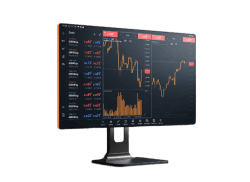
MT4 สำหรับเดสก์ท็อป
ดาวน์โหลดแอป MT4 สำหรับเดสก์ท็อปแบบเต็มฟีเจอร์สำหรับ Windows หรือ Mac เพื่อเข้าถึงชุดเครื่องมือการเทรดและการวิเคราะห์อย่างครบถ้วน
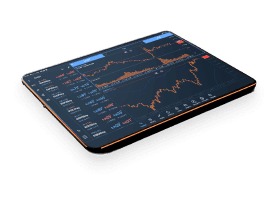
MT4 สำหรับเว็บ
เทรดได้โดยตรงผ่านเบราว์เซอร์โดยไม่ต้องดาวน์โหลดซอฟต์แวร์ เหมาะสำหรับการเทรดระหว่างเดินทางจากคอมพิวเตอร์เครื่องใดก็ได้
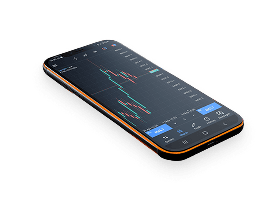
แอปเทรด MT4 บนมือถือ
เชื่อมต่อกับตลาดได้ตลอดเวลาด้วยแอป MT4 บนมือถือของ TIOmarkets สำหรับ iOS และ Android ติดตามสถานะคำสั่ง ส่งคำสั่งเทรด และวิเคราะห์ตลาดได้จากสมาร์ตโฟนหรือแท็บเล็ตของคุณ
เปรียบเทียบแพลตฟอร์ม MT4
ฟีเจอร์/ประโยชน์
ต้องติดตั้ง
ระบบปฏิบัติการที่รองรับ
คำสั่งซื้อขาย
อินดิเคเตอร์ทางเทคนิคและวัตถุ
ประเภทกราฟและกรอบเวลา
การเทรดแบบอัลกอริทึม (EAs & MQL5)
คัดลอกการเทรด (Copy Trading)
ข้อมูลตลาดแบบเรียลไทม์
ข่าวสารและการแจ้งเตือนทางการเงิน
การซื้อขายด้วยคลิกเดียว
เครื่องมือทดสอบกลยุทธ์ / แบ็กเทสต์
VPS (Virtual Private Server)
การเข้าถึง (Accessibility)
ความปลอดภัย (Security)
เดสก์ท็อป
ใช่
Windows, macOS
ครบชุด (คำสั่งตลาด, ลิมิต, สต็อป, เทรลลิงสต็อป)
30 อินดิเคเตอร์, ออบเจ็กต์กราฟิก 24 รายการ + อินดิเคเตอร์แบบกำหนดเอง
9 กรอบเวลา, กราฟหลายประเภท (แท่งเทียน, แท่งบาร์, ฯลฯ...)
ใช่
ใช่
ใช่
ใช่
ใช่
ใช่
ใช่
คอมพิวเตอร์เดสก์ท็อป
สูง (ติดตั้งในเครื่อง)
เว็บ
เลขที่
อุปกรณ์ใดก็ได้ที่มีเบราว์เซอร์สมัยใหม่
ครบชุด
30 อินดิเคเตอร์, 24 วัตถุกราฟิก
ไทม์เฟรม 9 แบบ, ประเภทกราฟ 3 แบบ
เลขที่
เลขที่
ใช่
จำกัด
ใช่
เลขที่
เลขที่
อุปกรณ์ใดก็ได้ที่มีอินเทอร์เน็ตเบราว์เซอร์
ข้อมูลเว็บเข้ารหัสและปลอดภัย
มือถือ
ใช่ (ดาวน์โหลดแอป)
iOS, Android
ครบชุด
30 อินดิเคเตอร์, 24 วัตถุกราฟิก
ไทม์เฟรม 9 แบบ, ประเภทกราฟ 3 แบบ
จำกัด (ไม่สามารถรัน EA ได้)
เลขที่
ใช่
ใช่
ใช่
เลขที่
เลขที่
สมาร์ทโฟนและแท็บเล็ต
ข้อมูลเว็บเข้ารหัสและปลอดภัย
ประโยชน์หลักของการเทรดบน MT4
ความน่าเชื่อถือที่เหนือชั้น
ตั้งแต่เปิดตัวในปี 2005 MetaTrader 4 ได้สร้างชื่อเสียงให้เป็นมาตรฐานของอุตสาหกรรมสำหรับการเทรดฟอเร็กซ์ ด้วยสถิติความเสถียรและประสิทธิภาพที่พิสูจน์แล้ว ทำให้เป็นตัวเลือกยอดนิยมทั้งสำหรับผู้เริ่มต้นและเทรดเดอร์มืออาชีพ
การวิเคราะห์ทางเทคนิคที่ทรงพลัง
ความสามารถด้านกราฟที่ครบถ้วนและอินดิเคเตอร์ทางเทคนิคของแพลตฟอร์มช่วยให้วิเคราะห์ตลาดได้อย่างเจาะลึก:
- ✓สร้างเลย์เอาต์กราฟได้หลายแบบ
- ✓ใช้การศึกษาทางเทคนิคได้หลากหลาย
- ✓ระบุจุดเข้าและจุดออกที่เป็นไปได้
- ✓พัฒนาและทดสอบกลยุทธ์การเทรด
ความสามารถในการเทรดอัตโนมัติ
หนึ่งในฟีเจอร์ที่ทรงพลังที่สุดของ MT4 คือการรองรับการเทรดอัตโนมัติผ่าน Expert Advisors (EAs):
- ✓เรียกใช้กลยุทธ์การเทรดที่ตั้งโปรแกรมไว้ล่วงหน้า
- ✓ลดการตัดสินใจเทรดตามอารมณ์
- ✓เทรด 24/5 แม้ในขณะที่คุณไม่ได้อยู่หน้าจอ
- ✓ทดสอบย้อนหลัง (Backtest) กลยุทธ์ด้วยข้อมูลในอดีต
ชุมชนและทรัพยากรระดับโลก
ในฐานะโบรกเกอร์ฟอเร็กซ์ MT4 เราเชื่อมต่อคุณเข้ากับระบบนิเวศของแหล่งข้อมูลจำนวนมาก:
- ✓อินดิเคเตอร์แบบกำหนดเองและ EA นับพันรายการ
- ✓ฟอรัมคอมมูนิตี้ที่คึกคักสำหรับการแชร์กลยุทธ์
- ✓แหล่งความรู้เฉพาะสำหรับการเทรดบน MT4
- ✓การอัปเดตและการปรับปรุงแพลตฟอร์มอย่างสม่ำเสมอ
เริ่มเทรดกับโบรกเกอร์ฟอเร็กซ์ MT4
วิธีการทำงานของมันคือแบบนี้

ขั้นตอนที่ 1
ลงทะเบียน
กรอกข้อมูลส่วนตัวและสร้างบัญชีของคุณให้ครบถ้วน ใช้เวลาเพียงไม่กี่นาทีเท่านั้น

ขั้นตอนที่ 2
ตรวจสอบ
โปรดอัปโหลดหลักฐานแสดงตัวตนและที่อยู่ของคุณ ซึ่งจำเป็นต้องใช้ก่อนการถอนเงิน
ขั้นตอนที่ 3
กองทุน
เลือกวิธีการที่สะดวกทั้งในประเทศและต่างประเทศ และฝากได้ทันที
ขั้นตอนที่ 4
ซื้อขาย
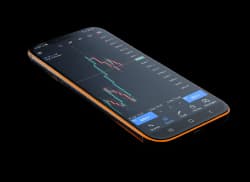
ดาวน์โหลดแพลตฟอร์ม โอนเงินเข้าบัญชีของคุณ เข้าสู่ระบบ และเริ่มทำการซื้อขายได้เลย
การซื้อขายมีความเสี่ยง
ฝากและถอนเงินได้อย่างมั่นใจ
การเติมเงินเข้าบัญชีของคุณสะดวกและปลอดภัย













มีบริการเติมเงินทันทีและฟรีในบางวิธี ระยะเวลาดำเนินการอาจแตกต่างกันไปตามประเทศและวิธี โดยทั่วไปคำขอถอนเงินจะถูกดำเนินการภายในหนึ่งวันทำการ และจะถูกส่งคืนผ่านวิธีฝากเงินเดิม
เรียนรู้เพิ่มเติมคุณพร้อมที่จะเริ่มต้นหรือยัง?
เข้าร่วมกับบัญชีที่เปิดแล้วกว่า 270,000+ บัญชีในกว่า 170 ประเทศ และค้นพบเหตุผลที่เทรดเดอร์เลือก TIOmarkets เป็นพันธมิตรการเทรดที่เชื่อถือได้
Based on 48 reviews

James Laplante
I switched after lots of slippage on another brokers platform So far i...
5 เดือนที่แล้ว
Read more reviews >Roy Isaac
ผมชอบการกระจายตัวของสี VIP Black มาก เหมาะมากสำหรับนักเก็งกำไรอย่างผม 👍
6 เดือนที่แล้ว
Candice Garten
The platform is intuitive and provides clear trading data. Suppo...
7 เดือนที่แล้ว
การซื้อขายมีความเสี่ยง
คำถามที่พบบ่อย
ทำไมฉันควรเลือก TIOmarkets เป็นโบรกเกอร์ฟอเร็กซ์ MT4 ของฉัน?
TIOmarkets เป็นตัวเลือกที่ยอดเยี่ยมสำหรับการเป็นโบรกเกอร์ฟอเร็กซ์ MT4 ของคุณ เนื่องจากเรามีเงื่อนไขการเทรดที่แข่งขันได้ ตัวเลือกเลเวอเรจที่ยืดหยุ่น และโบนัสเงินฝากสมาชิก 30% สำหรับทุกการฝากเงินเข้าบัญชีมาตรฐานของเรา
ฉันสามารถเทรดตลาดใดบน MT4 กับ TIOmarkets ได้บ้าง?
เมื่อใช้ TIOmarkets เป็นโบรกเกอร์ฟอเร็กซ์ MT4 ของคุณ คุณสามารถเทรดฟอเร็กซ์ ดัชนี สินค้าโภคภัณฑ์ หุ้น และคริปโตเคอร์เรนซีได้ทั้งหมดจากแพลตฟอร์มเดียว ความสามารถแบบหลายสินทรัพย์นี้ทำให้ MT4 เป็นตัวเลือกที่ยืดหยุ่นสำหรับการเทรด
MT4 เหมาะสำหรับผู้เริ่มต้นหรือไม่?
เหมาะสม แม้จะมีฟีเจอร์ขั้นสูง แต่ MT4 มีอินเทอร์เฟซที่ใช้งานง่ายซึ่งผู้เริ่มต้นสามารถเรียนรู้ได้อย่างรวดเร็ว เรามีแหล่งความรู้เพื่อช่วยให้เทรดเดอร์มือใหม่เริ่มต้น และบัญชีเดโมของเราช่วยให้คุณฝึกฝนได้โดยไม่ต้องเสี่ยงด้วยเงินจริง
ฉันสามารถใช้ Expert Advisors (EAs) บน MT4 ได้หรือไม่?
ได้อย่างแน่นอน MT4 รองรับการเทรดอัตโนมัติผ่าน Expert Advisors คุณสามารถสร้าง EA ของคุณเองด้วยภาษาโปรแกรม MQL4 ซื้อ EA สำเร็จรูปจาก MetaQuotes Marketplace หรือใช้โซลูชันจากผู้ให้บริการภายนอกที่เข้ากันได้กับแพลตฟอร์ม
ฉันจะดาวน์โหลดและติดตั้ง MT4 ได้อย่างไร?
คุณสามารถดาวน์โหลด MT4 ภายในพอร์ทัลลูกค้าหลังจากลงทะเบียนบัญชี MT4 รองรับ Windows, Mac, iOS และ Android


