


How to Change Leverage on MT4 or MT5: A Complete Step-By-Step Guide
BY Maria K.
|July 6, 2026Understanding how to change leverage on MT4 or MT5 is something many traders overlook after opening their accounts. Your leverage ratio can have a significant impact on your overall risk exposure and margin requirements. Learning how to modify leverage on MetaTrader 4 or MT5 could be an important part of managing your trading approach.
In this comprehensive guide, we'll cover:
- what leverage is and how it works
- exactly how to change MT4 or MT5 leverage settings (step-by-step)
- why you might need to adjust your leverage settings
- how to select a leverage ratio that suits your trading strategy
Let's start with the basics before diving into the step-by-step process.
What Is Leverage in Trading? And Why It Matters
Leverage is a financial tool that allows traders to control a larger position in the market with a smaller amount of capital. Think of it as borrowing power that magnifies your market exposure relative to your actual account balance. Simply put, leverage lets you trade with more money than you actually have in your account.
Leverage amplifies both potential profits AND potential losses. Higher leverage means smaller price movements can have a larger impact on your account balance, in either direction.
Understanding the Leverage Ratio
The leverage ratio format is expressed as 1:X, where X represents the multiplier. For example, 1:100 leverage means that for every $1 in your account, you can potentially control $100 worth of a financial instrument in the market.
Here's how different leverage ratios work in practice.
| Leverage Ratio | Account Balance | Position Size You Can Control |
| 1:10 | $250 | $2,500 |
| 1:50 | $500 | $25,000 |
| 1:100 | $1,000 | $100,000 |
| 1:500 | $2,000 | $1,000,000 |
Leverage vs. Margin - What's the Difference?
Leverage and margin are two sides of the same coin. While leverage determines your buying power multiplier, margin refers to the deposit required to open and maintain a position.
The relationship can be expressed with this formula.
Margin Required = (Market Price × Volume in Lots) / Account Leverage
For example, if you want to open 1 standard lot (100,000 units) of GBP/USD at a price of 1.2500 with 1:100 leverage:
Margin Required = (1.2500 × 100,000) / 100 = $1,250
With lower leverage of 1:50, the same position would require:
Margin Required = (1.2500 × 100,000) / 50 = $2,500
How to Change Leverage on MT4 or MT5: Step-By-Step Instructions
Leverage is a tool provided by your broker and it’s linked directly to your trading account rather than the trading platform itself. Therefore, you cannot directly modify leverage on MetaTrader 4 or MT5 from within the platform itself.
All leverage modifications must be processed through your broker's account management system. So here's how to change MT4 or MT5 leverage settings through the TIOmarkets client portal.
How to Change the Leverage on Your Trading Accounts
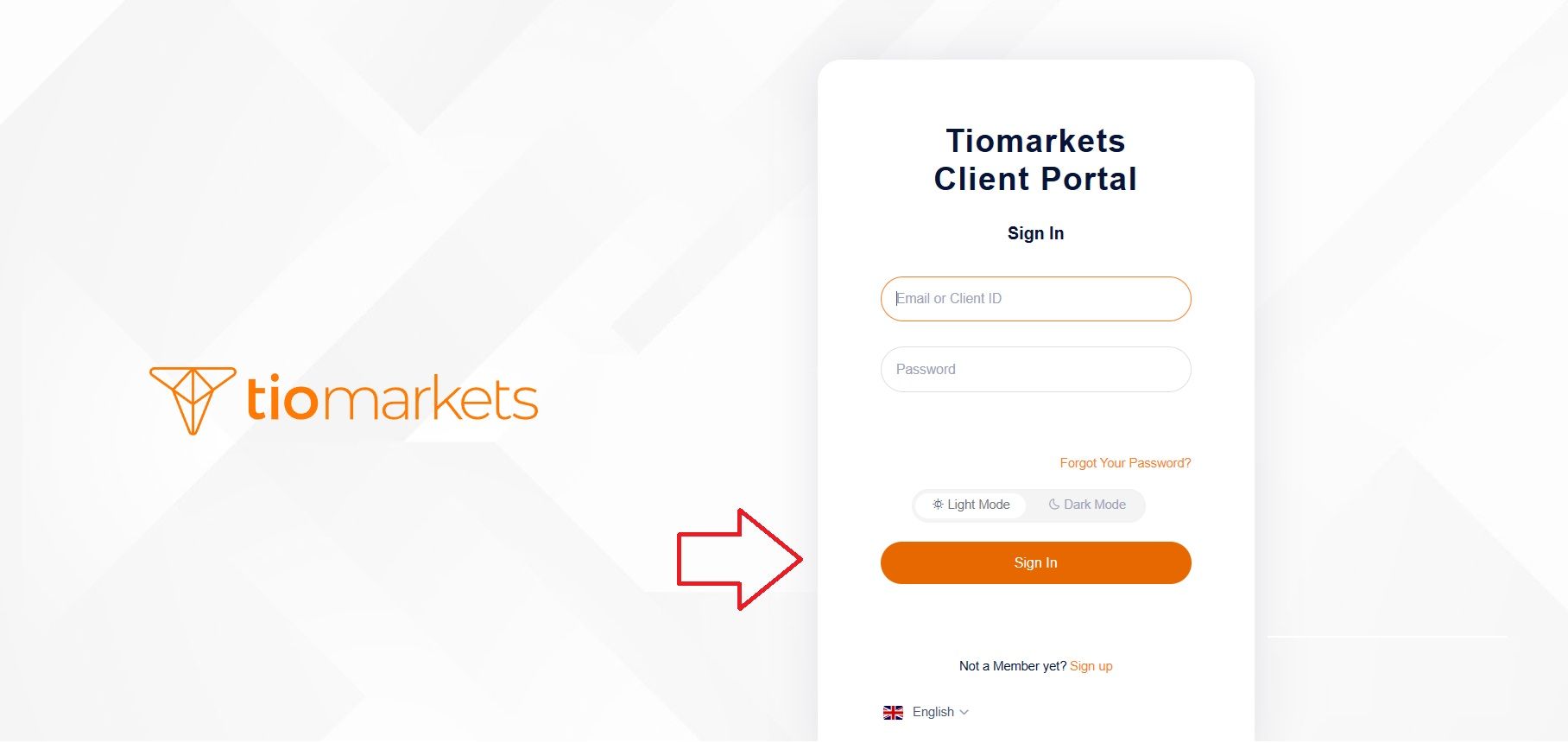
Step 1 Log in to TIOmarkets Client Portal
Visit the TIOmarkets client portal login page. Enter your registered email address and password.
Step 2 Navigate to the Accounts Area
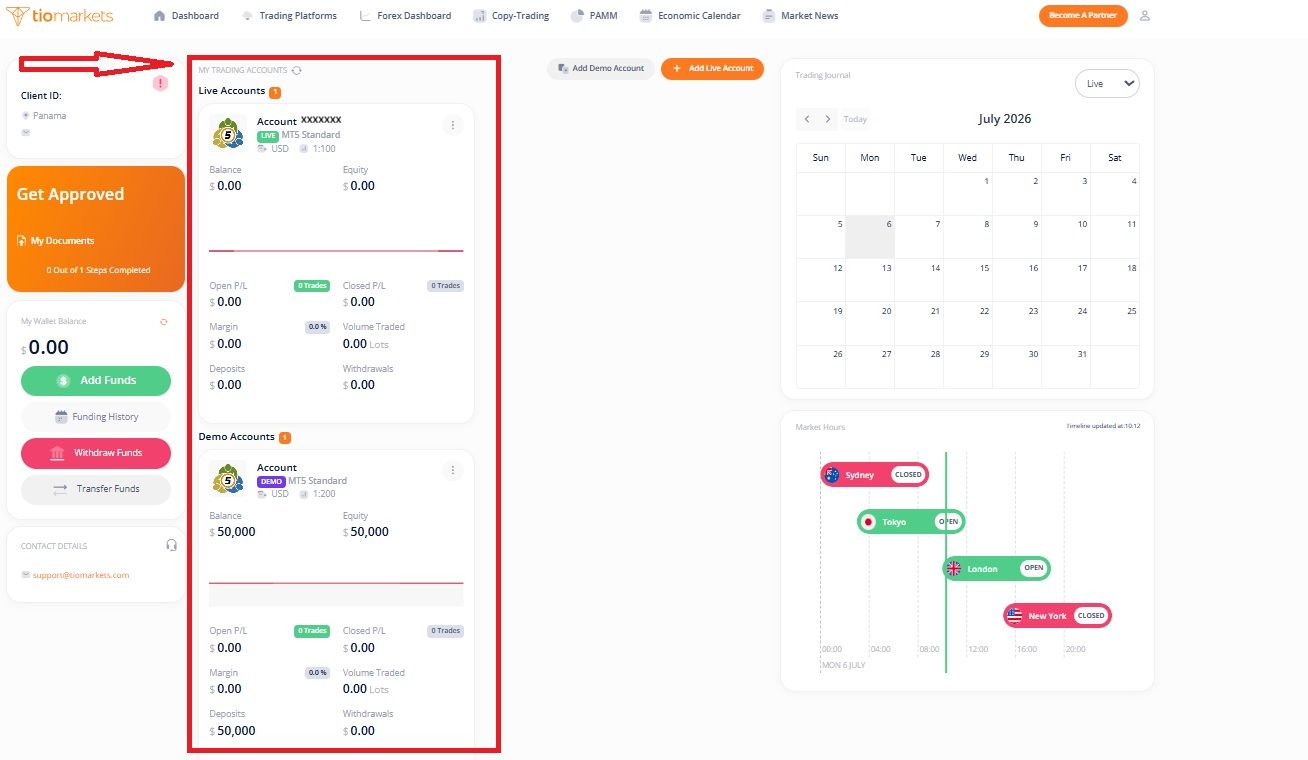
Locate the Accounts section listed under My Trading Accounts. It’s on the left-hand side of the dashboard.
Here you will see a list of your trading accounts, including MT4 live accounts, MT4 demo accounts, and any other account types you may have opened. Identify the specific MT4 account whose leverage you want to modify.
Step 3 Open the Account Settings / Edit Menu
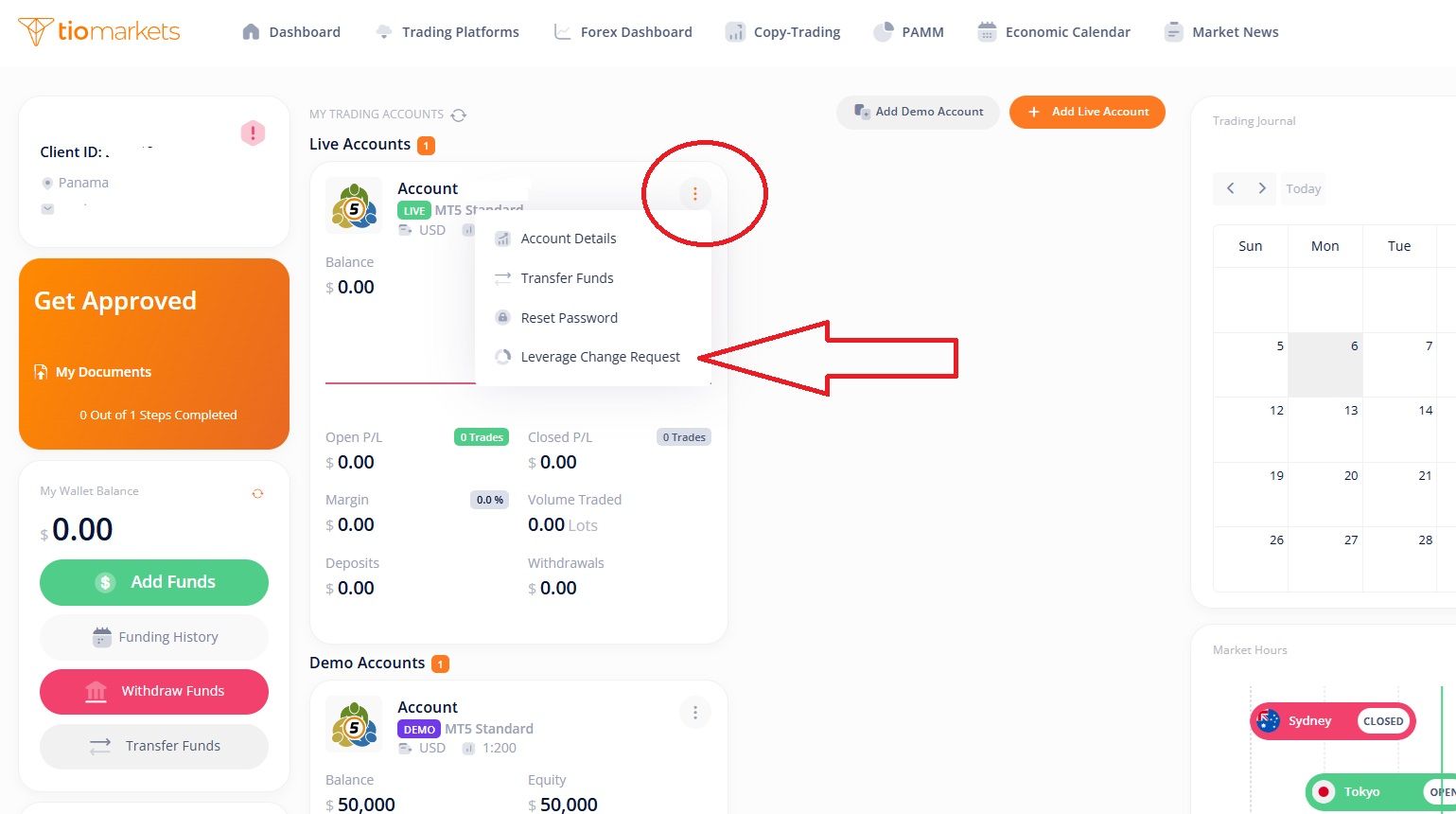
Look for the three-dot menu icon (⋮) next to your account number. Click on it to open the account settings panel, then select Leverage Change Request.
Step 4 Choose Your New Leverage Ratio
A drop-down menu will appear displaying the available leverage options for your specific account. Select your desired MT4 or MT5 leverage ratio from the available options.
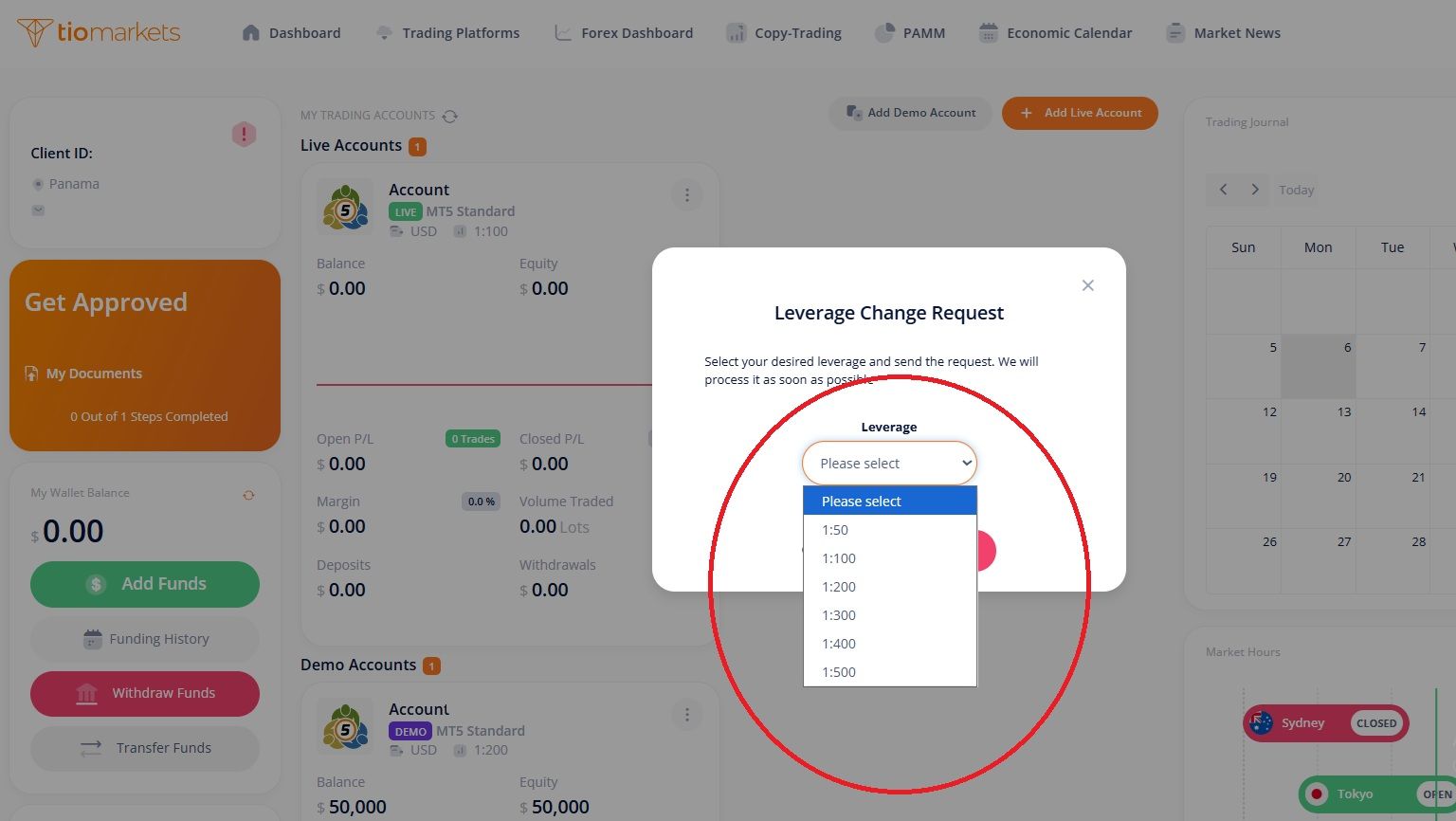
Available leverage options depend on your account type, trading instrument, and regulatory jurisdiction. Visit the TIOmarkets account types page to view the full range of options, including the Standard account which offers unlimited leverage.
Step 5 Submit and Confirm the Change
Click Send Request to submit your leverage change request and wait for approval. Typically, the change is processed within a few minutes.
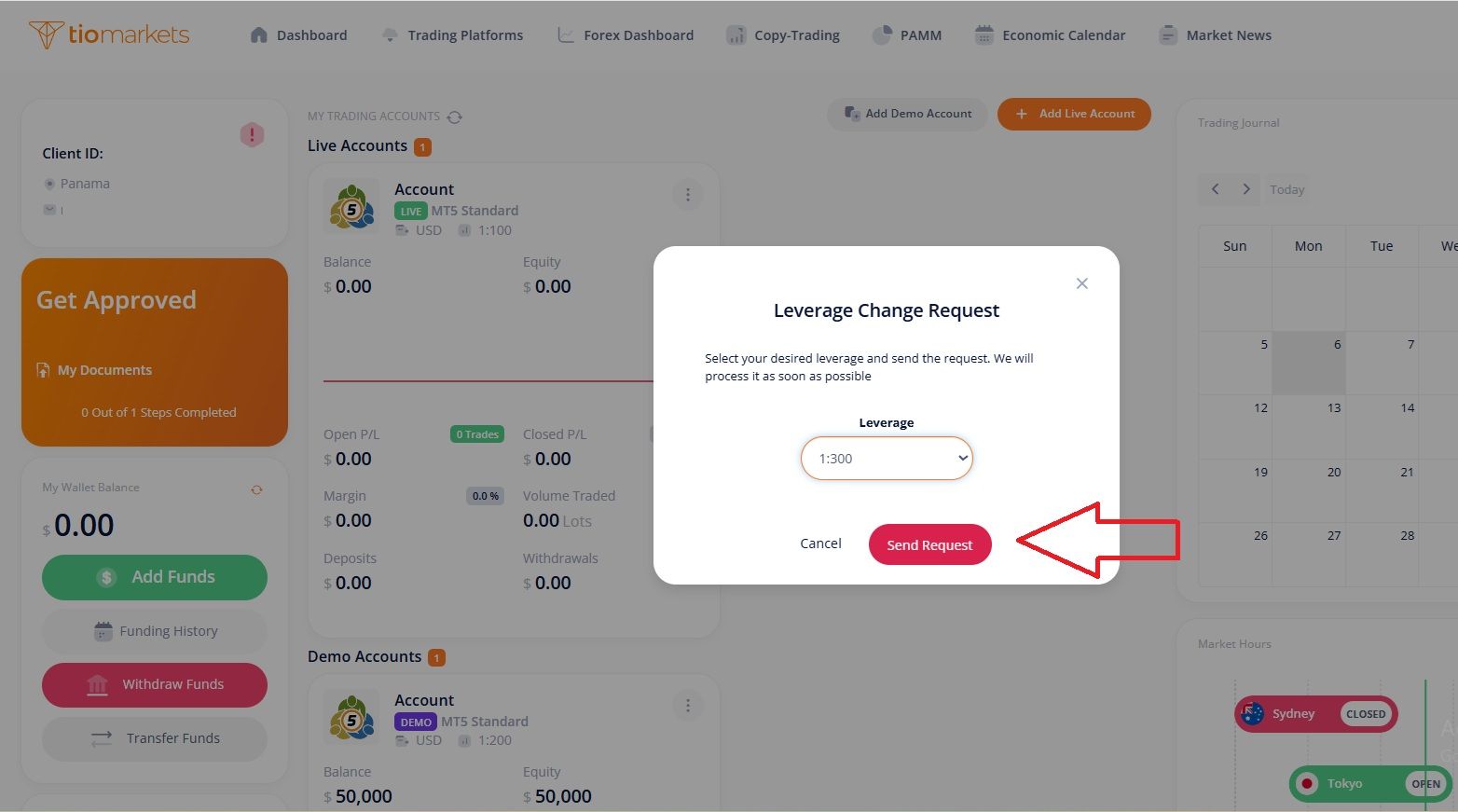
If you have open trades, changing your leverage, especially reducing it, can affect your margin requirements. For this reason, TIOmarkets allows a change of leverage only if no trades are opened.
How to Confirm Leverage Changes on MT4 or MT5 Accounts
Once your MT4 or MT5 leverage adjustment has been approved, you'll receive a confirmation email notifying you that the changes have been applied to your account. See below to find out how to check your leverage ratio for every one of your trading accounts.
How to Check Leverage on Your Trading Accounts
Each TIOmarkets account has its own leverage specifications. The available leverage depends on the account type, trading instrument, and jurisdiction. Here's how to check your current leverage settings:
Open the TIOmarkets client portal > Navigate to the Accounts area listed under My Trading Accounts to see a list of all your trading accounts > Locate the specific account you want to review.
The leverage information for each account is clearly displayed under your account number, alongside other details such as account type, platform, and base currency.
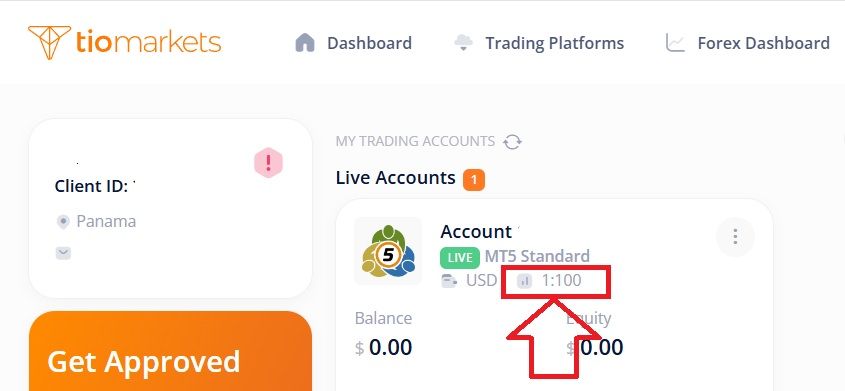
How To Choose the Right Leverage for Your MT4 or MT5 Account
Selecting an appropriate leverage ratio is a personal decision that may depend on several factors. Here's a framework that some traders use when considering their leverage settings.
Consider Your Trading Style
Different trading approaches may benefit from different leverage levels. The general logic is that longer holding periods typically involve more overnight exposure to market gaps and unexpected events, which may make lower leverage more appropriate for some traders.
Think About Your Risk Tolerance
Your comfort level with risk may influence your leverage selection. It all depends on whether you are a conservative trader, moderate trader or aggressive trader.
Take Into Account Your Account Size
Smaller accounts may benefit from lower leverage to help avoid rapid account depletion during adverse market conditions. Larger accounts might use higher leverage selectively for short-term trading opportunities.
The Golden Rule of Leverage
Many experienced traders prefer never to risk more than 1–2% of account balance on a single trade, regardless of leverage level.
It's important to understand that leverage does not inherently change your risk per trade - your position size and stop loss placement are what determine your actual risk. Leverage simply affects how much capital you need to open that position.
Can I Trade with Leverage at TIOmarkets?
Yes, TIOmarkets offers various leverage options across their account types. For traders seeking maximum flexibility, TIOmarkets provides unlimited leverage on certain account types, subject to terms and conditions. Visit the link above to learn more about eligibility and requirements.
Common Mistakes to Avoid When Changing Leverage
Understanding why you might change leverage on MT4 or MT5 - and the potential pitfalls - can help you make more informed decisions. Here are common mistakes to be aware of:
- Mistake 1: Changing leverage with open positions without first checking your margin requirements.
- Mistake 2: Assuming higher leverage automatically leads to higher profits (it amplifies losses equally).
- Mistake 3: Setting maximum leverage "just because it's available" without considering your actual trading needs.
- Mistake 4: Forgetting to verify that the leverage change took effect before placing new trades.
- Mistake 5: Not understanding how leverage affects margin calls and liquidation levels.
Key Takeaways: How To Change Leverage On MT4 or MT5
Here's a quick recap of the step-by-step process to update leverage on your MT4 or MT5 account:
- Log in to your client portal
- Navigate to the Accounts section under My Trading Accounts
- Find the three-dot menu icon next to your account number
- Select Leverage Change Request from the menu
- Choose your new leverage ratio from the available options
- Submit the request and wait for confirmation
Leverage is a powerful tool in forex margin trading that can magnify both gains and losses. Taking the time to understand how to change MT4 or MT5 leverage settings (more importantly, how to select appropriate leverage for your situation) may be a valuable part of your overall trading approach.
You can always open a TIOmarkets live account, but you can consider testing different leverage settings on a demo account first. This allows you to observe how various leverage ratios affect your margin requirements and overall trading experience without putting real capital at risk.
FAQ
Risk disclaimer: CFDs are complex instruments and come with a high risk of losing money rapidly due to leverage. You should consider whether you understand how CFDs work and whether you can afford to take the high risk of losing your money. Never deposit more than you are prepared to lose. Professional client’s losses can exceed their deposit. Please see our risk warning policy and seek independent professional advice if you do not fully understand. This information is not directed or intended for distribution to or use by residents of certain countries/jurisdictions including, but not limited to, USA & Countries included in the OFAC sanction list. The Company holds the right to alter the aforementioned list of countries at its own discretion.
TIOmarkets offers an exclusively execution-only service. The views expressed are for information purposes only. None of the content provided constitutes any form of investment advice. The comments are made available purely for educational and marketing purposes and do NOT constitute advice or investment recommendation (and should not be considered as such) and do not in any way constitute an invitation to acquire any financial instrument or product. TIOmarkets and its affiliates and consultants are not liable for any damages that may be caused by individual comments or statements by TIOmarkets analysis and assumes no liability with respect to the completeness and correctness of the content presented. The investor is solely responsible for the risk of his/her investment decisions. The analyses and comments presented do not include any consideration of your personal investment objectives, financial circumstances, or needs. The content has not been prepared in accordance with any legal requirements for financial analysis and must, therefore, be viewed by the reader as marketing information. TIOmarkets prohibits duplication or publication without explicit approval.
Join us on social media



Authors BIO

Maria is a writer and content strategist with over 10 years of experience in the finance industry. She specializes in developing research-backed articles that help financial professionals navigate complex market topics with confidence. Her expertise spans forex, stocks, CFDs and global markets, creating insightful content that educates readers and supports informed decision-making.