


Resolve trading is disabled on MT4 & MT5
There are several potential reasons why trading is disabled on your MT4 or MT5 platforms and most can be resolved quickly. When MT4 or MT5 shows the “trade is disabled” error or similar messages in the New Order dialog, it means the trading server has rejected your order because trading is not currently permitted on that symbol or account status.
Here are the most common reasons why, as well as solutions to get you back to trading.
Why does 'trade is disabled' happen?
1. The market is closed
If the market hours for the instrument you're trying to trade are outside active trading times, trading will be disabled.
- ✓Forex markets have specific session hours (closed on weekends).
- ✓Some CFDs (stocks, indices) have their own exchange hours.
- ✓National or bank holidays can also close markets.
How to fix it:
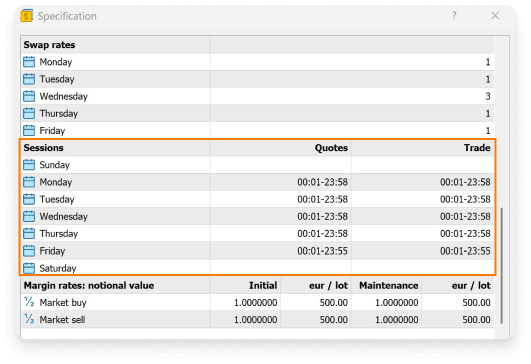
- ✓Check the contract specifications for the instrument's trading hours.
- ✓Wait until the market reopens.
Check market and trading hours in MT4/MT5 by right-clicking the symbol in market watch and choosing Specification.
2. You have not deposited the minimum amount
If you have not deposited the minimum amount for the account type, trade is disabled until you deposit the minimum requirement to activate it.
How to fix it:
- ✓Deposit the minimum amount for the account type
- ✓Add and transfer funds to the account to enable trading
Each account type requires a minimum deposit to activate trading.
Login & fund your account3. The symbol you're trying to trade on is disabled
Symbols can be disabled, discontinued and set to close-only for several reasons.
How to fix it:
- ✓Right-click in Market Watch and choose Show All
- ✓Look for symbols with different suffixes
- ✓Check if the symbol is grayed out with prices frozen (not tradable for your account)
Try another symbol or contact support if you're unsure which symbol to use.
4. Your account hasn't been verified
TIOmarkets allows trading immediately after signup under a 14-day grace period. If you haven't completed verification before the period expires, your account becomes read-only and trading will be disabled.
How to fix it:
- ✓Complete your account verification in the client area
- ✓Upload all required documents and wait for approval
Verified accounts can trade normally.
Verify your account5. You don’t have trading permissions
If you're logged in with the investor (read-only) password and try to place a trade, you will see trading is disabled because you don't have full trading permissions.
How to fix it:
- ✓You need to log in with the master account password
Check your email for the correct trading account login credentials, platform and server.
6. Your account is restricted
If your account has remained inactive for a long period of time or, if there's a compliance or system flag, or other backend issue, your account may be set to read-only.
How to fix it:
- ✓Contact support
- ✓Provide details of what you were doing when trading was disabled.
Support can investigate and restore trading permissions when appropriate.
If you're still unsure why trade is disabled
Our support team is ready to help. Contact them with your account details, the specific error message, and what you were trying to do when the error message occurred.
We can quickly check whether:
- ✓It's a platform configuration issue.
- ✓An issue with your account.
- ✓Or something else.
In most cases, ‘trade is disabled’ can be resolved quickly once the underlying condition is addressed.
Contact support




