


How to Create a Demo MetaTrader 5 Account
BY Maria K.
|July 16, 2026Many new traders find themselves overwhelmed by complex interfaces, unfamiliar terminology, and the pressure of the financial market movements. A MetaTrader 5 demo account offers a practical solution to this challenge. It provides a risk-free virtual trading environment where you can learn the ropes without putting your capital on the line.
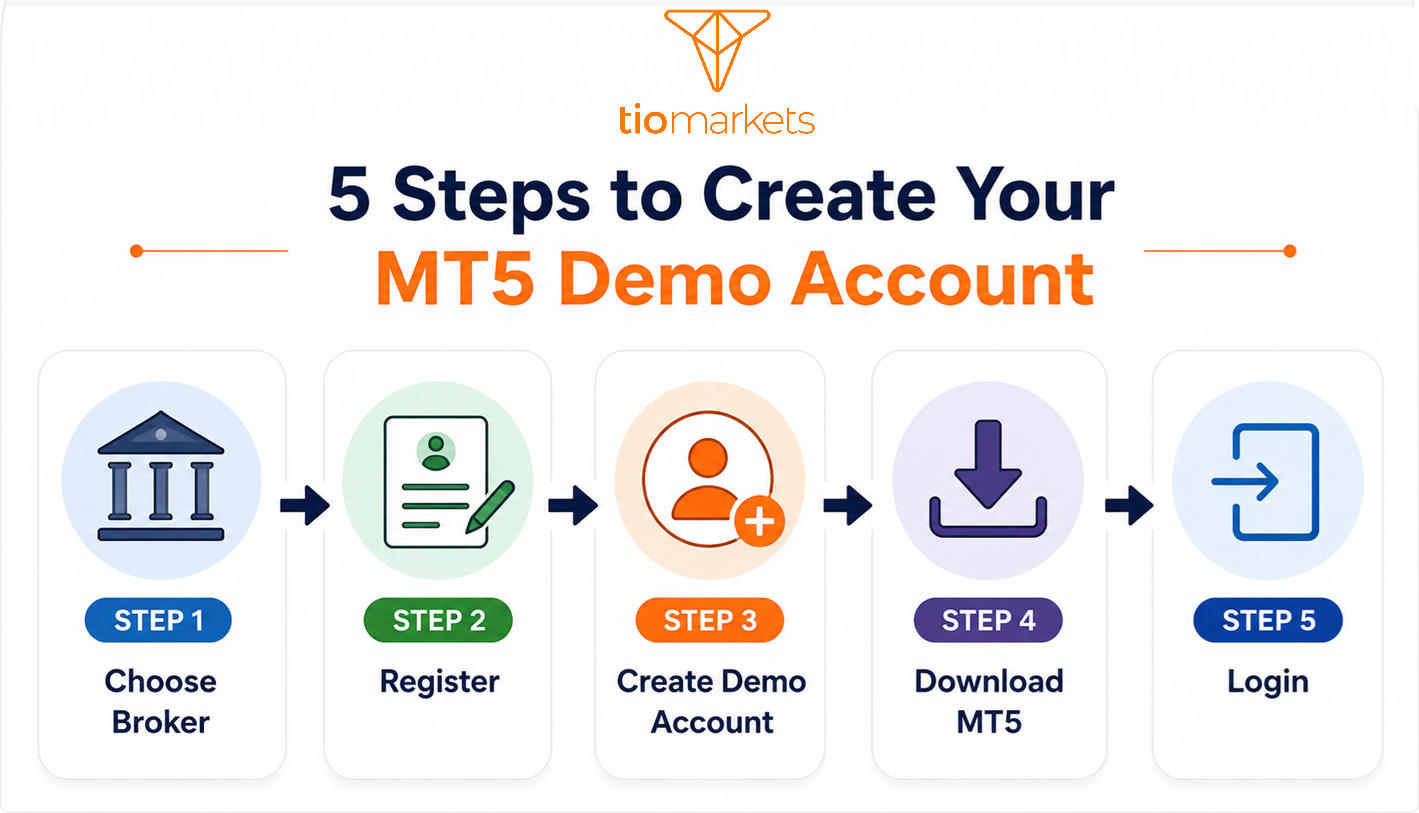
In this guide, we will walk you through exactly how to create a demo MetaTrader 5 account, covering everything from understanding what these accounts offer to completing the setup process. But first let’s see what MetaTrader is, why MetaTrader5 is the best option, and how an MT5 demo account works.
Key Takeaways
Completing your MT5 demo account sign up via a broker like TIOmarkets, is as simple as below.
1. Sign up: Go to your broker’s website and create a MetaTrader 5 practice account.
2. Receive credentials: You will receive an email with your MT5 login ID, password, and demo server name.
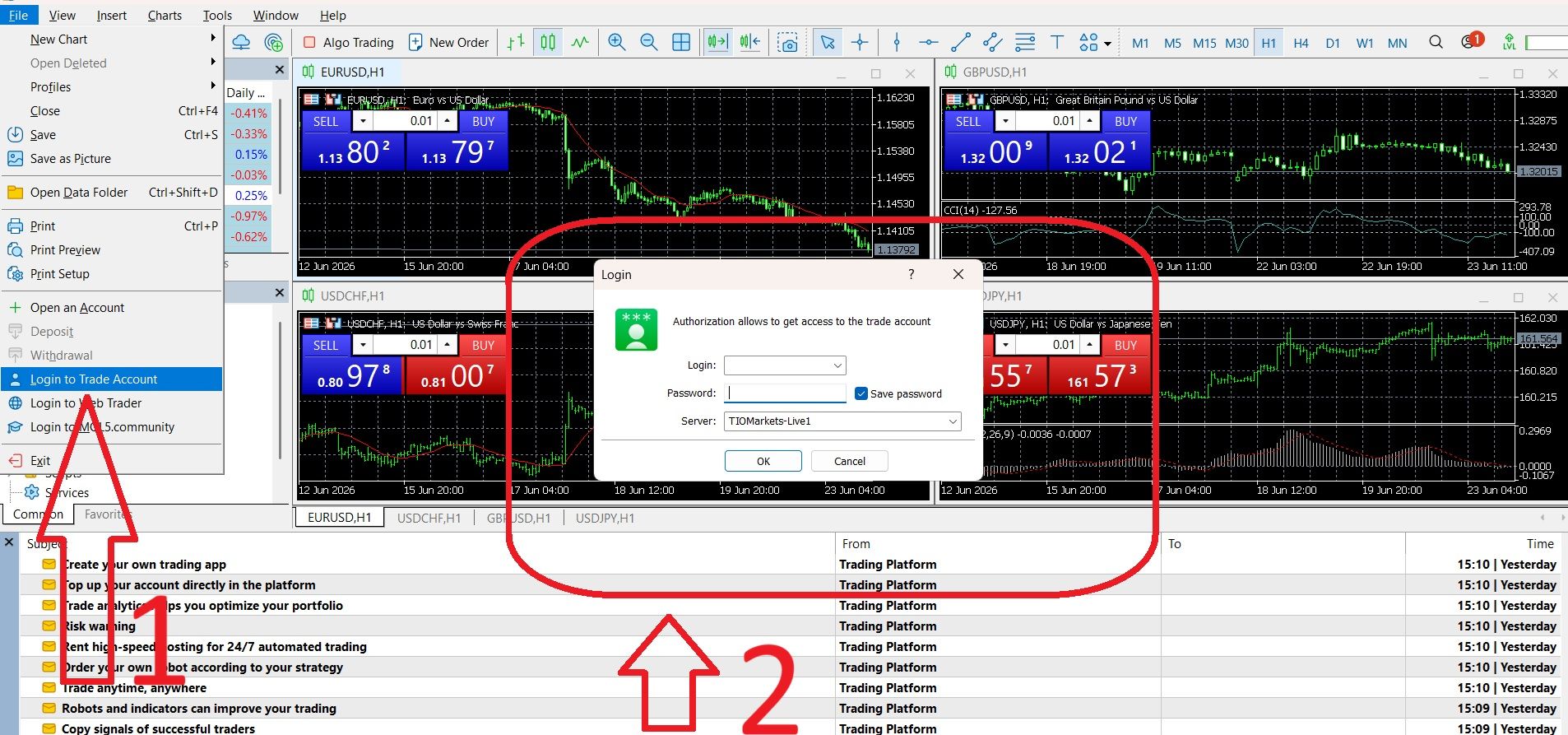
3. Log in to MT5: Open the MT5 platform, navigate to File > Login to Trade Account and log in using your provided credentials.
What is MetaTrader 5?
MetaTrader 5, or MT5, is a multi-asset trading platform developed by MetaQuotes and used by traders around the world. It offers charting features, technical analysis tools, and access to various financial instruments like forex, commodities, indices, and stocks.
However, MT5 is a trading platform not a broker. To place trades and access live market data, you first need to open an account with a broker such as TIOmarkets. Your broker will provide the login credentials that connect your demo or live account to the MT5 platform.
Which is better: MetaTrader 5 vs. MetaTrader 4
When deciding between MetaTrader 5 (MT5) and MetaTrader 4 (MT4), remember that the two platforms are designed with different capabilities in mind. MT4 is widely used in forex trading and is known for its simplicity. MT5 is a more advanced, multi-asset platform that supports not only forex but also stocks, commodities, indices, and CFDs, along with additional technical indicators, more timeframes, and an integrated economic calendar.
| Many traders who are researching how to create a demo MetaTrader 5 account are making the switch from MT4 specifically to take advantage of the extra features. For new traders, MT5 offers greater flexibility, while retaining stability and reliability. If your trading strategy involves multiple asset classes, or relies heavily on advanced analytics, MT5 is likely to provide more value over the long term. |
What Is a MetaTrader 5 Demo Account?
An MT5 demo account is a virtual trading account that allows you to practice buying and selling financial instruments using simulated funds. When you open MetaTrader 5 demo account, you essentially get a practice environment that mirrors the real trading experience without any financial risk involved.
How a Free MT5 Practice Account Works
When you register MT5 demo account, you receive a balance of virtual money. What makes these accounts particularly useful is that they replicate live market conditions as closely as possible. You get access to real market data, live price feeds, and the complete MT5 platform feature set. The charts move in real time, the spreads reflect actual market conditions, and the execution process mimics what you would experience with a live account.
Features of the MT5 Demo Account with TIOmarkets
TIOmarkets demo trading account mirrors the real market and live account but uses virtual funds. It's a training ground for beginners or experienced traders to familiarize themselves with market dynamics, the trading platform and to test new trading strategies.
With a TIOmarkets MT5 demo account setup, you get 90 days to practice trading with up to $50,000 in virtual funds. You can trade forex, stocks, indices, and commodities with leverage up to 1:500, giving you plenty of room to explore different markets and test strategies without any financial risk.

How to Create a Demo Account on MetaTrader 5 with TIOmarkets Step-by-Step
Now that you know what a MetaTrader 5 demo account is, how it works and its main features as provided by TIOmarkets, let’s get to the point: setting up a free MT5 demo account. The steps outlined below describe how to create a demo account on MetaTrader 5 when you select TIOmarkets as your broker. Screenshots are provided for easier understanding.
Step 1: Choose a Broker that Supports MT5, like TIOmarkets
MT5 is a platform, not a broker. You’ll need to register with a broker like TIOmarkets, that offers MT5 access.
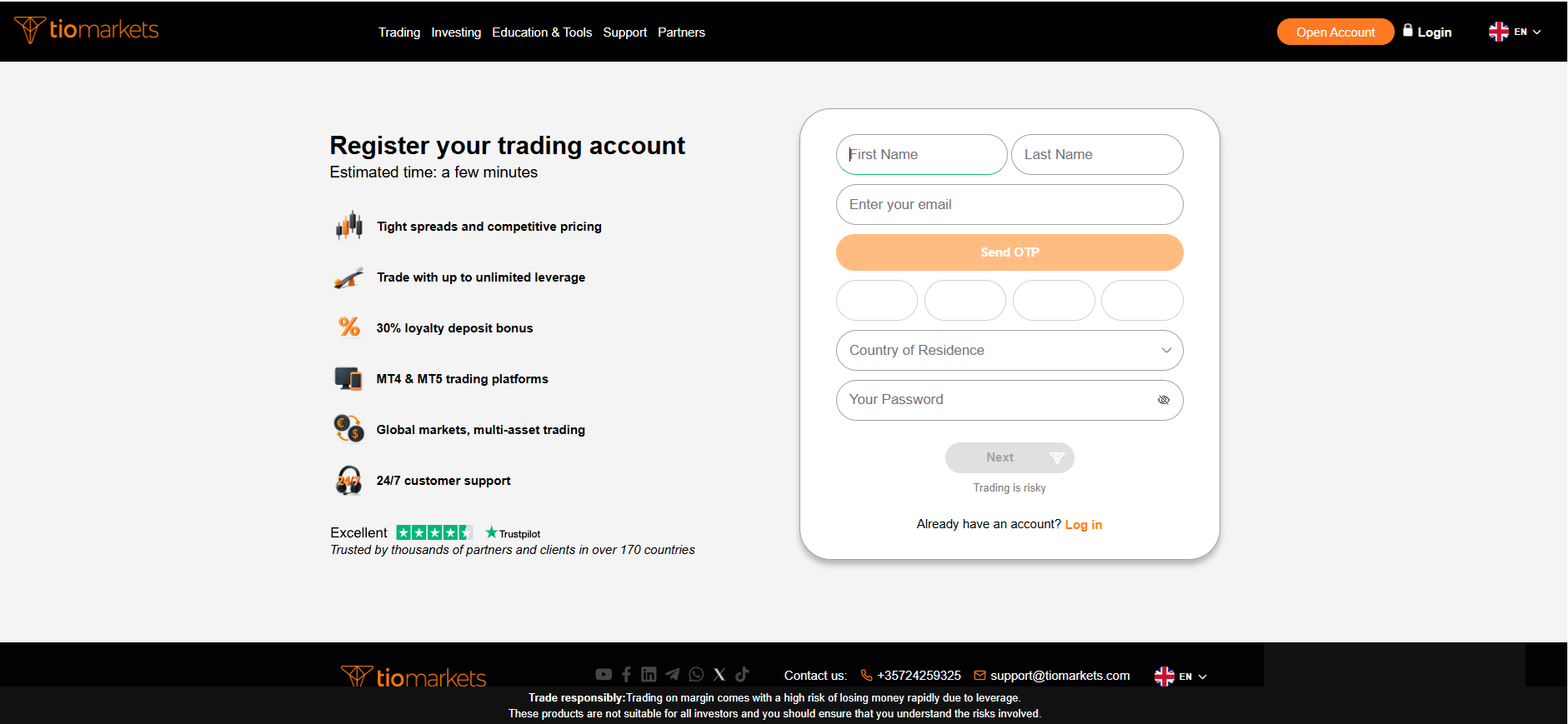
Step 2: Register to Trade with TIOmarkets
Go to TIOmarkets.com and select ‘Open Account’ at the top right. Enter your information and select next to continue.
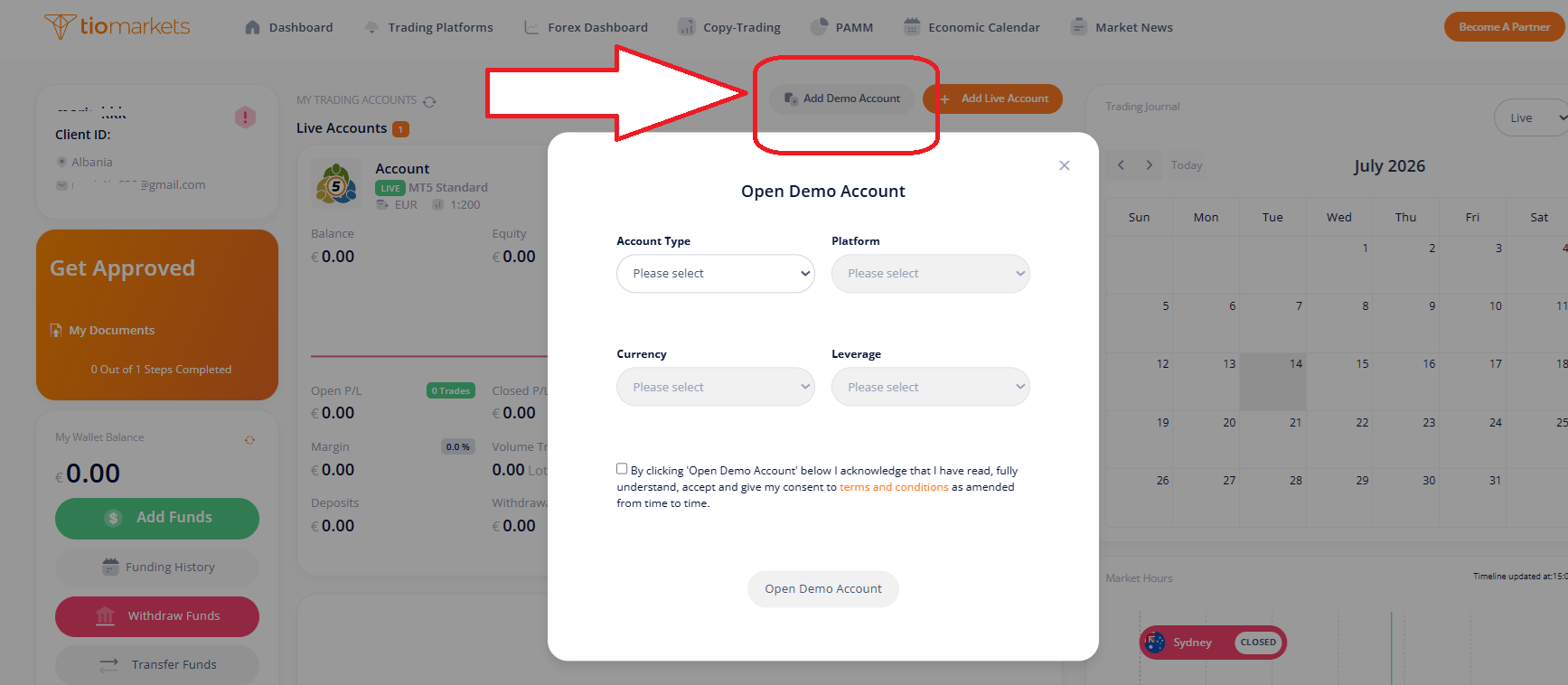
Step 3: Select the Type and Open an Account (Demo)
Once you complete registration and verify your email, you can access the TIOmarkets Client Area. From there you can create your Demo account: click on the button on the top and fill in the details.
Alternative Step: Select the Type and Open an Account (Live)
If you wish to trade on a real trading account instead:
- Log in to your TIOmarkets client portal.
- Click on ‘Add Live Account’ at the top.
- Choose your account parameters, such as currency, leverage, account type
- Submit your selection to generate your new live account.
| In both cases your account is immediately created and TIOmarkets sends an email with your MT5 account login credentials. Account number, password and server name are what you need to login into MT5. Remember that every account you open has different credentials for signing into the trading platform. |
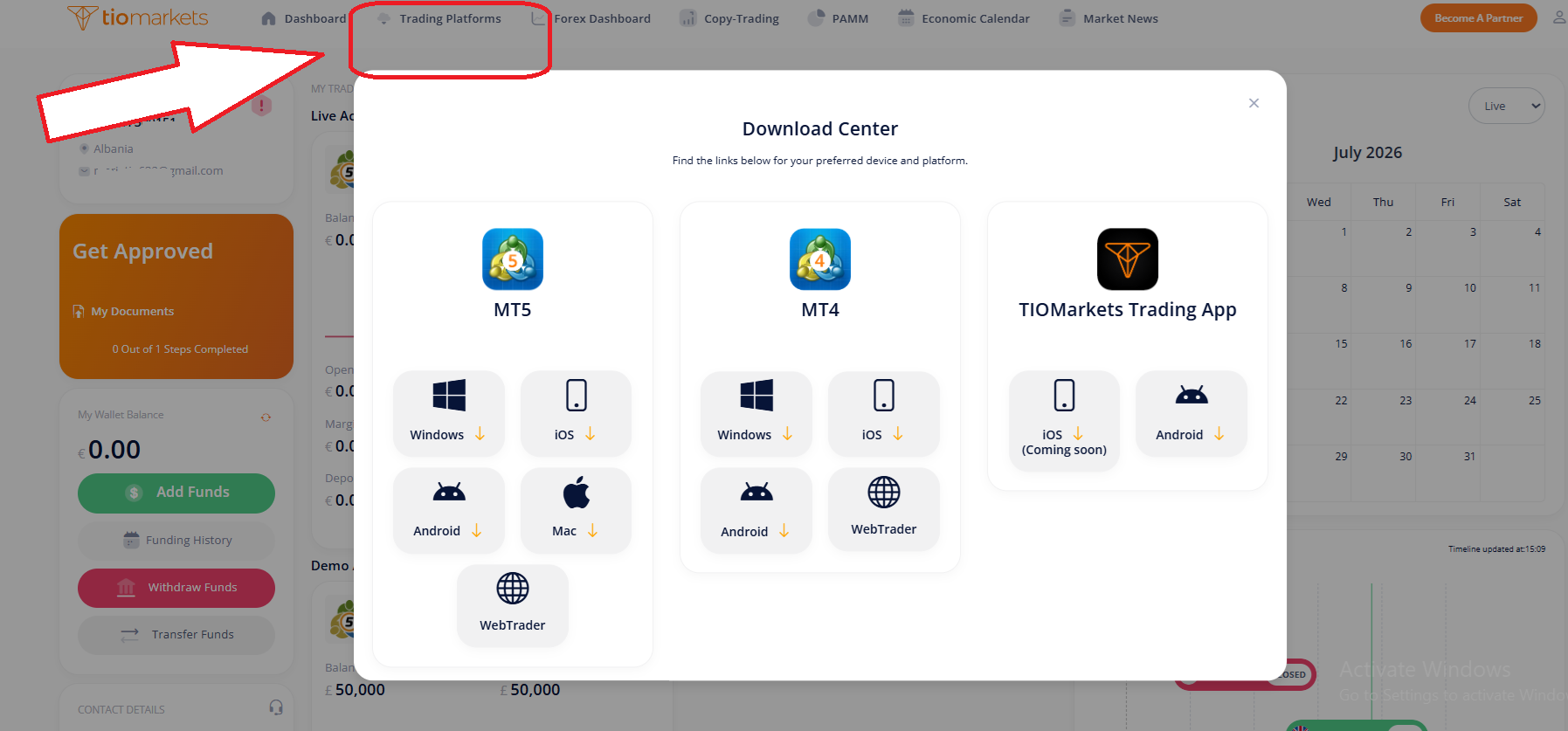
Step 4: How to Download and Install MT5
Within the TIOmarkets trading portal, click Trading Platforms to view the Download Center. Choose the right MetaTrader 5 platform type for your device.
Step 5: How to Log In to Your MT5 Account
Once your MetaTrader 5 account is created and approved, you’ll receive your MT5 login credentials via email. These details are different from your TIOmarkets client portal login and are specifically for accessing the MT5 platform. Each account has its own credentials.
To log in:
1. Open MetaTrader 5 on your desktop, mobile, or web browser.
2. Go to “File” - “Login to Trade Account” (on desktop) or the login option in your mobile/web menu.
3. Enter your MT5 account number and password exactly as provided in your email.
4. Select the correct TIOmarkets server listed in your welcome email.
5. Click Login and wait for the connection status in the bottom right to turn green, indicating you’re connected to the live or demo market.
Troubleshooting MT5 Login & Connection Issues
Once you’ve followed the steps for how to create a demo MetaTrader 5 account, you may occasionally encounter login or connection issues. These can happen for several reasons, and most are simple to resolve.
- Check your credentials. Make sure you’re entering the correct account number, password, and selecting the right server.
- Verify your internet connection. A weak or unstable internet connection can cause MT5 to lose contact with the trading server.
- Confirm account type. Using demo account credentials on a live server (or vice versa) will prevent you from logging in.
- Update MT5. Outdated platform versions can cause compatibility issues, especially on mobile devices.
Demo Account vs Real Account in MT5
One of the first decisions you'll face is whether to start with a demo or real account. Both run on the same MT5 platform with access to identical instruments, charts, and tools, but they serve very different purposes.
- A demo means an MT5 virtual trading account, that lets you practice without risk using virtual funds. You can explore MT5's features, test strategies, and get comfortable with order execution without real money. It’s ideal for beginners building their skills or experienced traders trying new approaches.
- A real account involves trading with your own deposited funds in live market conditions. Your profits and losses are real, and you experience the emotional side of trading that a demo can't replicate. Real accounts require ID verification and funding.
MetaTrader 5 demo vs. real account comparison table
| Feature | Demo Account | Real Account |
| Funds | Virtual balance provided by TIOmarkets | Your own deposited capital |
| Risk | No financial risk – trade in a simulated environment | Real market risk – profits and losses affect you |
| Purpose | Practice trading, test strategies, and learn MT5 tools | Trade the live markets with real funds |
| Market Conditions | Reflects live or near-live market prices | Live market prices and execution |
| Execution Speed | Same as real market simulation | Direct live execution with the broker’s liquidity |
| Trading Psychology | No emotional impact from losses | Requires trading discipline |
| Verification | Not required | Required before trading live |
| Best For | Beginners, strategy testing, and platform familiarization | Traders are ready to commit real capital |
While a demo account is a starting point for learning the MT5 platform and refining your strategies without risk, only a real account allows you to experience the true dynamics of live markets - from real-time price execution to genuine profit opportunities. With TIOmarkets, you get tight spreads from 0.0 pips, leverage up to 1:500 (region dependent), and access to the full range of instruments. Once you’re confident, upgrading to a real account is a natural step toward achieving your trading goals.
Switching from Demo to Real Trading
Many traders begin their journey on MetaTrader 5 with a demo account. This is a good first step as it allows you to practice trading. Once you feel confident in your skills and have developed a trading plan, the next step is moving to a real account. This transition is where you experience true market conditions. If you already know how to create a demo MetaTrader 5 account, the switch is simple: log in to your broker’s client portal, open a real account, and use the new credentials to sign in to MT5.
Trading on a real account with a regulated broker like TIOmarkets gives you access to competitive spreads, fast execution, and a secure trading environment. While a demo account builds your knowledge, a real account is where you put that knowledge into action and start working toward your trading goals.
Key MT5 Navigation Basics
Before you start placing trades, it’s essential to understand the main areas of the MetaTrader 5 interface. Understanding these sections is a critical step in learning how to create a demo MetaTrader 5 account and use it effectively, whether you’re trading on a demo or real account.
- Market Watch - Displays all the available instruments you can trade, including forex pairs, commodities, indices, and more. You can right-click to add or remove symbols and view real-time bid/ask prices.
- Navigator - Your hub for managing accounts, accessing indicators, Expert Advisors (EAs), and custom scripts. It’s also where you can quickly switch between demo and real accounts.
- Charts - The main visual representation of price movements. Here you can apply drawing tools, add technical indicators, and switch between different timeframes to analyze market trends.
- Toolbars - Provide quick access to key actions like placing new orders, changing chart types, zooming in/out, and applying indicators without navigating menus.
- Terminal Panel - Located at the bottom of the platform, it shows your open trades, account balance, trade history, alerts, news, and more. This is where you manage active positions and monitor account activity.
Choose the Right MT5 For You: MetaTrader 5 Mobile, Web & Desktop Comparison
Before you begin trading, it’s worth considering which version of MetaTrader 5 best suits your needs. Whether you trade from your phone, browser, or a dedicated desktop platform, the experience can vary in speed, features, and convenience. In essence, the choice between the three versions depends on your trading style and preference:
- Desktop is best for professional traders who demand advanced tools, customizability, and algorithmic trading.
- Web is perfect for users needing instant access from any device without installation, with almost full functionality.
- Mobile is tailored for active traders requiring full-featured trading and market analysis on the go with convenience and real-time alerts.
Why Create a Demo MetaTrader 5 Account with TIOmarkets?
When deciding whether to create a MetaTrader 5 Demo account, choosing the broker determines your overall trading experience, from the instruments available to the execution quality and support you receive. This choice becomes particularly important when you are ready to transition from demo to live trading. TIOmarkets offers a combination of competitive trading conditions, global market access, and client-focused features that make opening your MT5 account a smart choice.
Low Spreads from 0.0 Pips: Trading costs matter. With TIOmarkets, you can benefit from ultra-low spreads starting at 0.0 pips on major currency pairs. This means more of your profits stay in your account, and less is lost to trading costs. For active traders, tight spreads can make a significant difference over time.
Leverage Up to 1:500: TIOmarkets offers flexible leverage options - up to 1:500 depending on your region - allowing you to control larger positions with a smaller amount of capital. This can amplify potential profits, but should always be managed with a solid risk management plan.
Access to Both MT4 & MT5: When you open an account with TIOmarkets, you’re not limited to just one platform. You’ll have access to the TIOmarkets webtrader portal, MetaTrader 4, and MetaTrader 5, giving you the flexibility to choose the platform that best suits your trading style and strategy.
Multiple Funding Methods: Funding your trading account is fast and convenient with TIOmarkets. Choose from multiple deposit and withdrawal methods, including bank transfers, credit/debit cards, and popular e-wallets. This flexibility ensures you can manage your funds easily, wherever you are.
Conclusion on How to Create a Demo MetaTrader 5 Account
Learning how to create a demo MetaTrader 5 account is the first step toward accessing global financial markets with one of the most powerful trading platforms available. Whether you’re opening a demo account to practice risk-free or going straight into live trading with a broker like TIOmarkets, having the right setup can greatly impact your trading experience.
By choosing a trusted broker, selecting the MT5 version that suits your needs, and completing your account verification, you’ll be ready to explore MT5’s full suite of charting tools, market analysis features, and order execution capabilities.

FAQ
Risk disclaimer: CFDs are complex instruments and come with a high risk of losing money rapidly due to leverage. You should consider whether you understand how CFDs work and whether you can afford to take the high risk of losing your money. Never deposit more than you are prepared to lose. Professional client’s losses can exceed their deposit. Please see our risk warning policy and seek independent professional advice if you do not fully understand. This information is not directed or intended for distribution to or use by residents of certain countries/jurisdictions including, but not limited to, USA & Countries included in the OFAC sanction list. The Company holds the right to alter the aforementioned list of countries at its own discretion.
TIOmarkets offers an exclusively execution-only service. The views expressed are for information purposes only. None of the content provided constitutes any form of investment advice. The comments are made available purely for educational and marketing purposes and do NOT constitute advice or investment recommendation (and should not be considered as such) and do not in any way constitute an invitation to acquire any financial instrument or product. TIOmarkets and its affiliates and consultants are not liable for any damages that may be caused by individual comments or statements by TIOmarkets analysis and assumes no liability with respect to the completeness and correctness of the content presented. The investor is solely responsible for the risk of his/her investment decisions. The analyses and comments presented do not include any consideration of your personal investment objectives, financial circumstances, or needs. The content has not been prepared in accordance with any legal requirements for financial analysis and must, therefore, be viewed by the reader as marketing information. TIOmarkets prohibits duplication or publication without explicit approval.
Join us on social media



Authors BIO

Maria is a writer and content strategist with over 10 years of experience in the finance industry. She specializes in developing research-backed articles that help financial professionals navigate complex market topics with confidence. Her expertise spans forex, stocks, CFDs and global markets, creating insightful content that educates readers and supports informed decision-making.