


How to Create a Real Account on MetaTrader 5: The Complete Step-by-Step Guide
BY Maria K.
|June 24, 2026You've practiced on a demo account. You've tested strategies with virtual funds. You're ready to trade with real money. But the question now is how to create a real account on MetaTrader 5?
Here's the critical distinction that confuses many traders: MT5 real accounts cannot be opened directly inside the platform, they must be requested through a regulated broker. This isn't obvious when you first download MT5, but it's essential to understand before you begin.
MetaTrader 5 is the trading platform. A broker, like TIOmarkets, is the account provider. MT5 gives you the charts, tools, and interface to execute trades. The broker provides your account and market access, holds your funds, and processes funding and withdrawals. You need both to trade live.
Quick Answer: How to Create a Real Account on MetaTrader 5
- Choose a regulated broker that supports MT5, like TIOmarkets
- Register with the broker and complete KYC verification
- Receive your live server credentials from the broker
- Download and install MetaTrader 5
- Log in using the correct server, login number, and password
- Fund your account and start trading
The registration process at TIOmarkets takes a few minutes, and there is instant digital KYC verification when all submitted documents are valid and meet the required criteria. Our team will only check documents manually when required and even then the whole process should take up to one business day. Our clients can even trade before verification is complete, however complete verification is necessary before any withdrawals and within 14 days of funding your account.
This guide covers everything from document preparation, desktop setup, mobile setup for Android and iOS, to funding, troubleshooting, and security. By the end, you'll know exactly how to open your MT5 real account and what to expect at every stage.
What Is a Real Account on MetaTrader 5 (And How It Differs from a Demo Account)
Before you start the account opening process, you need to understand how MetaTrader 5 works and what the different account types actually mean.
MetaTrader 5 was developed by MetaQuotes Software. It's used by hundreds of brokers worldwide as their trading platform. MT5 is the software; the interface where you analyze charts, place trades, and manage positions. But MT5 itself does not hold your money. Your broker holds your funds and provides your account.
This distinction matters because it explains why you can't just download MT5 and create a live account like you would with most apps. The broker controls account creation, not the platform.
When you work with MT5, you'll encounter three main account types:
- Demo Account | Uses virtual funds for practice. No KYC verification required. Trading is enabled immediately with simulated market conditions.
- Live/Real Account | A fully verified account with real funds and trading enabled. This is your actual trading account where profits and losses are real.
- Contest Accounts | These are broker-created accounts for trading competitions and use virtual funds under specific contest rules.
| Account Type | Funds Used | KYC Required | Trading Enabled | Opened By |
| Demo | Virtual | No | Yes (simulated) | User (in MetaTrader 5 or Client Portal) |
| Live / Real | Real | Yes | Yes | Broker (after registering) |
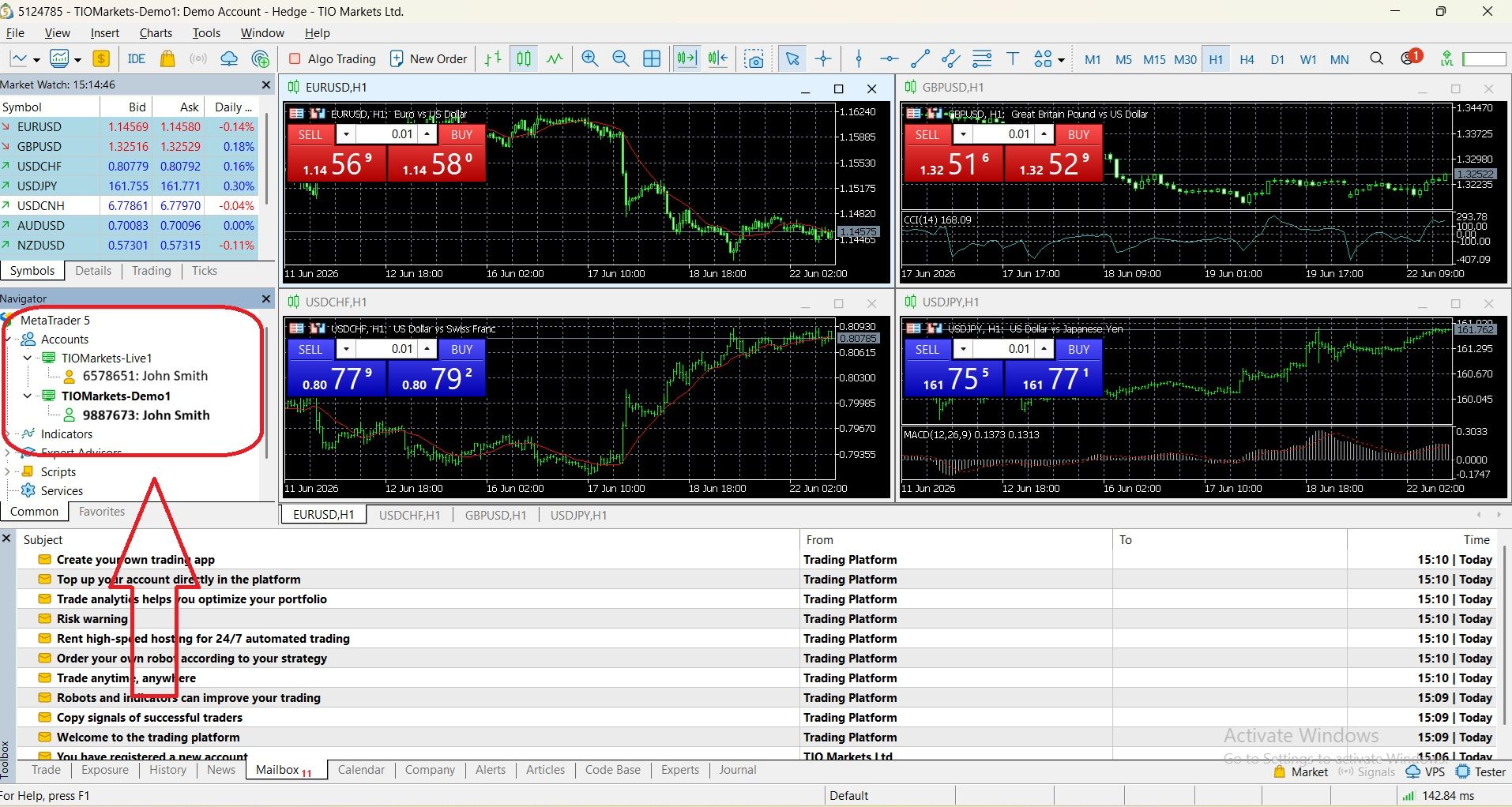
You can identify these account types in the Navigator window (the panel on the left side of MT5).
Before You Open MT5 Live Account - What You Need to Prepare
Opening a real account on MetaTrader 5 requires some preparation. Making informed decisions before you begin saves time and prevents verification delays.
1. Choose a Regulated Broker That Offers MetaTrader 5
Selecting a broker is the most important decision in this process. MT5 is available through hundreds of brokers, but not all brokers are created equal. Verify that the broker specifically offers MetaTrader 5 and their account types match your trading style.
2. Understand the MT5 Real Account Types Offered
Account types vary depending on the broker, but at TIOmarkets, you can open the following real accounts on MetaTrader 5: Nano, Standard, Raw, VIP Black.
TIOmarkets offers Nano which is a micro account where trades are executed in micro lots. As this is notably smaller than a standard lot, the potential gains and losses are significantly reduced. With TIOmarkets, you can trade with a minimum position size of 0.001 lots, by opening a Nano account from just $20.
The TIOmarkets Standard account is straightforward with simple pricing, wider spreads, no commission, lower minimum deposit - as low as $20.
The Raw account provides raw spreads from zero pips, $6 per lot commission, but a higher minimum deposit of $250.
Lastly, the VIP Black account features institutional-style pricing, with low spreads starting from 0.3 pips and zero commission, for just $1,000.
3. Gather Your Verification Documents
A customer's identity verification is a regulation prerequisite. It is a process used by financial institutions and other regulated businesses to verify the client’s identity before providing services. You need a government-issued photo ID, like a passport, national ID, or driver's license, and a proof of address dated within the last 3-6 months (utility bill or bank statement).
This is a legal requirement, not optional. Preparing your documents in advance speeds up the verification process significantly.
4. Decide on Your Account Parameters Before Applying
Before you submit your account application, you need to make decisions about your account setup.
- Base currency: USD, EUR, GBP, or other currencies.
- Leverage ratio: Choose carefully based on your risk tolerance. Higher leverage allows you to control larger positions with less capital, but it also magnifies losses.
- Position accounting system: This determines how MT5 handles multiple positions in the same instrument.
- Initial deposit amount: Must meet the minimum deposit requirement for your chosen account type. Standard accounts have low requirements but ECN accounts may require higher amounts.
How to Create a Real Account on MetaTrader 5 for Desktop (Windows/Mac)
Here is the exact process to create an MT5 real account for live trading on your desktop computer.
Step 1: Register with a Broker
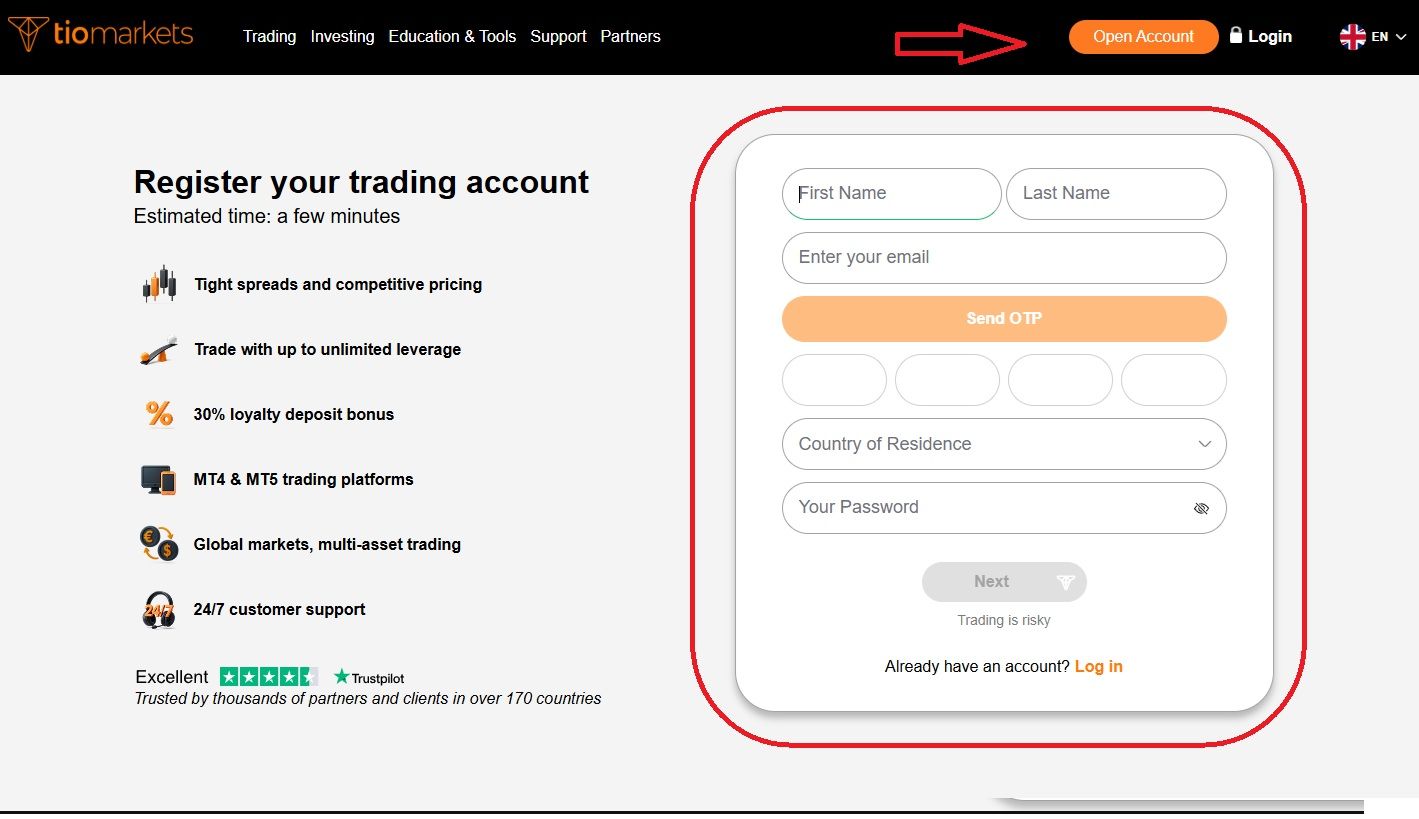
Start by visiting your chosen broker's official website. For TIOmarkets you just click on Open Account, fill in the form and complete the steps to register. At this stage you will be asked to choose your preferred currency since a Standard account will be automatically opened up for you. Additional accounts (RAW, VIP Black and Nano) can also be created from within the client area.
Step 2: Account Credentials Provided
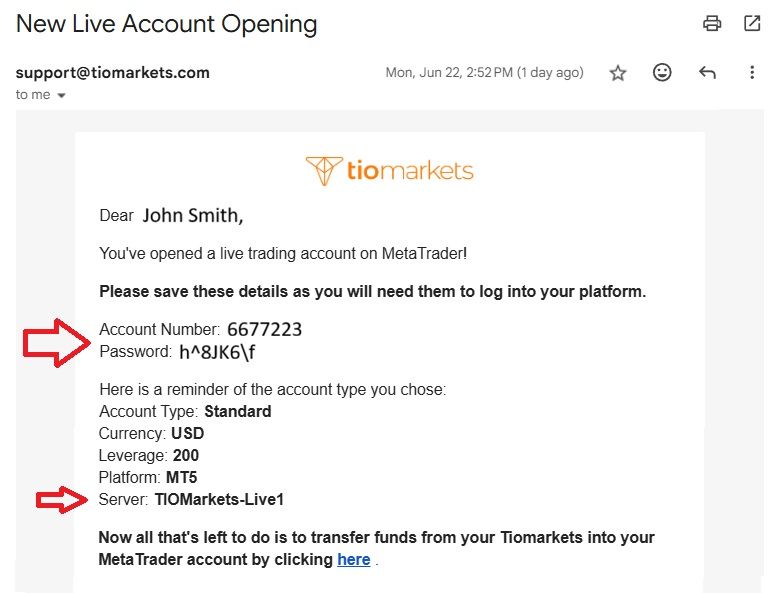
Immediately upon registration, your account is created and TIOmarkets sends an email with your MT5 account login credentials. Account number, password and server name are what you need to login into MT5. Remember that every account you open has different credentials for signing into the trading platform.
Step 3: Complete KYC Verification (Identity and Address)
After registration, log in to the client portal or personal area. Navigate to the verification or KYC section. Submit your documents for approval. TIOmarkets verification time is instant, though some cases may take slightly longer.
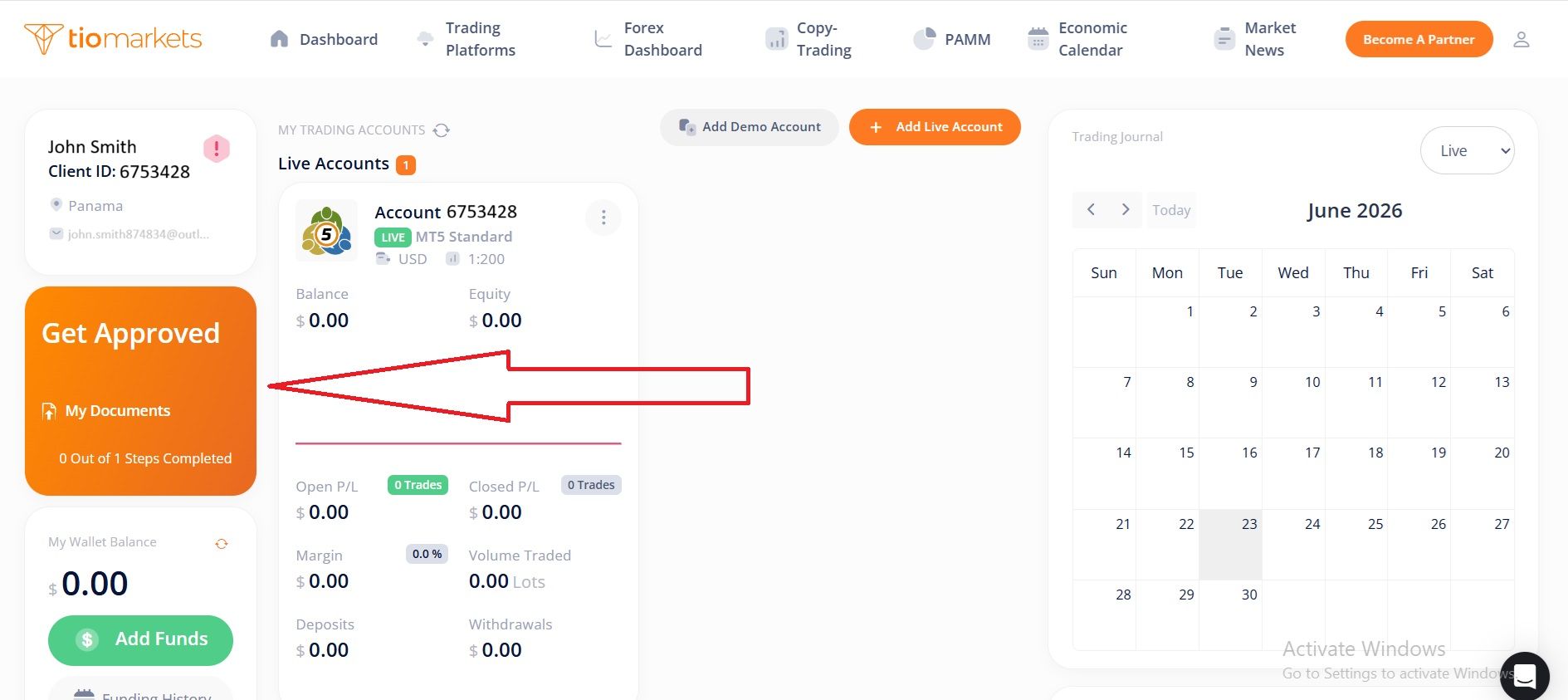
Verification must be completed before any withdrawals and within 14 days of funding the account.
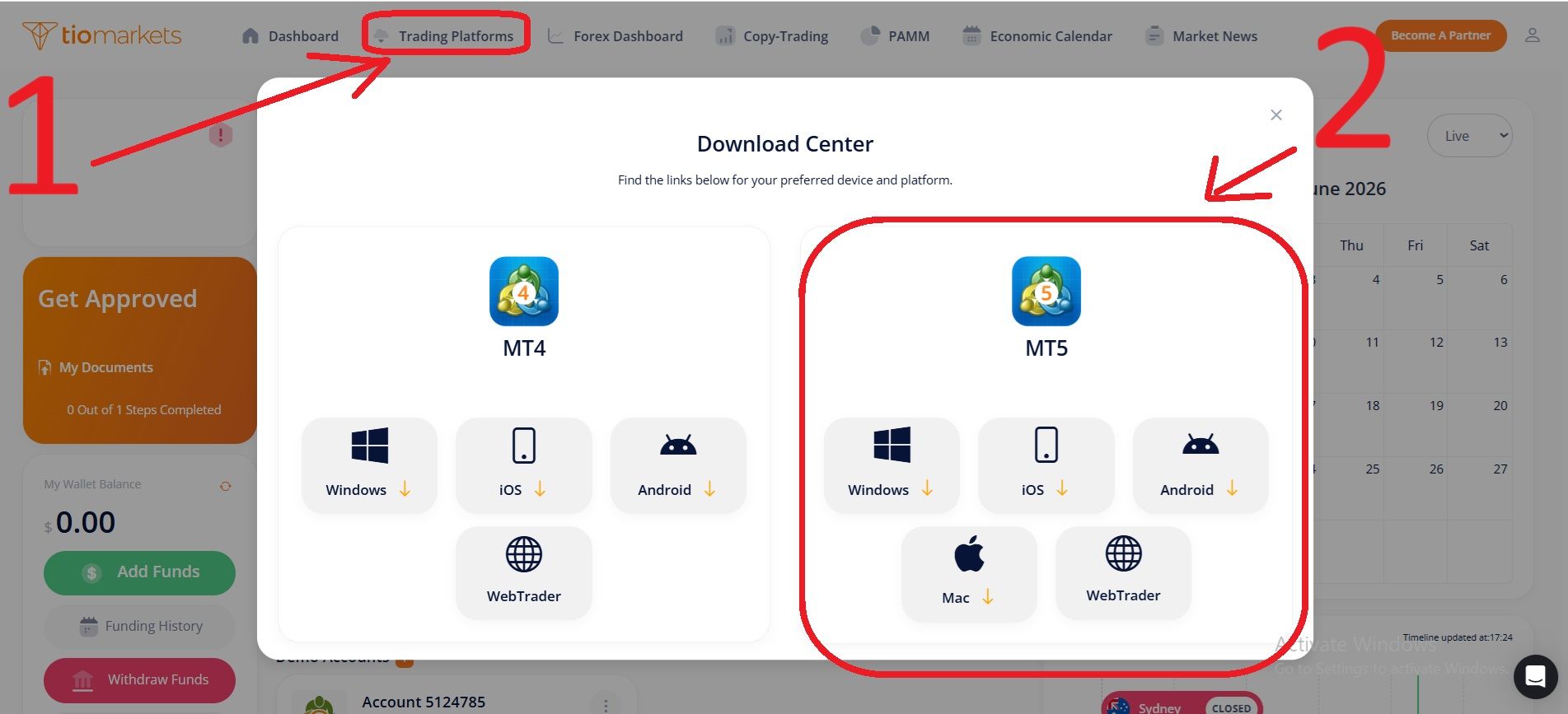
Step 4: Download and Install MetaTrader 5
Then you can download and install the MT5 platform. Downloading MT5 from the client portal is the recommended approach, as broker-specific versions usually include custom settings or server configurations.
Install the application on your Windows or Mac computer by following the installation prompts. The process is straightforward and similar to installing any other software.
Launch MetaTrader 5 once installation is complete. The platform will open and you'll see the main trading interface.
Step 5: Log In to Your Live MT5 Account
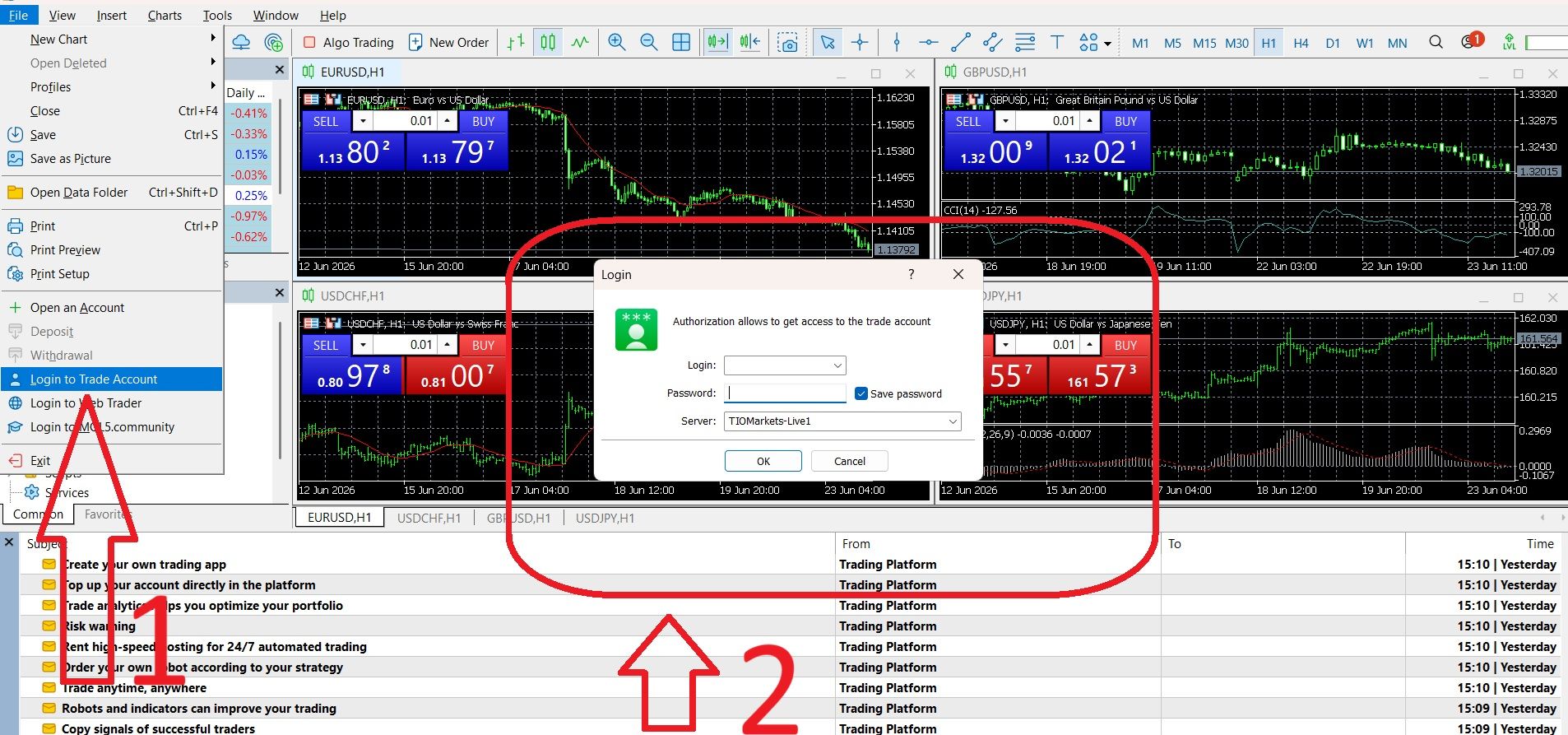
To do that you will need the login credentials received by email - described on step 2. These credentials include your login number (account number), your password, and the live server name.
To log in to your live account in MT5:
- Go to File → Login to Trade Account in the top menu, or click the account area in the top toolbar.
- Enter your login number (the account number your broker provided).
- Enter your password (the password your broker provided, which is different from your broker portal password).
- Select the correct live server from the dropdown menu. This is critical: the live server name is different from the demo server name. Using the wrong server is the most common login error. The broker provides the exact server name in your credentials email.
- Click Sign In to connect to your live account.
| 💡Tip: If you're having trouble logging in, double-check that you've selected the live server, not the demo server. The server name makes all the difference; your login credentials won't work on the wrong server. |
Step 6: Verify Your Account Is Connected
After logging in, verify that your account is properly connected and ready for trading.
- Check the bottom right corner of MT5 for the connection status indicator. When properly connected, you'll see your connection speed displayed (for example, "128 kb/s" or similar).
- Your account balance, equity, and margin will display in the toolbar at the top of the platform. If you haven't funded your account yet, these will show zero.
- The account will appear in the Navigator window on the left side of the platform.
How to Setup a Real MT5 Trading Account on Android Mobile Device
Opening a real account on MetaTrader 5 using an Android device is equally easy. Here is the step-by-step guide for any trader choosing to open a real MT5 account with TIOmarkets.
- Register with TIOmarkets & Open a trading account
- Log in to the Client Area
- Click on Trading Platforms to see the Download Center
- Download, install and open MT5 for Android
- In the next screen click on TIO Markets Ltd. to select it as your broker
- Click Login to your existing account, fill the fields and select the live server
- Start trading
How to Setup a Live MetaTrader 5 Account on iPhone or iPad (iOS)
Opening a real trading account on MetaTrader 5 using your iPhone or iPad is a straightforward process, and closely mirrors the steps on Android devices. This section will guide you step-by-step to ensure you can start live trading on your iOS device quickly.
- Register with TIOmarkets & Open a trading account
- Log in to the Client Area
- Click on Trading Platforms to see the Download Center
- Download, install and open MT5 for iOS
- Select your broker, i.e. TIO Markets Ltd.
- Log in to your existing real MT5 account and start trading
Understanding How Real MT5 Accounts Work
Understanding the whole process can remove uncertainty and help you confidently proceed with your account registration. Here’s what happens when you submit a live account opening request with us.
Account Creation
Registering for the first time as a client with TIOmarkets, means that once you submit your registration, a real account is instantly created on our server. This account is live and ready for trades to happen but it has zero balance until you fund it via the client portal.
Confirmation Email
After registering, TIOmarkets immediately sends an email to the address you used. This confirms you opened a live trading account on MetaTrader with TIOmarkets and provides the sign-in details to log into the platform.
Compliance Review
We ask for your documents (government-issued photo ID and recent proof of address) to verify your identity and ensure regulatory requirements (like AML and MiFID rules) are met. You need to complete the verification requirements, either before or after funding. Verification must be completed before any withdrawals and within 14 days of funding the account.
While this can take longer with other brokers, TIOmarkets has instant digital verification in place. This means if your documents are valid and uploaded correctly, you can be verified in minutes.
Account Approval or Rejection
If documents are rejected, you'll be notified of the specific reasons (blurry images, mismatched names, expired certificates). You will need to resubmit clear, updated documents.
If your verification is rejected you don't need to worry, it is usually easy to fix.
✔ Check the reason in your email
✔ Upload new documents that meet the requirements
✔ Ensure they are valid, clear and show the full page
With TIOmarkets, once your account is live, you are able to deposit funds and begin placing live trades on the MT5 platform. When KYC-approved, your account is a fully active MT5 live trading account where you can trade, deposit and withdraw without restrictions.
How to Fund Your MT5 Real Account and Start Live Trading
Opening your real account is just the first step: you need to fund it before you can start trading live. Here’s a complete guide on how to deposit money into your MT5 real account and begin your trading journey.
1. Log in to the Client Portal
Deposits are made through the official client area or portal, not directly within the MetaTrader 5 platform. To access the portal, log in using your client credentials (they are different from your MT5 login).
2. Navigate to the Deposit Section
Look for the green Add Funds button. Here you select the amount and can view the multiple deposit options available displayed.
3. Choose Your Preferred Payment Method
Select from available deposit methods. There are a variety of options to cater to clients globally.
4. Start Live Trading
With funds now credited, open your MT5 platform (desktop or mobile), select your real account, and place your first live trade.
Common Errors During Your MT5 Account Setup (And How to Fix Them)
Setting up a real MT5 account can sometimes prompt errors. Below is a practical troubleshooting guide that addresses common pitfalls and their solutions:
| Problem | Likely Cause | Solution |
| "Invalid account" error on login | Wrong server selected (demo vs live) | Select the correct live server provided by your broker |
| Account shows zero balance | Funds did not go through | Make sure your selected payment method worked, deposit via another channel |
| KYC documents rejected | Blurry image, expired document, name mismatch | Resubmit clear, current documents matching registration name |
| Can't find broker in server list | Broker name spelled incorrectly or not an MT5 broker | Contact broker for exact server name; verify they support MT5 |
| Password not working | Investor password used instead of master password | Use the master (trading) password, not the investor (read-only) password |
| Mobile app showing "No connection" | Wrong server or internet issue | Check internet connection; re-enter server name manually |
| MT5 account verification taking longer | High volume or additional document requested | Contact broker support; check email for document requests |
How to Keep Your MT5 Real Account Secure After Opening
Your MT5 real account controls your funds, trades, and personal data. Keeping it secure is critical. Here’s how you protect your account beyond the initial setup:
- Use a strong and unique password.
- Never share your password.
- Enable Two-Factor Authentication (2FA) and Extended Authentication.
- Use MT5’s Extended Authentication (OTP) feature.
- Secure your devices and always log out of MT5 when finished.
- Monitor your trading and deposit history frequently to detect unauthorized activity.
- Maintain up-to-date email and phone number information with your broker.
Conclusion
Opening a real account on MetaTrader 5 is a straightforward process once you know the essential steps. Start by choosing a regulated broker that supports MT5, gather the necessary identification and address verification documents, and submit your real account request. Complete KYC verification, fund your account, and begin live trading on your MT5 platform.
Ready to open your real MetaTrader 5 account? You can start by registering your account with TIOmarkets.

FAQ
Risk disclaimer: CFDs are complex instruments and come with a high risk of losing money rapidly due to leverage. You should consider whether you understand how CFDs work and whether you can afford to take the high risk of losing your money. Never deposit more than you are prepared to lose. Professional client’s losses can exceed their deposit. Please see our risk warning policy and seek independent professional advice if you do not fully understand. This information is not directed or intended for distribution to or use by residents of certain countries/jurisdictions including, but not limited to, USA & Countries included in the OFAC sanction list. The Company holds the right to alter the aforementioned list of countries at its own discretion.
TIOmarkets offers an exclusively execution-only service. The views expressed are for information purposes only. None of the content provided constitutes any form of investment advice. The comments are made available purely for educational and marketing purposes and do NOT constitute advice or investment recommendation (and should not be considered as such) and do not in any way constitute an invitation to acquire any financial instrument or product. TIOmarkets and its affiliates and consultants are not liable for any damages that may be caused by individual comments or statements by TIOmarkets analysis and assumes no liability with respect to the completeness and correctness of the content presented. The investor is solely responsible for the risk of his/her investment decisions. The analyses and comments presented do not include any consideration of your personal investment objectives, financial circumstances, or needs. The content has not been prepared in accordance with any legal requirements for financial analysis and must, therefore, be viewed by the reader as marketing information. TIOmarkets prohibits duplication or publication without explicit approval.
Join us on social media



Authors BIO

Maria is a writer and content strategist with over 10 years of experience in the finance industry. She specializes in developing research-backed articles that help financial professionals navigate complex market topics with confidence. Her expertise spans forex, stocks, CFDs and global markets, creating insightful content that educates readers and supports informed decision-making.