


How to Add Money on MT4 or MT5: The Complete MetaTrader Funding Guide
BY Maria K.
|June 29, 2026You are a new trader, just created your trading account, and downloaded your trading platform: MetaTrader, but can't figure out how to add money on MT4 or MT5. You're not alone, and this is a common source of confusion for many new traders.
MetaTrader 4 (MT4) and MetaTrader 5 (MT5) are some of the world's most popular trading platforms, used by millions of traders globally to access forex, commodities, indices, and other financial markets. However, there's one critical point that most beginners miss: deposits and withdrawals are managed by your broker, not MetaTrader itself.
This is the number one source of confusion for new traders, and understanding this distinction can help you avoid unnecessary confusion during the funding process.
In this comprehensive guide, you'll learn exactly how to deposit money into MT4 and how to fund MT5 accounts using all major payment methods: this can include MT4 bank wire transfer, debit and credit card MT5 deposits, and MT5 e-wallet transactions. We'll walk you through the entire process step-by-step, cover common issues, and ensure you can confidently manage your trading account funding from day one.
Understand How MT4 and MT5 Deposits Work
Let's first clear up the biggest misconception in trading platform deposits. MetaTrader platforms, MT4 or MT5, are trading software. They provide the interface for analyzing markets, placing trades, and managing positions. They are not financial institutions and do not hold your money.
The entity that holds your trading funds, executes your orders, and provides access to the markets is your broker, a financial firm just like TIOmarkets is. When you deposit money for trading, those funds go directly to your trading wallet. From there, they can be transferred to your trading account. Whatever balance you have in that account is reflected within the MetaTrader platform, allowing you to open trades.
MetaTrader 4 / MetaTrader 5 Fund Transactions
MT4 and MT5 deposits and withdrawals are processed exclusively through the client portal. To add funds to MetaTrader 4 or MT5, you must log into your client area, navigate to the Add Funds section, and complete the transaction there. Read on to find how the process works, step by step.
📌The availability of payment methods, processing times, fees, and deposit limits are entirely determined by your broker. Your chosen broker can make a difference with regards to deposit experience, payment methods, processing times, and funds protection. That’s why TIOmarkets ensures all the info is available upfront.
Before You Can Add Money to Your MT4 or MT5 Account
Preparation is the key to a smooth deposit experience. Before attempting to fund MetaTrader 4 or MT5 trading accounts, ensure you have everything in place. This pre-flight checklist will help you avoid delays and common obstacles.
Pre-Deposit Checklist
✅ A verified live trading account with a regulated broker, like TIOmarkets. Demo accounts don't require funding, but to trade with real money, you need a verified live account.
✅ Completed identity verification. Brokers are legally required to verify your identity before processing deposits or withdrawals. This typically includes submitting a government-issued ID and proof of address.
✅ Access to the client portal. Bookmark your broker's client area login page and ensure you can access it with your credentials sent via email.
✅ A supported payment method. Confirm your preferred payment method (card, bank account, or e-wallet) is accepted by your broker.
✅ Knowledge of your account's minimum deposit requirement. Different account types have different minimums. The Nano and Standard account require a minimum deposit of $20.
✅ Sufficient funds in your chosen payment method. Ensure your bank account, card, or e-wallet has adequate balance, including any potential fees.
How Much Money Do You Need to Deposit Into MT4 or MT5?
One of the most common questions new traders ask is about minimum deposit requirements. The answer depends entirely on the specific account type you've chosen.
Minimum Deposit Variations
- With TIOmarkets, you can trade with a minimum position size of 0.001 lots, by opening a Nano account from just $20.
- The TIOmarkets Standard account is straightforward with simple pricing, wider spreads, no commission, lower minimum deposit, again as low as $20.
- The Raw account provides raw spreads from zero pips, $6 per lot commission, but a higher minimum deposit of $250.
- Lastly, the VIP Black account features institutional-style pricing, with low spreads starting from 0.3 pips and zero commission, for just $1,000.
How to Add Money to Your MT4 or MT5 Account: Step-by-Step Guide
Now that you understand the relationship between MetaTrader and your broker, let's walk through the exact process of adding funds to your MT4 or MT5 trading account. Following these steps carefully will ensure your deposit is processed smoothly and your funds appear in your account as quickly as possible.
1. Log In to Client Portal
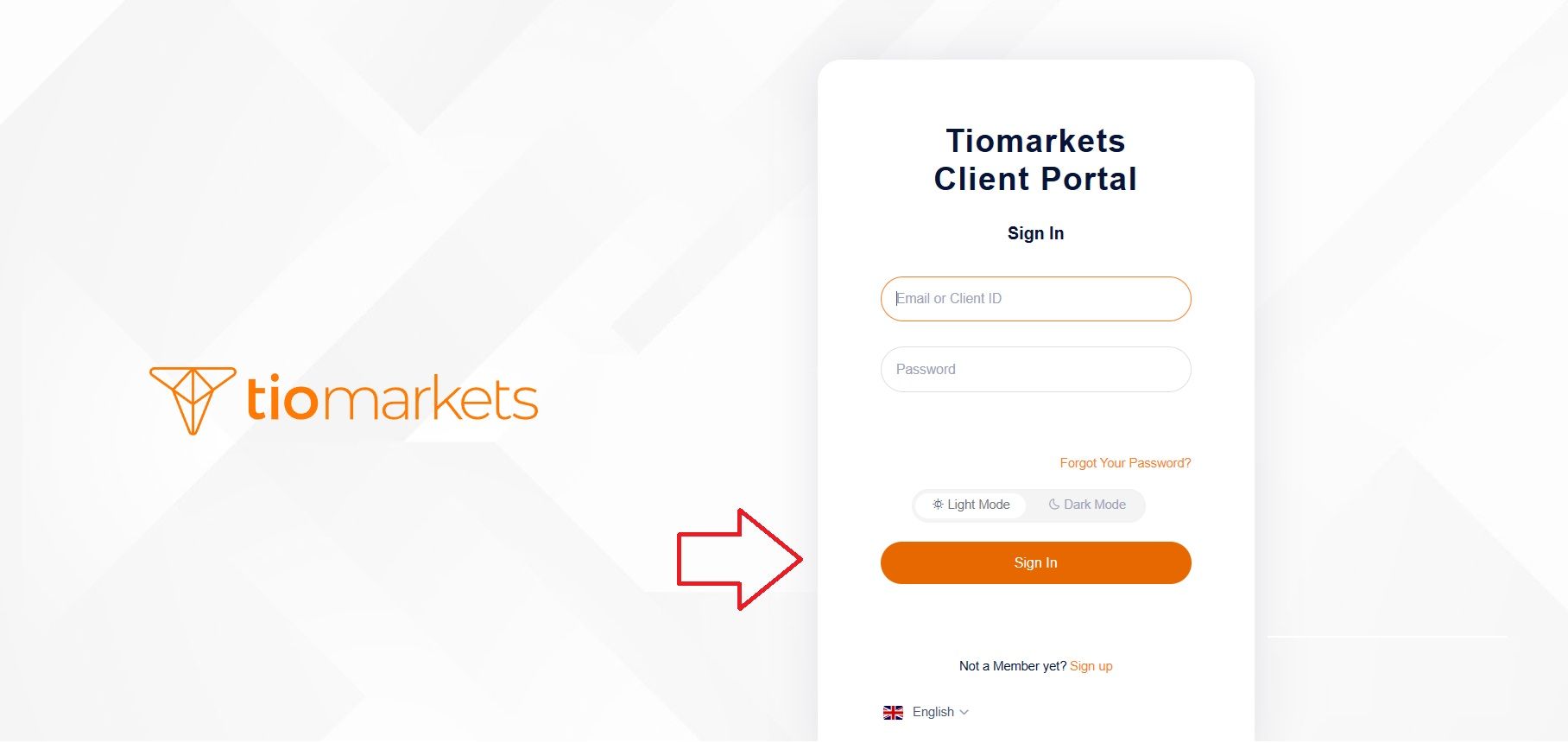
Begin by opening your preferred web browser and navigating to the broker's official website. Always type the URL directly or use a bookmarked link to avoid phishing sites that mimic legitimate broker pages. Locate the Login button, found in the top right corner of the homepage. Enter your registered email address and password to access your secure dashboard. If you've forgotten your password, use the "Forgot Password" recovery option.
2. Navigate to the Deposit Section
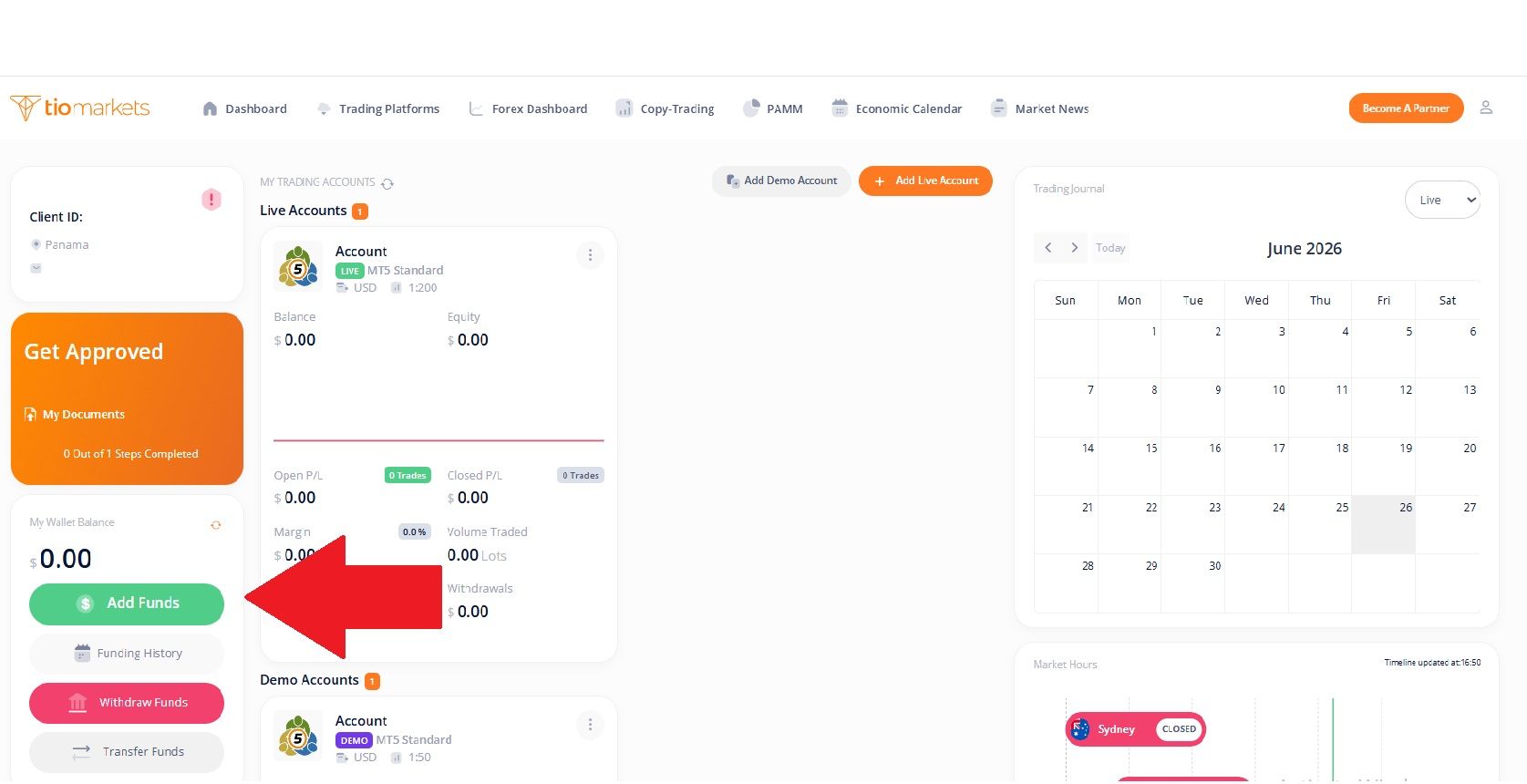
Once logged into your client portal, look for the funding section labeled “Add Funds”. This will open the Deposit window, where you can add funds to your TIOmarkets wallet. It displays all available payment methods based on your country of residence and account status.
3. Choose Amount & Preferred Deposit Method
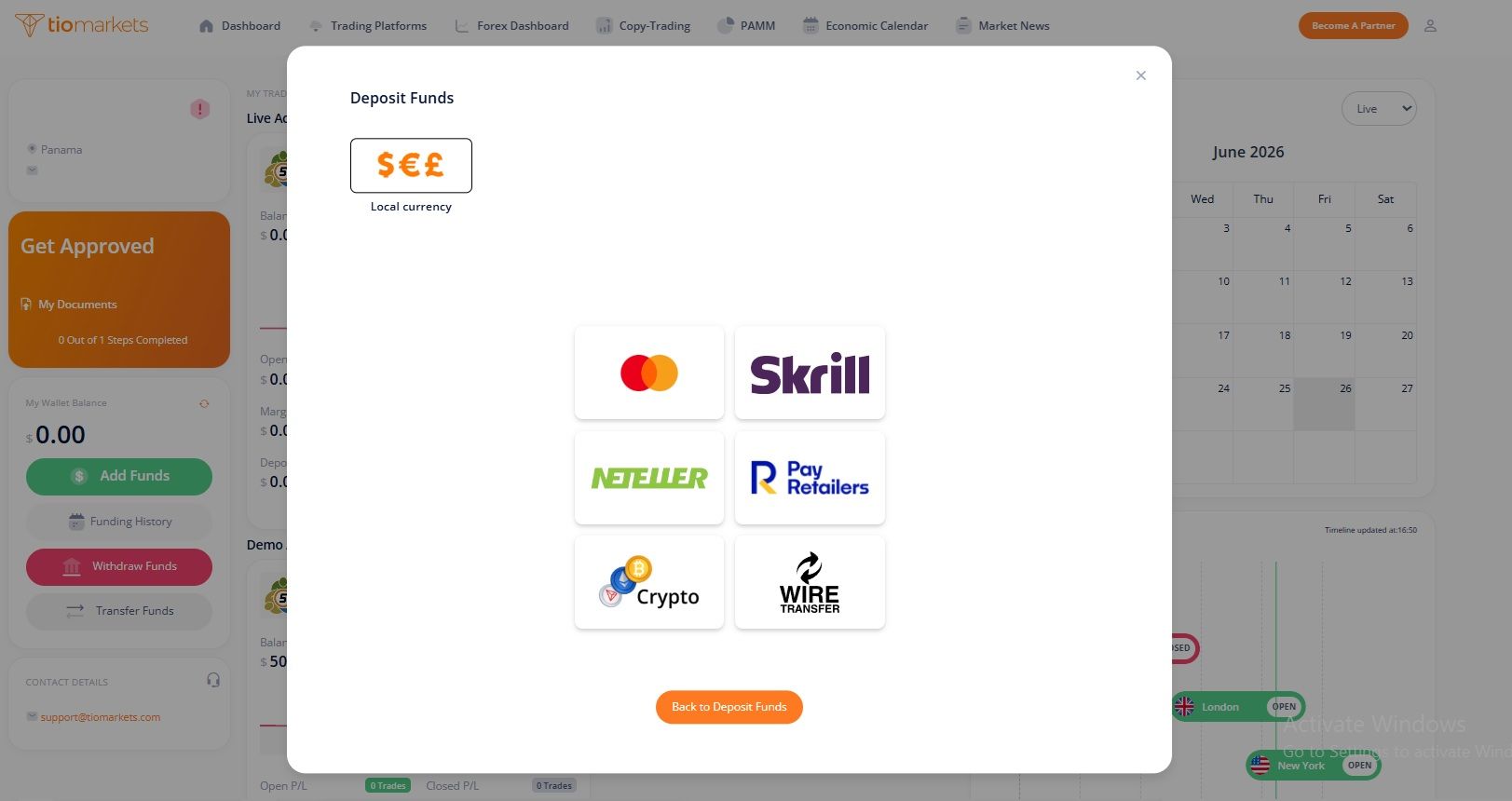
Once you select the amount, you see all available payment options. TIOmarkets offers a wide range of MT4 and MT5 deposit methods to accommodate traders worldwide. They depend on your country of residence, and some options may have restrictions. These funding methods are subject to change, so always check the Deposit area for the most current options.
4. Enter Payment Details
Either you use card deposit, bank wire transfer, e-wallets or any local payment methods, the system will guide you accordingly. Complete all the fields accurately and double-check all information before proceeding. Incorrect details can result in failed transactions, delayed processing, or funds being sent to the wrong destination.
5. Confirm and Submit Your Deposit
Before finalizing your deposit, review every detail carefully. Once confirmed, transactions cannot typically be reversed, and errors may require customer support intervention to resolve. At this point, your funds will be credited to your TIOmarkets wallet, not directly to your trading account. There's one more important step to complete.
6. Transfer Funds from Your Wallet to Your Trading Account
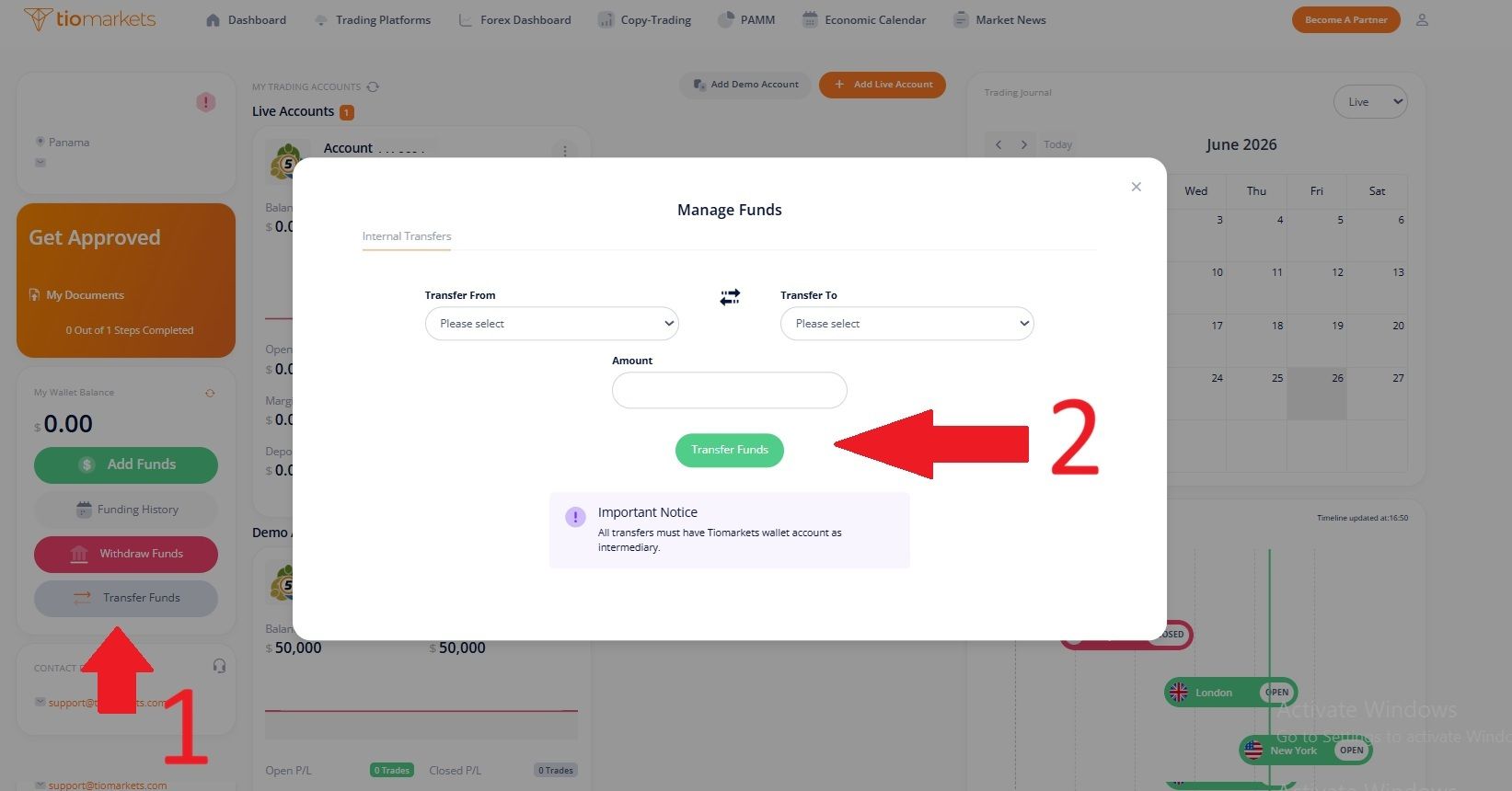
This is a crucial step. After your deposit is credited to your wallet, you need to transfer the funds to your specific MT4 or MT5 trading account. To complete the internal transfer:
➤ In your client portal, navigate to "Transfer Funds" on the left hand side
➤ Select the source (your wallet) and destination (your trading account)
➤ Enter the amount you wish to transfer
➤ Confirm the transfer
Internal transfers between your wallet and trading accounts are typically processed instantly, so your funds should appear in your MT4 or MT5 account within seconds.
7. Check that the Funds Appear in Your MT4 or MT5 Account
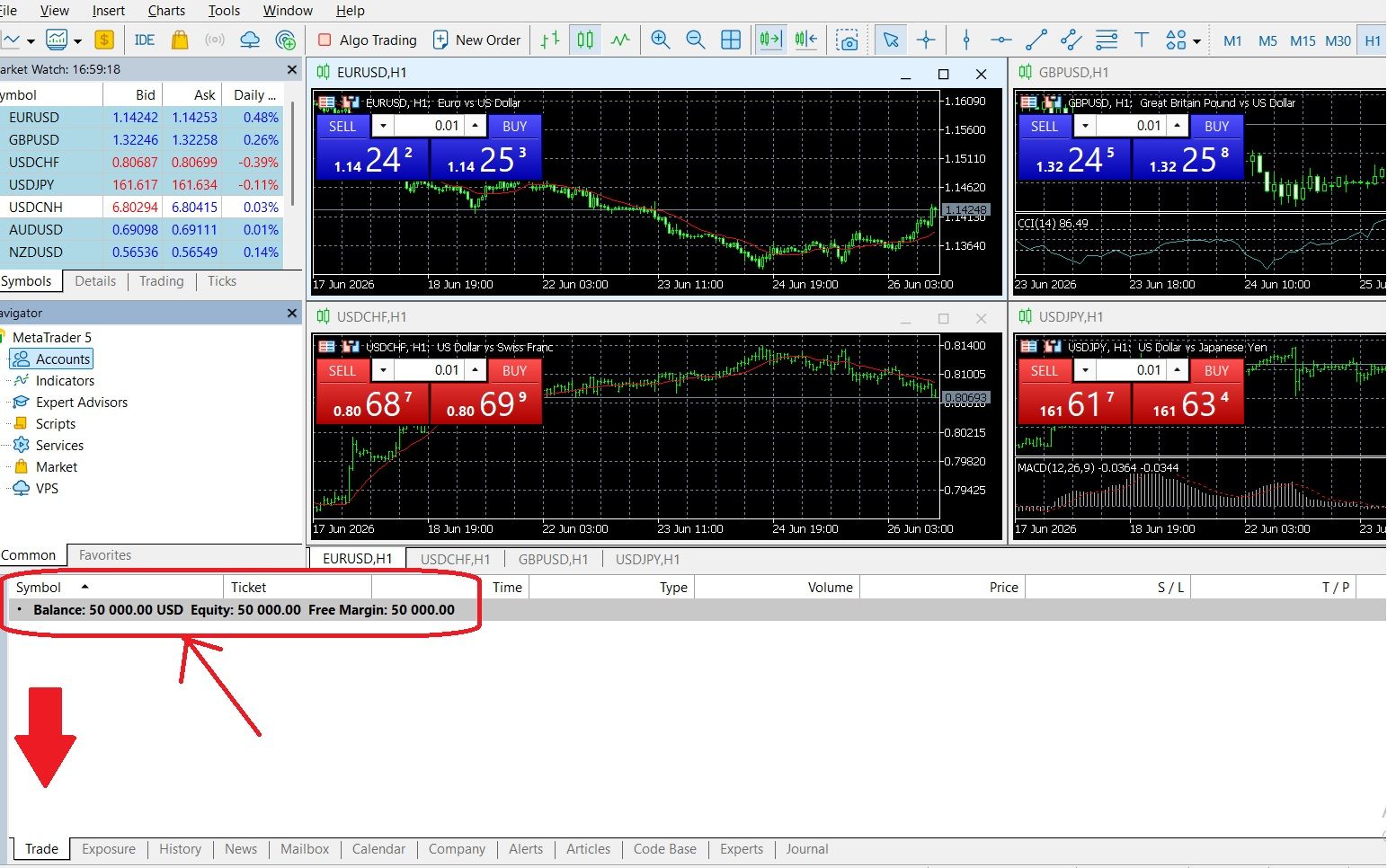
The final step is confirming that your transferred funds appear in your trading account and are available for trading. To check your MT4/MT5 balance open the MT4 or MT5 platform and log in with your trading account credentials. Find the Trade tab at the bottom of the screen where your current balance, equity, and free margin are displayed.
Processing times vary by payment method, but if your funds don't appear within the expected timeframe:
- Check your email for any notifications from TIOmarkets
- Log into the client portal and review your wallet balance and transaction history
- Ensure you've completed the transfer from wallet to trading account (Step 6)
- Verify the funds were debited from your payment source
- Contact TIOmarkets customer support with your transaction reference number
Available Methods for Funding Your MT4 or MT5 Account
TIOmarkets supports multiple local and international funding methods, with available options, processing times, and delivery varying depending on the method used, banking hours, and your country of residence.
These global payment options include bank wire transfer, SEPA, and credit/debit card. E-wallet options are available like Skrill and Neteller. Some regional payment methods include Gigadat, EFTpay, Divepay, Paytrust Local Transfer, FXPay Local Transfer, Online Naira, FasaPay, PayRetailers and Kora Pay (Mobile Money).
📍 TIOmarkets zero-fee policy: The company covers payment provider charges when you deposit the minimum amount. This may reduce the cost of funding your trading account, depending on your payment method.
Payment Methods Comparison Table
| Method | Typical Processing Time | Minimum Deposit | Notes |
| Debit/Credit Card | Instant | $20 USD or equivalent | Visa and Mastercard accepted; supports EUR, USD, GBP, AED, ZAR |
| Bank Wire Transfer | Same day but can take up to 5 business days | $20 USD or equivalent | Best for large amounts; supports EUR, USD, GBP, CAD, AED; include client ID in reference |
| E-Wallet (Skrill/Neteller) | Instant | $20 USD or equivalent | Fast and convenient; supports EUR, USD, GBP, AUD; some country restrictions apply |
| Crypto-to-Fiat | Usually instant – up to few hours | $20 USD or equivalent | Supports Bitcoin, Ethereum, Cardano, Ripple, Solana, Litecoin, USDC, USDT (ERC20 & TRON) |
| Mobile Money | Instant | $20 USD or equivalent | Available for KES and GHS currencies |
Important: TIOmarkets allows you to deposit and start trading immediately with a 14-day grace period to complete account verification. However, your account must be fully verified before any withdrawals can be processed.
Troubleshooting Common MT4 and MT5 Deposit Problems
Even with a straightforward deposit process, traders occasionally encounter issues when trying to fund MetaTrader trading accounts. Most MetaTrader deposit issues have simple solutions and can be fixed within minutes once you identify the root cause.
| Problem | Likely Cause | Solution |
| Payment method not available | Method not supported in your country or currency | Check the Deposit channel for available options based on your region; try an alternative payment method |
| Insufficient funds | Card spending limit exceeded or insufficient bank balance | Use a different card, increase your limit with your bank, or choose bank wire transfer for larger amounts |
| Incorrect payment details | Typo in card number, expiration date, or CVV | Re-enter all details carefully; ensure card number has no spaces |
| Failed verification | Account not fully verified within 14-day grace period | Complete identity verification by uploading required documents through the client portal |
| Transaction declined by bank | Bank flagged the international transaction as suspicious | Contact your bank to authorize transactions to TIOmarkets; some banks require you to whitelist forex broker payments |
| Name mismatch | Payment method registered to a different name | TIOmarkets prohibits deposits from accounts not in your name; use only payment methods registered in your own name |
| Currency not supported | Attempting to deposit in an unsupported currency | Deposit in a supported currency; automatic conversion will apply if needed |
| Card not eligible | Prepaid or virtual card not accepted | Use a standard Visa or Mastercard debit/credit card issued by a recognized bank |
| Funds deposited but not showing in MT4 or MT5 | The funds are in your trading wallet and need to be transferred to account | Check the funds are in the wallet and complete the internal transfer. Allow for processing time |
| Deposit is pending long | Payment provider is conducting additional authorization, verification, or security checks | Check your email for any verification requests from the payment provider; log in to your e-wallet or banking app to confirm the transaction status; contact the payment provider directly |
How to Withdraw Money From Your MT4 or MT5 Account
Since you learned how to add money to your MT4 or MT5, it is useful to know how to withdraw. Withdrawing funds from your trading account follows a similar process. TIOmarkets processes withdrawal requests promptly, with most requests handled within 24 hours during business days. However, the actual time for funds to reach your account depends on your chosen withdrawal method and external payment processors.
Step-by-Step Withdrawal Process
- Log In to Your Client Portal: Use your registered email and password to do so.
- Transfer Funds from Your Trading Account to Your Wallet: Navigate to "Transfer Funds" and transfer the desired amount.
- Navigate to the Withdrawal Section: Click on "Withdraw Funds" to access the withdrawal options.
- Choose Your Withdrawal Method: Due to financial regulations, withdrawals are generally processed back to the original funding source.
- Enter Your Payment Details: Provide the required information.
- Confirm and Submit Your Withdrawal Request: Confirm to process your withdrawal request.
Before initiating a withdrawal, your TIOmarkets account must be fully verified. All withdrawals require complete account verification, this includes identity verification and proof of address documentation.
Tips for Efficient MT4 and MT5 Deposits
Following these best practices ensures your deposits are processed smoothly and securely:
🔒 Always use TIOmarkets' official portal.
💳 Use the same payment method for deposits and withdrawals.
📧 Keep your contact email up to date.
🔄 Don't close the payment page mid-transaction.
📋 Save your transaction reference numbers.
💱 Check currency conversion.
🏦 For large deposits, use bank wire transfer.
Conclusion
Adding money to your MT4 or MT5 account is straightforward once you understand that all deposits are processed through the client portal, not the trading platform itself. With TIOmarkets, you'll deposit to your central wallet first, then transfer funds to your chosen trading account.
Before depositing, familiarize yourself with available payment methods in your region, expected processing times, and any minimum deposit requirements. If you encounter any payment-related issues, TIOmarkets' customer support team can assist with troubleshooting and guidance.
If you decide to open a live account, you can follow the steps above to fund your MT4 or MT5 account.

FAQ
Risk disclaimer: CFDs are complex instruments and come with a high risk of losing money rapidly due to leverage. You should consider whether you understand how CFDs work and whether you can afford to take the high risk of losing your money. Never deposit more than you are prepared to lose. Professional client’s losses can exceed their deposit. Please see our risk warning policy and seek independent professional advice if you do not fully understand. This information is not directed or intended for distribution to or use by residents of certain countries/jurisdictions including, but not limited to, USA & Countries included in the OFAC sanction list. The Company holds the right to alter the aforementioned list of countries at its own discretion.
TIOmarkets offers an exclusively execution-only service. The views expressed are for information purposes only. None of the content provided constitutes any form of investment advice. The comments are made available purely for educational and marketing purposes and do NOT constitute advice or investment recommendation (and should not be considered as such) and do not in any way constitute an invitation to acquire any financial instrument or product. TIOmarkets and its affiliates and consultants are not liable for any damages that may be caused by individual comments or statements by TIOmarkets analysis and assumes no liability with respect to the completeness and correctness of the content presented. The investor is solely responsible for the risk of his/her investment decisions. The analyses and comments presented do not include any consideration of your personal investment objectives, financial circumstances, or needs. The content has not been prepared in accordance with any legal requirements for financial analysis and must, therefore, be viewed by the reader as marketing information. TIOmarkets prohibits duplication or publication without explicit approval.
Join us on social media



Authors BIO

Maria is a writer and content strategist with over 10 years of experience in the finance industry. She specializes in developing research-backed articles that help financial professionals navigate complex market topics with confidence. Her expertise spans forex, stocks, CFDs and global markets, creating insightful content that educates readers and supports informed decision-making.