


Forex Trading App Guide: Features, Comparison & Tips
BY Maria K.
|October 6, 2026A forex trading app is a mobile application that enables users to access foreign exchange markets, execute currency trades, and manage positions from smartphones or tablets. These apps typically offer real-time price quotes, charting tools, and complete account management features.
Mobile forex trading has become the primary interface for currency traders worldwide, providing flexibility to monitor and manage positions from any location. Apps range from industry-standard platforms like MetaTrader to broker-specific proprietary solutions, each offering distinct advantages for different trading approaches.
This guide covers how forex trading apps work, key features to evaluate, associated costs, and selection criteria. The focus is on providing a practical evaluation framework for choosing the right forex markets trading app based on individual needs and trading style.
Forex Trading Apps Explained: Benefits & Capabilities
A forex trading app is a mobile application that lets you trade currencies and other financial instruments directly from your smartphone or tablet, with full access to charts, orders, and account management. It connects to currency markets through a broker's infrastructure, enabling order execution, market analysis, and account management from any location.
Why Traders Use Mobile Trading Apps
Mobile forex trading has shifted from convenience feature to primary trading method for most retail traders. Key drivers include:
- 24-hour market access: Forex markets operate continuously from Sunday evening to Friday night, making mobile alerts and execution essential for catching opportunities outside desk hours
- Real-time position monitoring: Open trades can be tracked and managed instantly, with push notifications for price alerts, margin warnings, and order executions
- Faster reaction time: News events and price movements can be acted on immediately rather than waiting to access a desktop platform
- Account management flexibility: Deposits, withdrawals, and verification can be completed without visiting separate web portals
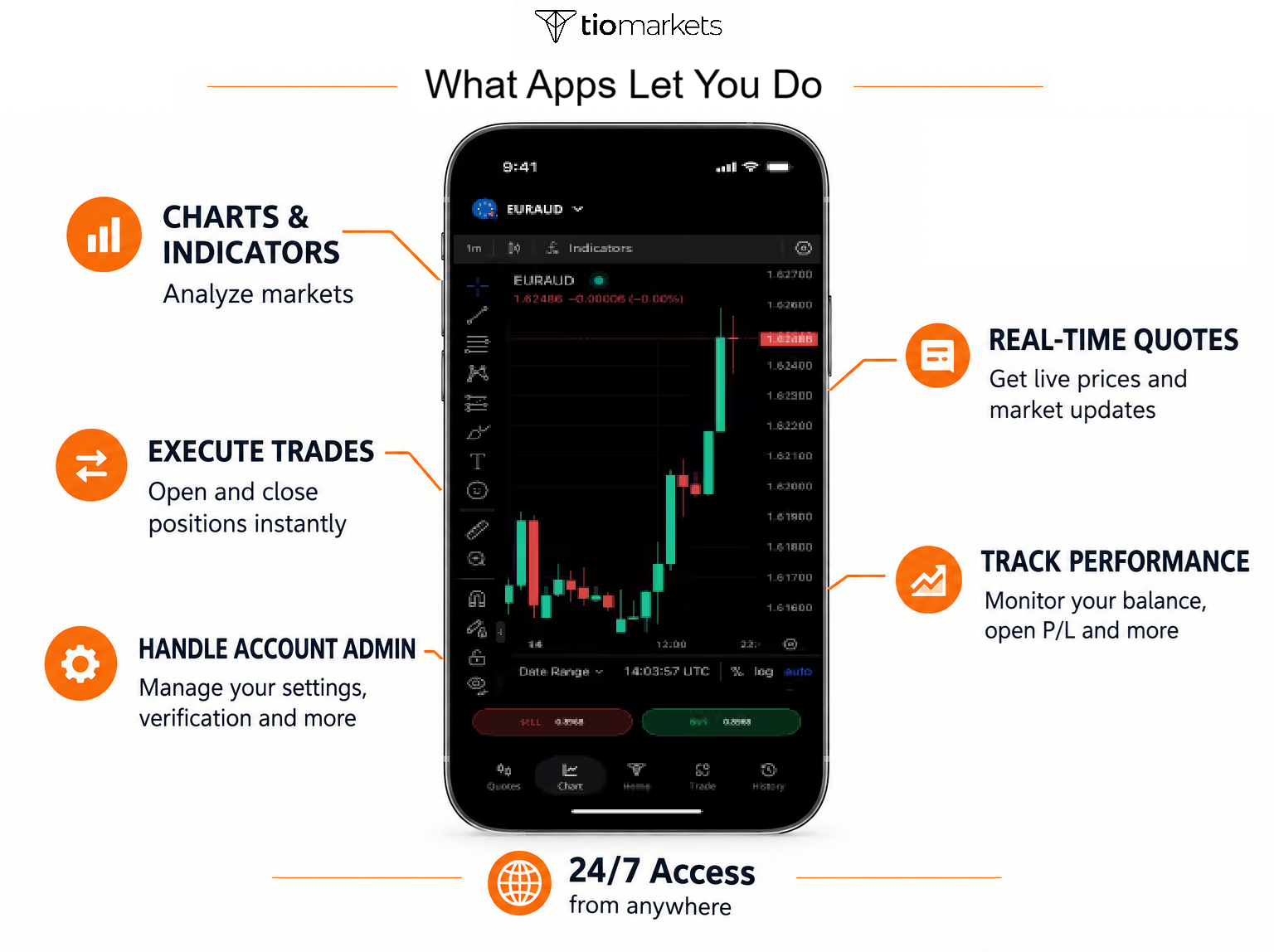
What Forex Trading Apps Let You Do
A forex trading app replicates most desktop trading functionality on your mobile device. Standard capabilities include:
- Execute trades: Open and close positions on currency pairs and other instruments with market, limit, and stop orders
- Analyze markets: View price charts with technical indicators, multiple timeframes, and drawing tools
- Manage risk: Set stop-loss and take-profit levels, monitor margin usage, receive alert notifications
- Track performance: Review trade history, monitor open positions, and check account balance and equity in real time
- Handle account admin: Many apps now include deposit/withdrawal functions, verification, and support access
Features to Look for in a Forex Trading App
Essential forex app features include reliable order execution, comprehensive charting tools, risk management functions, and security measures, with priority varying based on individual trading style and experience level.
Essential Features Every Forex App Needs
You can use this checklist when evaluating any forex trading app:
| Category | Features to Look For |
| Execution & Orders | Real-time price streaming without significant lag · Multiple order types (market, limit, stop, trailing stop) · One-click or one-tap trading option · Order modification and cancellation capability |
| Charting & Analysis Tools | Multiple timeframes (minimum: M1, M5, M15, H1, H4, D1) · Candlestick, bar, and line chart options · Technical indicators (minimum 20+) · Drawing tools for trend lines and support/resistance levels |
| Risk Management | Stop-loss order functionality · Take-profit order capability · Margin level monitoring and alerts · Position size calculator (beneficial for risk control) |
| Usability & Support | Beginner-friendly interface with intuitive navigation · Risk-free demo account available for practice · 24/7 customer support accessible via the app |
| Account Management | Real-time balance and equity display · Complete trade history access · Deposit and withdrawal functionality · Statement generation for record keeping |
What Security Features Should a Forex Trading App Have?
Secure forex trading apps implement SSL/TLS encryption, two-factor authentication, biometric login options, automatic session timeouts, and secure credential storage to protect account access and trading data.
| Category | What to Check |
| Data Protection | SSL/TLS encryption for all data transmission · Encrypted storage of login credentials · Secure connection indicators visible to users |
| Authentication Options | Two-factor authentication (2FA) availability · Biometric login support (fingerprint/face recognition) · PIN code protection option · Strong password requirements enforced |
| Session Security | Automatic logout after period of inactivity · Remote session termination capability · Login attempt notifications · Device management options for account access |
| Red Flags to Avoid | No mention of encryption in security policy documentation · Missing two-factor authentication option · Poor app store security ratings or reviews · Infrequent app updates or unresponsive developer |
How to Match Trading App Features to Trader Type
| Trader Type | Priority Features |
| Beginner & Casual Trader | Simple, uncluttered interface, demo account access, preset watchlists, top movers, visual risk calculators showing potential loss in currency values, educational resources, basic charting |
| Day Trader | Fast execution, advanced charting, multiple indicators, quick order modification, multi-chart view (up to four splits), fast timeframe switching, drag-and-drop stop-loss and take-profit lines |
| Scalper | One-click trading from charts, ultra-fast order placement, minimal latency, spread display, rapid chart updates, drag-and-drop risk controls on active canvas |
| Swing Trader | Multi-timeframe analysis, integrated advanced charting suites (like TradingView), deep technical indicators, price alerts, economic calendar, filtered news feeds, position monitoring |
| Position Trader | Built-in economic calendars, market sentiment tools, simultaneous modification of multiple orders, batch closing of open positions, long-term charting capabilities |
| Multi-Account Trader | Easy account switching, real-time sync across devices, batch order management, consolidated performance tracking across individual accounts |
Most Used Forex Trading Apps - A Comparison
Trading apps fall into two categories: third-party platforms and proprietary broker applications.
- Third-party platforms like MetaTrader 4 and MetaTrader 5 are developed by software companies and offered by brokers as their trading interface. These platforms exist in three formats: desktop applications, web-based versions, and mobile apps for iOS and Android. When a broker offers MetaTrader, they customize it to connect to their servers and display their available instruments. This means traders using MT4/5 through different brokers may see different currency pairs and spreads despite identical interfaces. Most established brokers offer at least one MetaTrader version, allowing traders to trade with multiple brokers if they want while maintaining platform familiarity.
- Proprietary apps are developed by individual brokers exclusively for their clients, integrating full services, from account registration through trading and withdrawals, within a single interface.
Below, we compare MT4, MT5, and a proprietary broker app - using TIOmarkets as an example to illustrate features, advantages, and limitations across different platform types.
MetaTrader 4 (MT4) App Overview
MetaTrader 4 remains one of the most widely adopted forex trading apps globally, with compatibility across 750+ brokers worldwide. The platform maintains strong app store ratings and has established itself as an industry standard since its desktop release in 2005.
Key Features
- 30 technical indicators and 24 analytical objects
- 9 timeframes for chart analysis (M1 to Monthly)
- 3 chart types including bar, candlestick, and line
- One-click trading execution for rapid order placement
- Push notifications for customizable price alerts
- Support for Expert Advisors enabling automated trading strategies
Pros
- Industry standard with widespread broker support and familiarity
- Extensive community resources including indicators, templates, and tutorials
- Free to download and use across iOS and Android devices
- Familiar interface for traders transitioning from desktop versions
Cons
- Interface design appears dated compared to modern mobile applications
- Limited primarily to forex-focused functionality and features
- Customization and advanced features require technical knowledge
MetaTrader 5 (MT5) App Overview
MetaTrader 5 represents the evolution of the MetaTrader platform, offering expanded asset class coverage including stocks, futures, and options alongside forex. The app provides enhanced analytical capabilities while maintaining the core trading functionality traders expect.
Key Features
- 38 technical indicators and 44 analytical objects
- 21 timeframes expanded significantly from MT4's 9 options
- Economic calendar integration for fundamental analysis
- Depth of Market (DOM) display showing liquidity levels
- Enhanced order types including buy stop limit and sell stop limit
- Improved strategy tester for developing automated trading systems
Pros
- Multi-asset trading capability beyond forex pairs
- More advanced analytical tools than MT4 platform
- Better execution architecture and processing speed
- Built-in economic calendar eliminates need for external sources
Cons
- Not backward compatible with MT4 Expert Advisors or indicators
- Steeper learning curve for beginners due to expanded features
- Smaller community resource base compared to MT4
TIOmarkets Mobile Trading App Overview
The TIOmarkets mobile trading app offers 950+ CFD instruments across forex, stocks, indices, commodities, and cryptocurrencies with millisecond execution speed. It is free to download and available on iOS, Android, and alternative app stores. It features TradingView-powered charting and supports 20+ languages.
Standout Features
- TradingView charts with technical indicators (RSI, MACD, Bollinger Bands), multiple timeframes, and drawing tools
- One-click trading and bulk position closing for efficient management
- Real-time quotes with smart filtering by change percentage and swap fees
- Complete in-app account management including registration, verification, deposits, and withdrawals
- Biometric and two-factor authentication (2FA) security
- Integrated economic calendar and market newsfeed
- 24/7 in-app customer support access
- Refer-a-Friend program with rewards
Pros
- Institutional-quality TradingView charting available on mobile devices
- All-in-one solution from registration through active trading
- Fast execution designed for active trading strategies
- Support for 20+ languages for global accessibility
Cons
- Available to TIOmarkets accounts only
- Different interface from MT4/MT5 requiring adjustment for experienced users
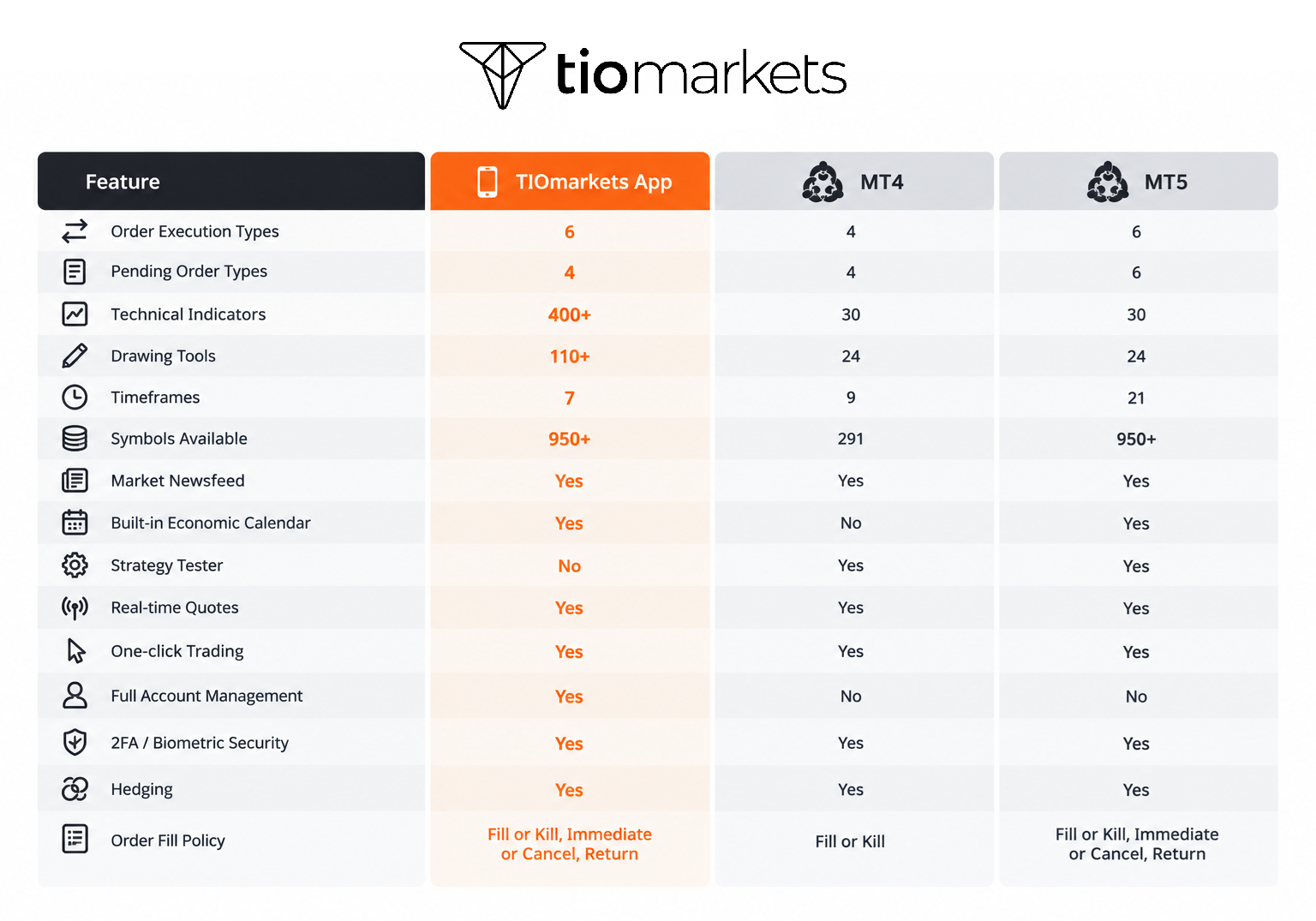
Applying the Feature Checklist: The TIOmarkets Proprietary App Example
The following table shows how these criteria apply in practice, using the TIOmarkets mobile app as a case study.
| EXECUTION & ORDERS | TIOmarkets Implementation |
| Real-time price streaming | Bid/ask prices streaming live across all markets |
| Multiple order types | Market, pending orders, customizable position sizing |
| One-click trading | Execute trades instantly with a single tap |
| Order modification /cancellation | Full order management |
| Bulk position closing | Exit all trades at once or filter by direction, result, or symbol |
| CHARTING & ANALYSIS | |
| Multiple timeframes | 1-minute to monthly charts |
| Chart types | Candlestick, bar, line |
| Technical indicators | RSI, MACD, Bollinger Bands, moving averages + more |
| Drawing tools | Trendlines, Fibonacci, support/resistance levels |
| Charts | TradingView-powered |
| RISK MANAGEMENT | |
| Stop-loss & take profit orders | Built-in risk management |
| Limit & stop orders | Schedule trades at specified price levels or trigger execution when price reaches set level |
| Margin level monitoring | Margin call & stop out alerts |
| MARKET RESEARCH | |
| Economic calendar | Enhanced filters for market-moving events |
| Market newsfeed | Breaking financial news and analysis |
| Smart quote filtering | Sort by change %, swap fees, and more |
| Custom watchlists | Organize and monitor favorite markets |
| USABILITY & SUPPORT | |
| Beginner-friendly interface | Clean, intuitive design |
| Demo account | Risk-free practice |
| 24/7 customer support | In-app support access |
| Language availability | Select from 20+ languages |
| Push notifications/alerts | Pending orders, positions, margin calls, stop outs |
| ACCOUNT MANAGEMENT | |
| Real-time balance/equity display | Live account monitoring |
| Trade history access | Full transaction records |
| In-app deposits/withdrawals | Fund account or withdraw profits |
| In-app registration/verification | Open account and verify ID in minutes |
| Multiple account management | Switch between accounts with simple scroll |
| AUTHENTICATION & SECURITY | |
| Two-factor authentication (2FA) | Extra layer of account protection |
| Biometric login | Fingerprint authentication |
| Auto logout after inactivity | Automatic session timeout |
| ADDITIONAL FEATURES | |
| Instruments available | 950+ CFDs (forex, stocks, indices, commodities, crypto) |
| Execution speed | Millisecond execution |
| Refer-a-Friend program | $50 withdrawable cash per qualifying referral |
| Loyalty bonus program | Rewards enabled within app |
| App availability | iOS, Android, Samsung Galaxy Store, Aptoide, AppBrain |
| Global reach | 270,000+ accounts in 170+ countries |
How to Evaluate a Forex Trading App: Step-by-Step Process
Evaluating a forex trading app involves verifying broker regulation, comparing costs, assessing security measures, confirming feature alignment with your needs, and testing functionality through a demo account before depositing real funds.
Step 1: Verify Broker Regulation
Before downloading any trading app, confirm the broker is licensed by recognized regulators such as the FCA, ASIC, CySEC, or equivalent authorities. Don't just take the broker's word for it; verify license numbers directly on the regulator's official website. Ensure negative balance protection and client fund segregation policies are in place, meaning your money is kept separate from the broker's operational funds. Additionally, review the broker's operational history and industry reputation to gauge reliability and trustworthiness.
Step 2: Compare Total Trading Costs
Understanding the true cost of trading goes beyond spreads. Calculate spread costs on the currency pairs or instruments you intend to trade most frequently. If you're considering a raw spread account type, factor in any commissions charged per trade. For positions held overnight, swap costs can add up; review these rates carefully. Finally, examine deposit and withdrawal fee structures to avoid unexpected charges when funding or accessing your profits.
Step 3: Assess Security Measures
Your trading app should protect both your funds and personal data. Verify that the app offers encryption and authentication options such as two-factor authentication (2FA) and biometric login. Check app store ratings and read recent user reviews to identify any recurring security concerns or technical issues. Review how frequently the developer releases updates and how responsive they are to reported problems. Test customer support accessibility and response time before committing; knowing help is available when needed provides peace of mind.
Step 4: Confirm Features Match Your Needs
Not every trading app suits every trader. Compare the app's available features against your personal requirements list, ensuring your specific trader type needs are met (refer to the Features section above). Consider your future growth as well; an app that works for you now should still serve you as your trading skills develop. Verify device compatibility and storage requirements to ensure smooth performance on your smartphone or tablet.
Step 5: Test with a Demo Account
Most traders don't commit to a trading app without testing it first. Opening a free demo account to access the full platform in a risk-free environment is the best idea. Execute all order types you plan to use, including market, limit, and stop orders. Test charting tools, technical indicators, and drawing functions to ensure they meet your analysis needs. Evaluate interface usability and navigation flow. Compare performance on both WiFi and cellular connections to ensure reliability on the go.
Once satisfied with your testing and if you feel ready, you can freely proceed to live account setup and funding.
Conclusion
Forex trading apps provide essential mobile access to currency markets, with options ranging from industry-standard MetaTrader platforms to broker-specific proprietary applications. Selecting the right app requires evaluating features against your trading style, understanding cost structures, verifying security measures, and testing functionality through demo accounts.
Whether choosing MT4 for its widespread compatibility, MT5 for advanced features, or a proprietary platform like TIOmarkets' mobile app for integrated broker services, the key is matching capabilities to your specific trading needs. Start with demo account testing to ensure your chosen platform supports your trading approach before committing real capital.
FAQ
Risk disclaimer: CFDs are complex instruments and come with a high risk of losing money rapidly due to leverage. You should consider whether you understand how CFDs work and whether you can afford to take the high risk of losing your money. Never deposit more than you are prepared to lose. Professional client’s losses can exceed their deposit. Please see our risk warning policy and seek independent professional advice if you do not fully understand. This information is not directed or intended for distribution to or use by residents of certain countries/jurisdictions including, but not limited to, USA & Countries included in the OFAC sanction list. The Company holds the right to alter the aforementioned list of countries at its own discretion.
TIOmarkets offers an exclusively execution-only service. The views expressed are for information purposes only. None of the content provided constitutes any form of investment advice. The comments are made available purely for educational and marketing purposes and do NOT constitute advice or investment recommendation (and should not be considered as such) and do not in any way constitute an invitation to acquire any financial instrument or product. TIOmarkets and its affiliates and consultants are not liable for any damages that may be caused by individual comments or statements by TIOmarkets analysis and assumes no liability with respect to the completeness and correctness of the content presented. The investor is solely responsible for the risk of his/her investment decisions. The analyses and comments presented do not include any consideration of your personal investment objectives, financial circumstances, or needs. The content has not been prepared in accordance with any legal requirements for financial analysis and must, therefore, be viewed by the reader as marketing information. TIOmarkets prohibits duplication or publication without explicit approval.
Join us on social media



Authors BIO

Maria is a writer and content strategist with over 10 years of experience in the finance industry. She specializes in developing research-backed articles that help financial professionals navigate complex market topics with confidence. Her expertise spans forex, stocks, CFDs and global markets, creating insightful content that educates readers and supports informed decision-making.