


Trading App with TradingView Charts: How to Download & Use for Free
BY Maria K.
|July 17, 2026Many traders spend hours searching for the right trading platform. That’s because every trader knows that to trade you need professional charting tools preferably without expensive subscriptions. You need a reliable broker app that combines powerful analysis with easy execution.
TIOmarkets solves this problem. The newly-launched trading app with TradingView charts offers everything traders need in one free download. It brings institutional-grade charts in your mobile device. All you need is an account with TIOmarkets and you can start trading more than 900+ symbols available in forex, metals, energies, stocks, indices or cryptocurrencies - wherever you are.
What the trading app with TradingView charts includes:
- 12 chart types and 7 timeframes
- 100+ technical indicators
- 110+ drawing tools
- Chart-based order execution
- 900+ tradable instruments
- No separate TradingView subscription required
In this guide, you will learn what makes TradingView integration valuable. You will discover how to download and set up the TIOmarkets app. Most importantly, you will understand how to use TradingView professional charts for better trading decisions. Let us explore why this trading app deserves your attention.
What Is a Trading App with TradingView Charts?
Before downloading any trading app, a detailed analysis of TradingView technology helps you appreciate its value. This knowledge will show you why millions of traders prefer apps using TradingView charts over basic alternatives.
TradingView Technology Overview
TradingView is a charting platform used by over 50 million traders monthly. The platform provides technical analysis tools that include:
- Highly responsive charts: They load quickly and update in real-time, which matters for traders monitoring fast-moving markets.
- Over 100 technical indicators: These range from simple moving averages to complex oscillators like MACD and Stochastic.
- Precision drawing tools for technical analysis: Traders can mark trend lines, Fibonacci retracements, and support levels accurately.
- Clean and intuitive interface: Most users can create functional chart setups within minutes, regardless of experience level.
TradingView also provides extensive customization options. Users can change colors, adjust timeframes, and create personalized charts. This flexibility serves different trading styles, from short-term day trading to longer-term position trading.
How TradingView Integration Works in the TIOmarkets Trading App
TradingView chart integration means the charting technology is built directly into the TIOmarkets’ app. You do not need to switch between applications. Everything happens in one place. When you open an instrument in the TIOmarkets app, TradingView charts load automatically. You see the same quality charts that you would use on desktop platforms. The integration is seamless and requires no additional setup creating a smooth trading experience.
Trading from charts becomes effortless. You can place orders directly from the chart view. Set your stop-loss or adjust take-profit levels with a few clicks. The best part however is that you do not need a separate TradingView subscription. The charting features come included with your TIOmarkets account - just choose any of the ones TIOmarkets offers.
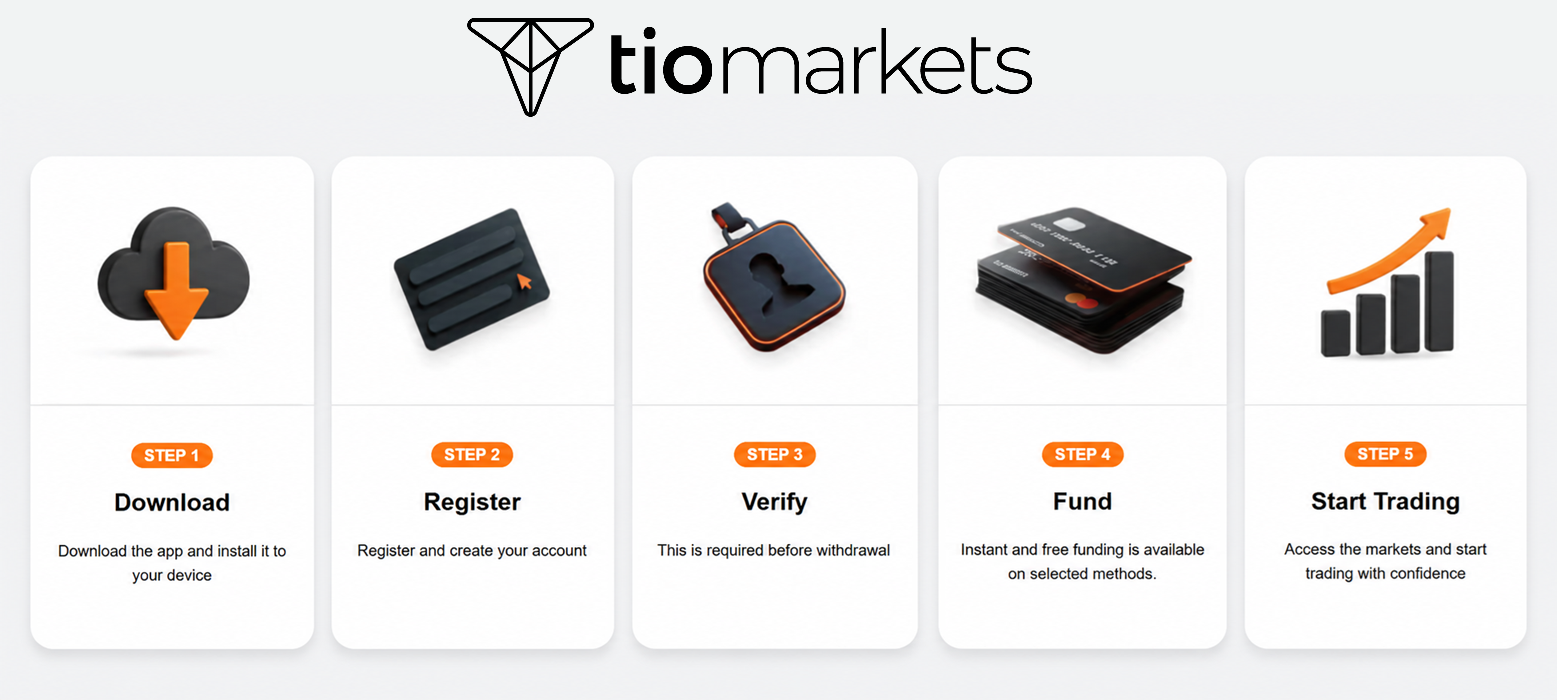
All you need to do is download the app, register as a client, and make a deposit ($20 is the minimum). Then you can start trading or just test the charts and tools available with a Demo account until you feel comfortable to dive in.
Who is the Broker behind the Trading App with TradingView Charts
Now that you understand TradingView technology, let us examine TIOmarkets specifically: a broker with TradingView charts that has built a strong reputation among global traders. TIOmarkets is an established forex and CFD broker serving traders worldwide.
- Competitive trading conditions: The company focuses on providing trading parameters like low spreads, fast execution, and quality tools.
- Regulation: TIOmarkets operates under proper regulatory oversight. This gives traders confidence that their funds are protected.
- Excellent client support: The company has built a global community of traders. Therefore, customer support is available in multiple languages. Educational resources help beginners learn trading basics.
Why TIOmarkets Chose TradingView Integration
TIOmarkets looked into what traders want and charting quality became a top priority. The decision to integrate TradingView was deliberate. Rather than offering inferior proprietary charts, the company partnered with an industry leader. This broker app with TradingView integration gives TIOmarkets a competitive advantage. Traders who already use TradingView feel immediately comfortable and new traders benefit from learning the industry standard.
Markets Available in This Trading App with TradingView Charts
The TIOmarkets app offers access to diverse financial markets. All instruments come with full TradingView charting capabilities.
- Forex currency pairs form the core offering. You can trade major pairs like EUR/USD and GBP/USD. Minor and exotic pairs are also available.
- Commodities include gold, platinum, silver, gas and oil. These instruments can accommodate traders seeking portfolio diversification.
- Global indices let you trade entire market movements. Access popular indices from America, Europe, and Asia. Index trading suits those who prefer broader market exposure.
- Stocks provide access to individual company shares. Trade well-known companies without owning the underlying stock.
- Cryptocurrencies complete the offerings. Bitcoin, Ethereum, Dash, Litecoin, and other digital assets are available.
Features of This Free Trading App with TradingView Charts
Understanding specific features helps you maximize your trading experience. This trading app powered by TradingView offers comprehensive functionality.
TradingView Charting Specifications
The app includes a range of TradingView charting features accessible on mobile devices - including 12 chart types, 7 timeframes, over 100 technical indicators, and 110+ smart drawing tools. Here is an overview of what the charting suite contains.
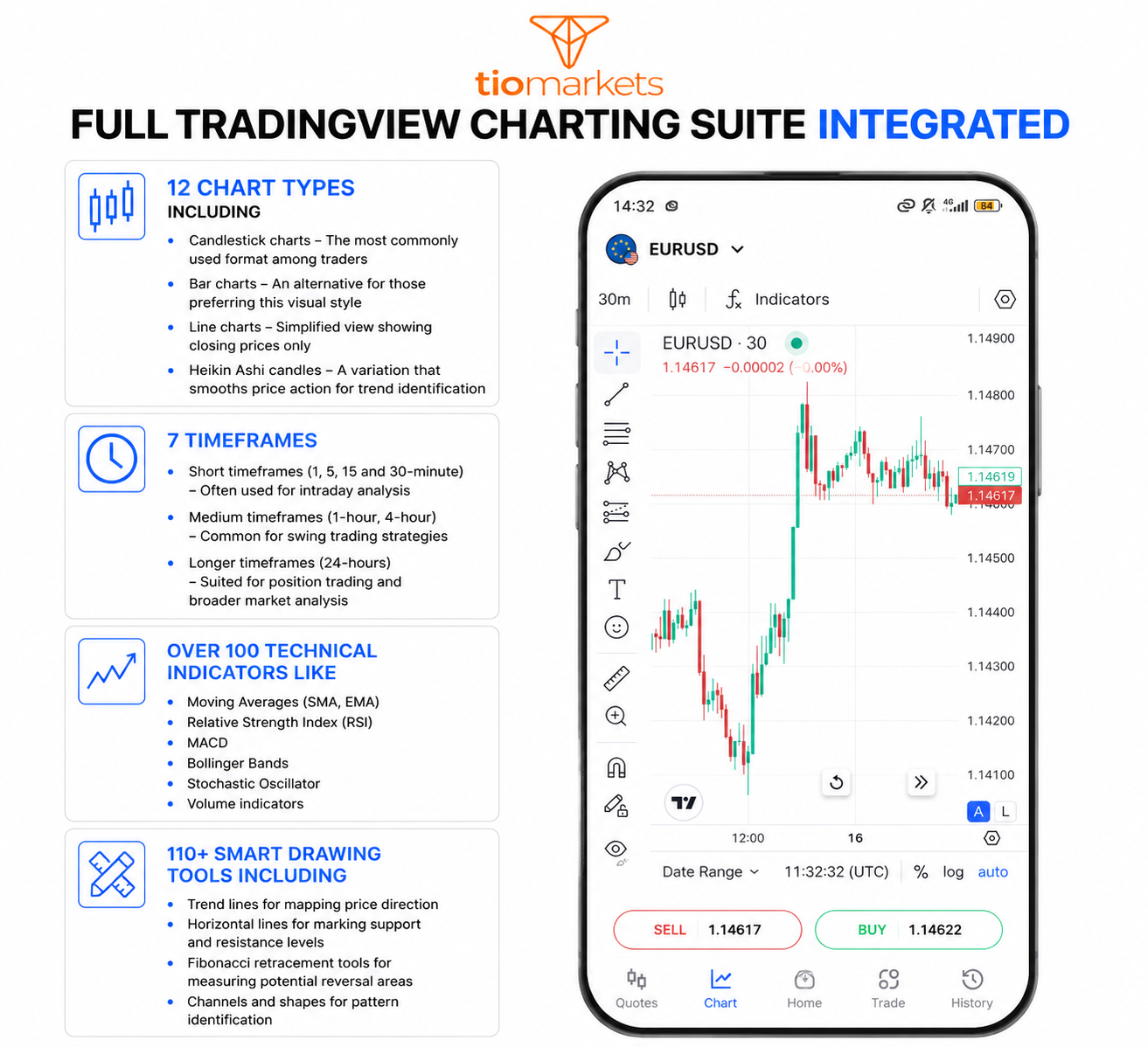
Chart Trading Functions
The app integrates order execution directly into the charting interface. This means trades can be placed without switching between separate screens - keeping the chart and trading functions in a single view. Orders can be submitted from the chart view. The app supports one-tap order placement for both buy and sell positions.
Smart Alert System
The app includes a built-in alert system that sends notifications based on user-defined conditions and account activity. Alerts include notifications related to trading account activity helping users stay informed of account and order status.
- Position opened: Notification when a new trade is executed
- Position closed:Notification when a trade is closed, whether manually or automatically
- Margin alerts: Notification when account margin falls below a specified threshold
- Stop out alerts: Notification if positions are automatically closed due to insufficient margin
How to Download This Trading App with TradingView Charts
Getting started with TIOmarkets is straightforward. This section provides step-by-step instructions for downloading and setting up your Android app with TradingView charting.
Step 1: Download the app
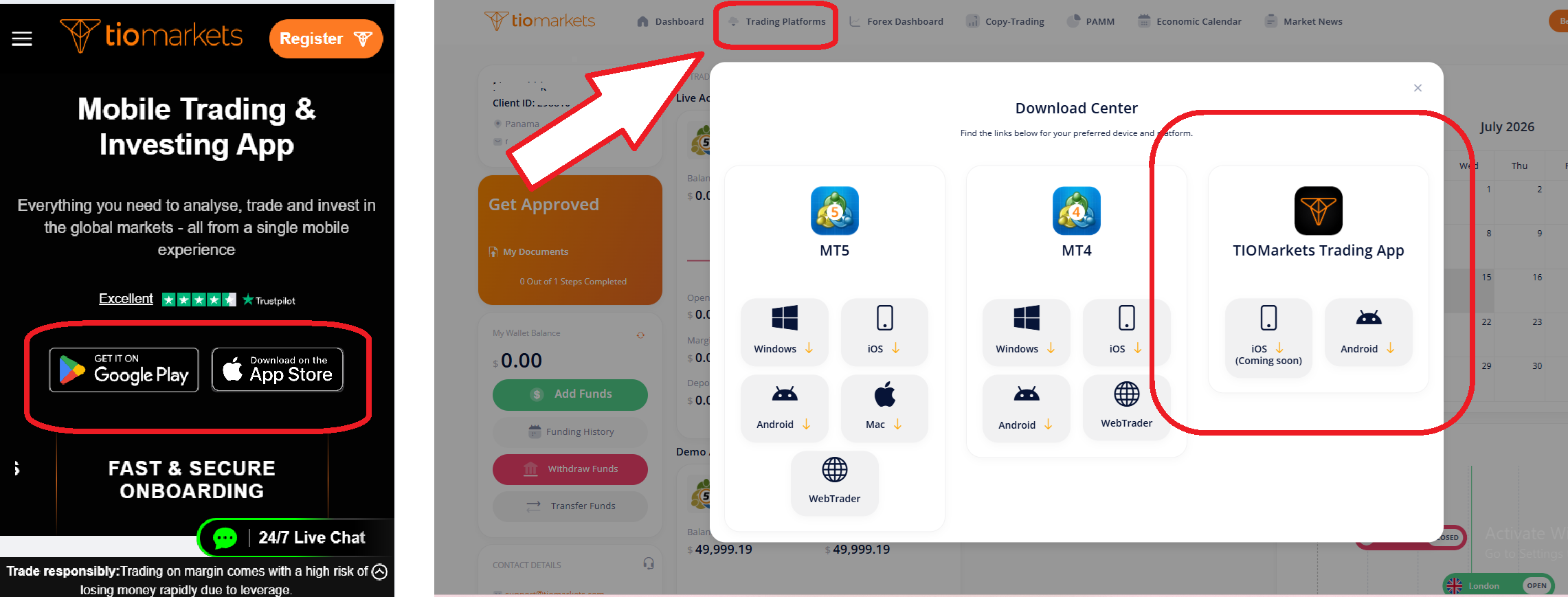
Download the TIOmarkets app and install it to your device. Currently the TIOmarkets app is available for download through the Google Play Store for Android devices. Direct download links are accessible through the TIOmarkets official website. Existing TIOmarkets clients can also access the download links through the Downloads Centre in the Client Portal.
Step 2: Register an account
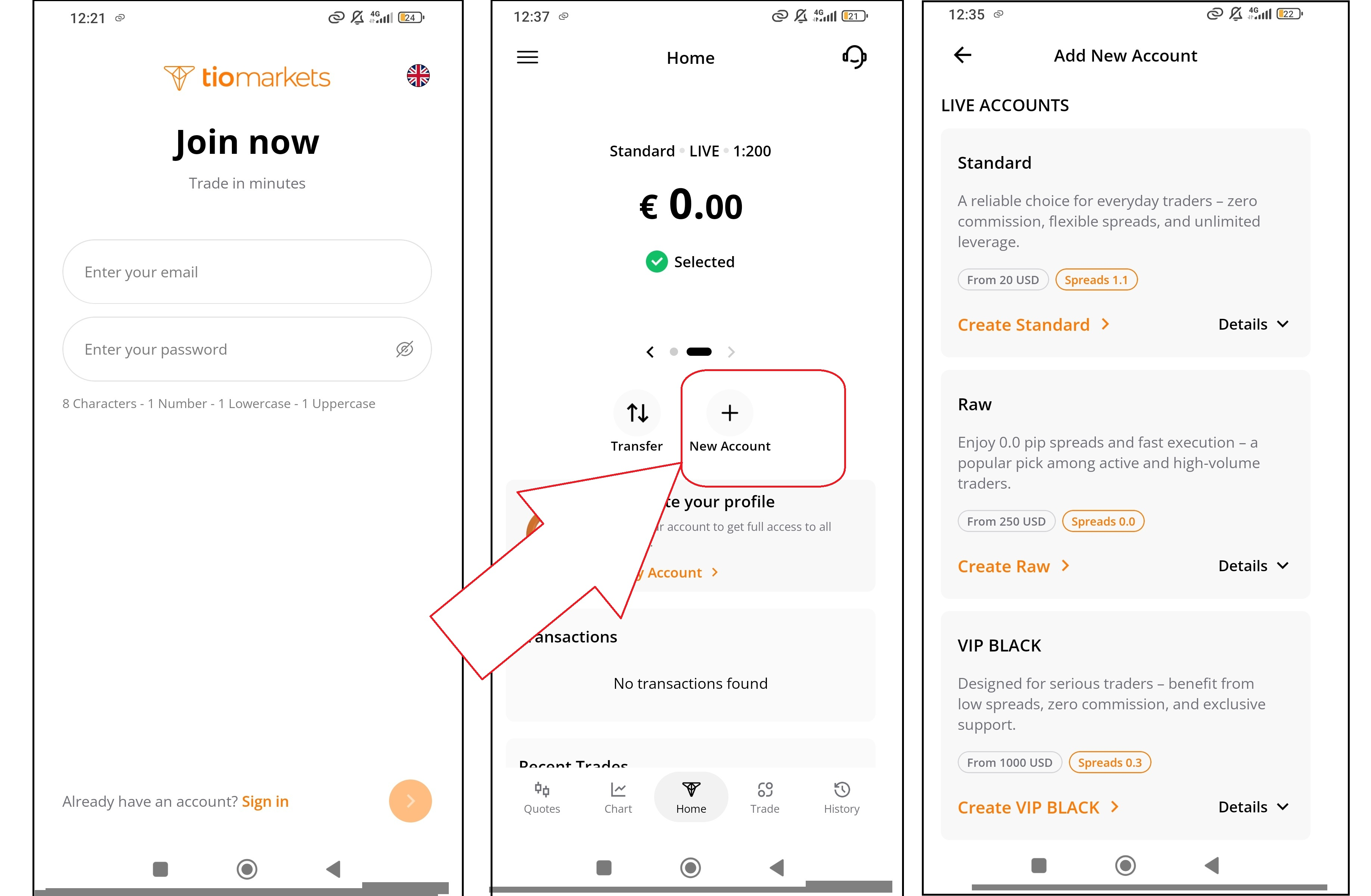
Register and create an account. Upon registration you automatically get a Standard account, but then users can select from the account types offered by TIOmarkets, including Standard, Raw, and VIP Black accounts.
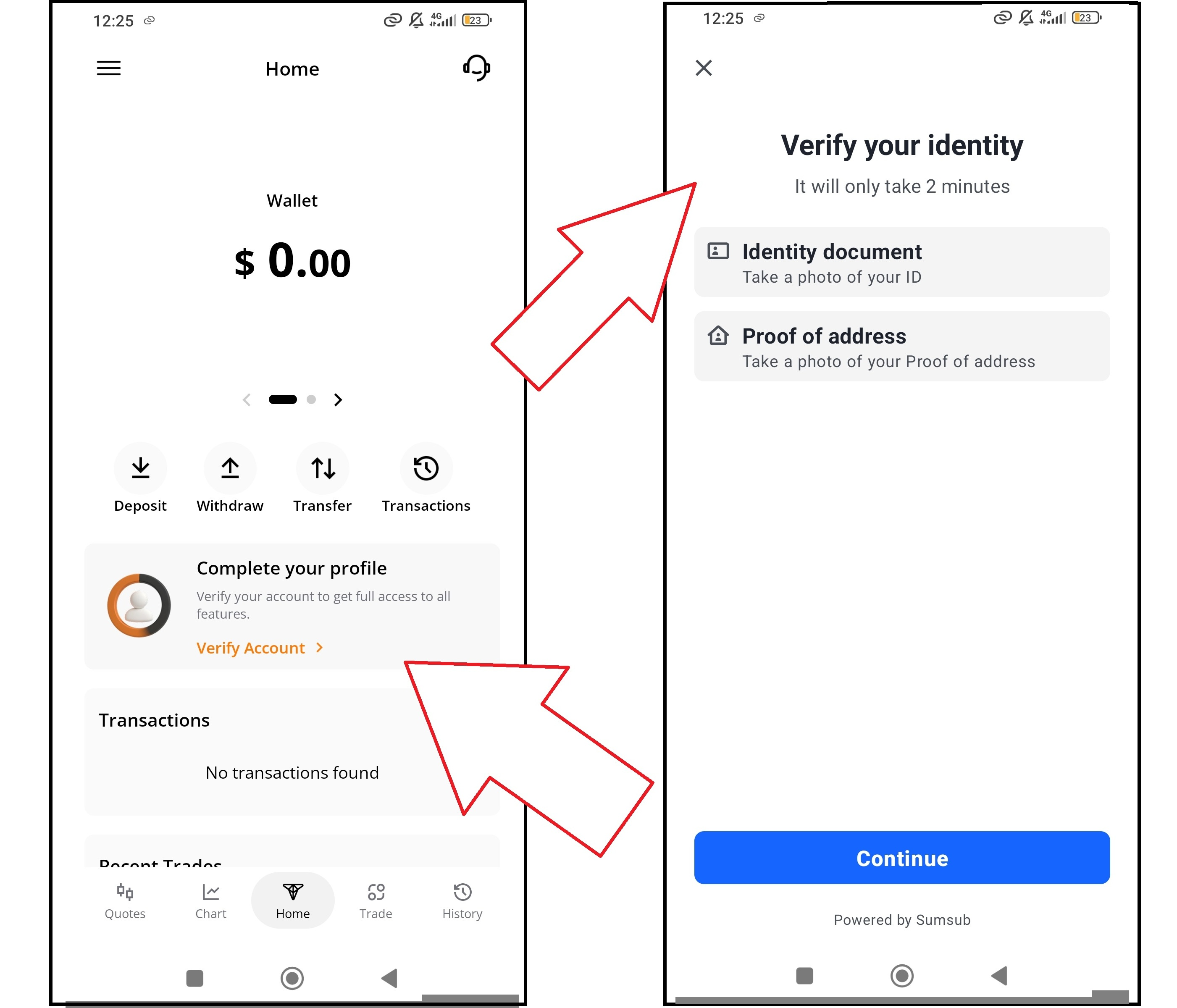
Step 3: Complete verification
Complete identity verification by uploading the required documents. This step is required before placing trades or processing withdrawals.
Step 4: Fund the Account
Deposit funds into the account. The minimum deposit amount is $20. Instant and free funding is available on selected payment methods.
After completing these steps, users can begin trading live markets or even use a Demo account to test the charting tools and platform features.
Using TradingView Charts in TIOmarkets App
After downloading and setting up your free trading app with TradingView charts, you can begin using the charting features immediately. This section covers how to access, navigate, and configure the TradingView charts within the TIOmarkets app.
Accessing the TradingView Charts
There are two ways to access TradingView charts in the app:
- Quotes Menu: Select "Quotes" from the bottom menu, choose an instrument, then tap the "Chart" tab
- Chart Menu: Select "Chart" from the bottom menu to view charts for instruments in your favorites list
Both methods provide full access to the TradingView charting suite included in this free trading app with TradingView charts.
Configuring Your Trading App with TradingView Charts
The charts appear with default settings initially. You can customize everything according to your preferences from the Settings cogwheel.
Selecting a Chart Type
TradingView offers several chart types including candlestick, bar, line, and Heikin Ashi. Each chart type presents the same underlying price data in different visual formats. Candlestick charts display open, high, low, and close prices for each time period. Other chart types display price information differently and may be suited to different analysis approaches. Candlestick charts are commonly used for pattern recognition, while line charts may be preferred for identifying overall trends.
Choosing Timeframes
Charts can be viewed across multiple timeframes, from 1-minute intervals to daily periods. The timeframe selected affects how price data is displayed. Shorter timeframes show more detail but also more noise. Longer timeframes smooth out price action and highlight broader trends. Many traders use multiple timeframes to gain different perspectives on the same instrument.
Adding Indicators
Indicators can be added to charts from the indicator library. Users can customize indicator parameters such as period lengths, colors, and display settings. To add technical indicators to your charts in this trading app with TradingView charts:
- Tap the indicators button in the chart toolbar
- Browse or search the indicator library (100+ available)
- Tap an indicator to add it to the chart
- Adjust parameters if needed (period length, colors, line styles)
Using Drawing Tools
The TradingView charts include 110+ drawing tools accessible from the vertical toolbar:
- Lines – Trend lines, horizontal lines, vertical lines, ray lines
- Channels – Parallel channels, regression channels
- Fibonacci tools – Retracement, extension, fan, arcs, time zones
- Shapes – Rectangles, circles, triangles, arrows
- Patterns – Head and shoulders, triangles, XABCD patterns
- Text and labels – Annotations, price labels, notes
Drawings remain on the chart until manually deleted and are saved with your chart configuration.
Navigation Controls
- Pinch to zoom in and out
- Swipe to navigate historical data
- Tap an indicators name to add it
- Click on the vertical toolbar icons for drawing tools
Benefits of This Trading App with TradingView Charts
Several compelling reasons make this mobile app with professional TradingView charts stand out.
Cost Structure
The TIOmarkets app is available as a free download with no purchase cost. TradingView charting functionality is included within the app without requiring a separate subscription. Demo accounts are available at no cost and provide access to the full range of charting tools and platform features.
Interface Design
The app interface uses organized menu structures and icon-based navigation. Educational resources and tutorials are accessible within the platform, covering trading basics and platform functionality.
Trading Conditions
TIOmarkets offers multiple account types with varying specifications:
| Feature | Details |
| Spreads | Vary by account type and instrument |
| Execution | Electronic order processing |
| Account Types | Standard, Raw, VIP Black |
| Minimum Deposit | $20 |
Specific spread values, execution speeds, and detailed account specifications are published on the TIOmarkets website.
Download Your Trading App with TradingView Charts
The TIOmarkets mobile app provides access to TradingView charting tools integrated with brokerage services. It’s an app that combines professional analysis tools with easy mobile trading. The integration gives you everything needed for quality technical analysis and the download process takes only minutes.
To download this free trading app with TradingView charts:
- Download via TIOmarkets’ page
- Register and create a trading account
- Complete identity verification
- Fund the account ($20 minimum) and start
Users new to trading or unfamiliar with the TradingView platform may use the demo account to explore charting features, test indicators, and practice analysis techniques before transitioning to live trading.

FAQ
Risk disclaimer: CFDs are complex instruments and come with a high risk of losing money rapidly due to leverage. You should consider whether you understand how CFDs work and whether you can afford to take the high risk of losing your money. Never deposit more than you are prepared to lose. Professional client’s losses can exceed their deposit. Please see our risk warning policy and seek independent professional advice if you do not fully understand. This information is not directed or intended for distribution to or use by residents of certain countries/jurisdictions including, but not limited to, USA & Countries included in the OFAC sanction list. The Company holds the right to alter the aforementioned list of countries at its own discretion.
TIOmarkets offers an exclusively execution-only service. The views expressed are for information purposes only. None of the content provided constitutes any form of investment advice. The comments are made available purely for educational and marketing purposes and do NOT constitute advice or investment recommendation (and should not be considered as such) and do not in any way constitute an invitation to acquire any financial instrument or product. TIOmarkets and its affiliates and consultants are not liable for any damages that may be caused by individual comments or statements by TIOmarkets analysis and assumes no liability with respect to the completeness and correctness of the content presented. The investor is solely responsible for the risk of his/her investment decisions. The analyses and comments presented do not include any consideration of your personal investment objectives, financial circumstances, or needs. The content has not been prepared in accordance with any legal requirements for financial analysis and must, therefore, be viewed by the reader as marketing information. TIOmarkets prohibits duplication or publication without explicit approval.
Join us on social media



Authors BIO

Maria is a writer and content strategist with over 10 years of experience in the finance industry. She specializes in developing research-backed articles that help financial professionals navigate complex market topics with confidence. Her expertise spans forex, stocks, CFDs and global markets, creating insightful content that educates readers and supports informed decision-making.