


Mobile Trading: Complete Guide to Trading on a Smartphone
BY Maria K.
|September 16, 2026Mobile trading refers to buying, selling, and managing financial securities using smartphones, tablets, and other portable devices through specialized applications provided by brokers and financial institutions.
The scale of mobile trading adoption is substantial. As an indication of this shift, the mobile version of the trading platform MetaTrader 4 (MT4) has surpassed 10 million downloads on the Google Play Store alone. This represents just one option among dozens available to traders worldwide, indicating that millions of market participants now rely on smartphone trading as part of their regular market activity.
This guide covers the fundamentals of trading on the go, examines how mobile brokerage platforms function, compares different platform types, and explores security considerations. Readers evaluating mobile apps can find practical criteria for assessing what makes a mobile brokerage platform suitable for their trading needs and style.
Mobile Trading Explained
Mobile trading is the practice of executing financial transactions and managing investment portfolios through applications installed on smartphones and tablets, providing real-time mobile market access from any location with internet connectivity.
Mobile Trading Definition and Core Concepts
Mobile trading encompasses the complete process of buying, selling, and managing financial instruments through dedicated applications designed for portable devices. This goes beyond simply monitoring market prices or checking portfolio values; true on-the-go trading includes the ability to execute actual transactions that affect positions and capital.
The distinction between smartphone trading and mobile market monitoring matters for understanding platform capabilities. Market monitoring apps display prices, charts, and news without transaction functionality, while mobile trading platforms provide full order execution, position management, and account administration capabilities within the same interface.
The range of available instruments varies by broker and platform, but usually includes indices, stocks, forex currency pairs, futures contracts, and cryptocurrency CFDs.
Phone trading became viable in the late 2000s as smartphone capabilities improved and mobile internet speeds increased sufficiently to support real-time data transmission and secure transaction processing. The evolution from desktop-only trading terminals to mobile investment apps is a significant shift in how individuals access financial markets. What once required dedicated hardware and physical presence at a trading desk now fits in a pocket, enabling market participation from virtually any location with internet connectivity.
How Mobile Trading Differs from Traditional Methods
Desktop trading platforms historically offered more screen space, faster processing, and access to more sophisticated analytical tools than early mobile alternatives. Nowadays, the gap between desktop and mobile capabilities has narrowed considerably, though differences remain in information density and complex analysis features. Trader behavior has shifted alongside mobile platform development, with many market participants expecting constant market access. This influences brokers’ services and how trading workflows accommodate portable trading solutions.
Portable trading tends to suit traders who need flexibility in when and where they access markets, those who manage positions over longer timeframes, and individuals who use mobile primarily for monitoring and basic order management while reserving complex analysis for desktop environments.
How Does Mobile Trading Work?
Smartphone trading works through applications that connect to broker infrastructure via secure internet connections, transmitting orders to exchanges and market makers while providing real-time data feeds, account information, and portfolio management tools.
The Technical Infrastructure Behind Mobile Apps
Applications function as interfaces between the trader and the broker's server infrastructure. Real-time market data flows allow live price information streaming and the continuous data delivery enables traders to monitor live market conditions and make informed decisions based on current pricing.
Modern trading platforms for mobiles typically synchronize with desktop and web versions of the same platform - or even across platforms via a unified trading account. For instance, TIOmarkets offers MT4 and MT5 accounts with access across desktop, web, and mobile versions. Traders can also use the TIOmarkets mobile trading app to view all trading activity and place trades through integrated TradingView charts, creating a unified experience across devices and platforms.
Main Types of Mobile Trading Platforms
These platforms include broker-proprietary applications developed by individual firms, third-party platforms like MetaTrader that multiple brokers support, and web-based mobile interfaces accessible through smartphone browsers.
Broker-Proprietary Trading Applications for Mobile
Custom mobile applications developed by individual brokerages represent one category of trading platform. These proprietary apps integrate directly with the broker's specific infrastructure and often include features unavailable on third-party alternatives.
The TIOmarkets mobile trading app exemplifies this approach with integrated TradingView charts that give users access to multiple timeframes, technical indicators, and detailed price analysis. Once a potential opportunity is identified, traders can move directly from research to execution by placing market or pending orders, using one-click trading, and managing position sizes within the app.
This combination connects analysis, execution, and administration in a single workflow rather than treating them as separate tasks. Users can access more than 950 tradable instruments across forex, stock CFDs, indices, metals, energies, crypto CFDs, and futures. The range includes more than 70 currency pairs, major global indices, hundreds of stock CFDs, and widely traded metals such as gold, silver, platinum, and palladium.
Proprietary platforms can create some platform lock-in, and traders switching between platforms may face learning curves when adapting to different interfaces. However, TradingView charts are some of the easiest to handle and most widely used so the transition is mostly smooth.
Third-Party Trading Platforms
MetaTrader 4, MetaTrader 5, and TradingView represent widely-used third-party platforms available across multiple brokers. These platforms offer standardized interfaces that traders can use with different brokers, providing feature consistency and familiar navigation regardless of which brokerage holds the account.
Mobile Web Trading Interfaces
Browser-based trading on mobile devices requires no application installation and provides basic trading functionality through smartphone web browsers. While convenient for occasional use, web interfaces typically offer fewer features and less responsive performance compared to native mobile apps.
What Are the Common Mobile Trading App Features?
Mobile trading apps - just like the TIOmarkets one - provide real-time quotes and charts, order placement and management, portfolio tracking, market research, various alerts and notifications, account management, and varying levels of technical analysis tools.
Core Trading Functionality
The TIOmarkets app enables actual trade execution and order monitoring in one interface. Users can place market orders, set pending orders, use one-click trading, access real-time pricing, and manage position sizing through their smartphone. The core trading features include:
- Real-time execution of orders
- Multiple order types including market, limit, stop-loss, and trailing stops
- In-app account management for deposits, withdrawals, and verification
- Position monitoring with real-time profit/loss tracking
- Order modification and cancellation capabilities
Market Data and Research Capabilities
The quality and depth of market data significantly affects mobile trading utility. Different platforms offer varying levels of data access and analytical tools.
| Feature | What to Look For | TIOmarkets App |
| Quote data | Real-time pricing | Yes |
| Chart types | Multiple | 12 types |
| Timeframes | Multiple | 7 timeframes |
| Indicators | 50+ | 400+ |
| News feed | Integrated | Yes |
| Economic calendar | Built-in | Yes |
Portfolio Management and Account Features
Beyond trading execution, mobile platforms vary in their account management capabilities. Features like multi-account viewing, asset allocation visualization, performance tracking, and deposit/withdrawal functionality determine how much administrative work can be completed on mobile devices.
The most capable mobile apps for trading allow complete account management without switching platforms. TIOmarkets allows users to verify identity, open accounts, deposit funds, and trade, all within a single app, eliminating the need to switch between mobile and desktop for administrative tasks.
How Does Mobile Trading Compare to Desktop Trading?
This type of trading offers portability and constant market access but typically provides fewer simultaneous data views, smaller charts, and less complex analysis tools. Compared to desktop platforms which offer larger screens, faster processing, and more sophisticated multi-tasking capabilities, app trading has some limitations.
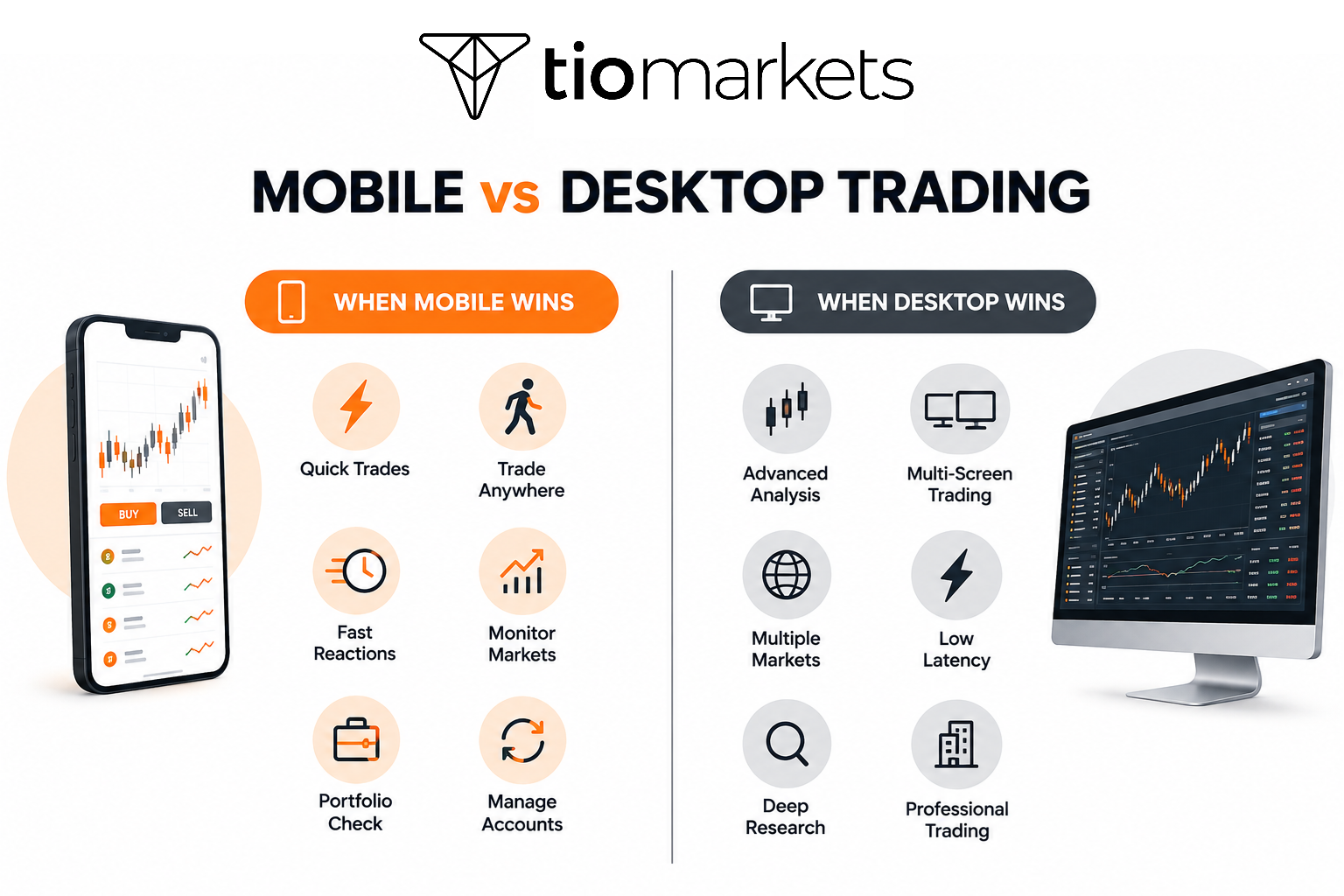
When Trading on Mobile Works Better Than Desktop
Trading on a mobile device provides clear advantages in specific situations.
- Quick position adjustments during market hours when away from a computer
- Monitoring markets while traveling or during commutes
- Responding to time-sensitive opportunities that arise unexpectedly
- Simple trades and basic order management tasks
- Portfolio checking and fundamental analysis on the go
- Managing multiple account types from one interface
When Desktop Trading Remains the Best Choice
Desktop platforms maintain advantages for certain trading activities.
- Complex multi-leg options strategies requiring simultaneous data views
- Intensive technical analysis using multiple indicators and chart layouts
- Trading multiple markets simultaneously with split-screen monitoring
- High-frequency or scalping strategies demanding minimal latency
- Extended research requiring multiple information sources
- Professional day trading operations with high volume execution
Is Mobile Trading Safe?
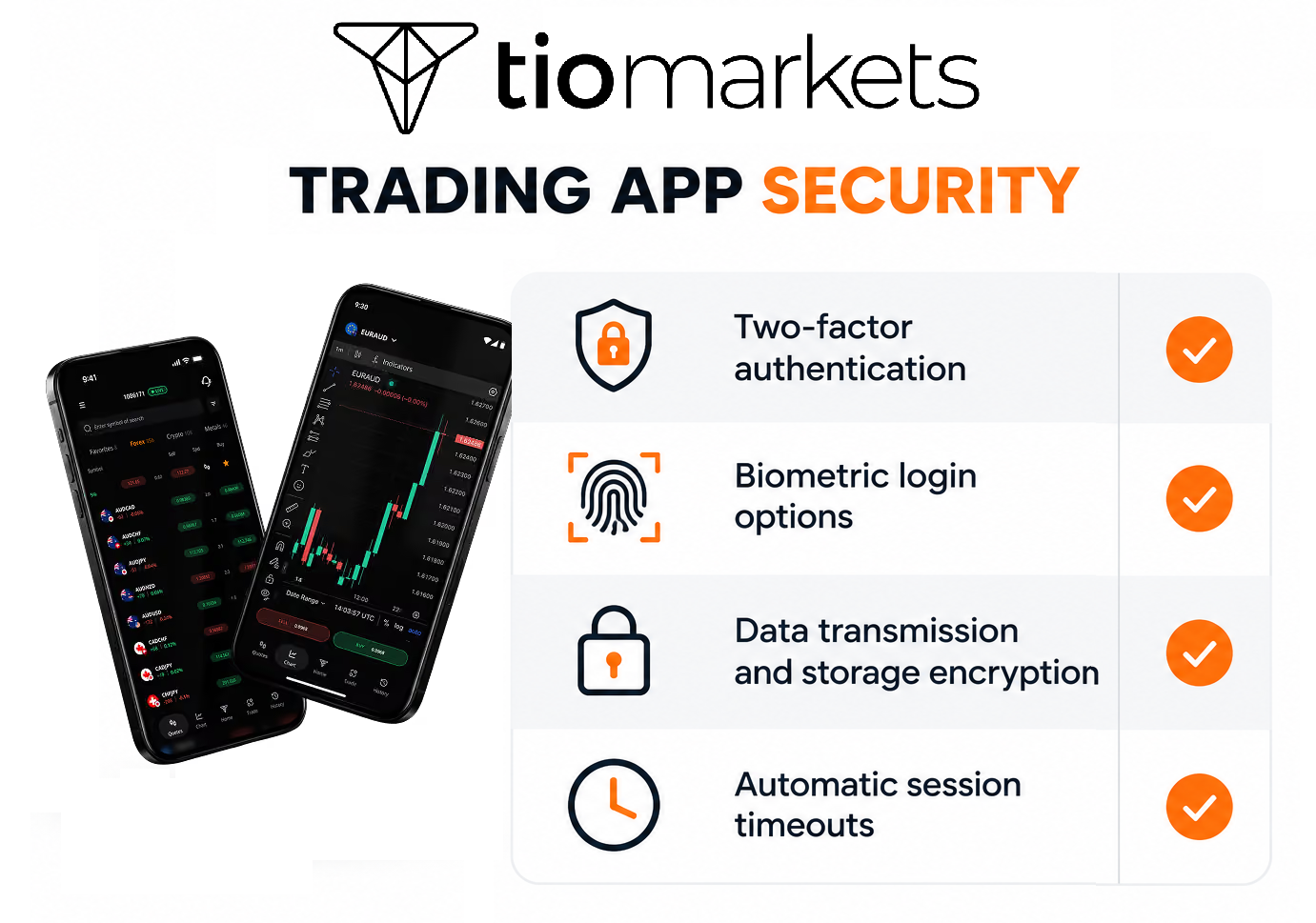
Security for trading on portable devices typically includes multi-factor authentication, biometric login options, encryption of data transmission and storage, automatic session timeouts, and remote device management features that allow account lockdown if a device is lost or stolen.
Authentication and Access Control
Trading platforms implement various security layers to protect account access. Two-factor authentication adds verification beyond passwords, while biometric authentication using fingerprint or facial recognition provides convenient yet secure login methods.
Session management features automatically log users out after periods of inactivity, and device registration systems help brokers identify authorized access points.
Data Protection and Encryption
Transport layer security (TLS) encrypts data during transmission between mobile devices and broker servers. Local encryption protects stored credentials and account information on the device itself, though users should ensure their device operating system security settings are appropriately configured.
Trading from your phone requires the highest levels of protection, and the TIOmarkets trading app has comprehensive security measures in place to safeguard client data and funds. Check the image below for the specifics.
Best Practices for Secure Mobile Trading
- Consider VPN usage when trading on unfamiliar networks
- Keep trading apps updated to receive security patches
- Avoid executing trades on public or unsecured WiFi networks
- Configure device security settings including screen locks and encryption
- Enable remote wipe capabilities in case of device loss or theft
What Are the Advantages of Mobile Trading?
Trading on the phone or a tablet provides location independence, immediate market access during time-sensitive situations, portfolio monitoring flexibility, and the ability to respond to market movements without being tied to a physical desk or computer.
- Accessibility and Convenience Benefits: Trade execution from any location with internet access removes geographical constraints from market participation. Traders no longer depend on physical trading setups or specific locations to manage their positions, enabling portfolio management during travel, commutes, or time away from primary workstations.
- Immediate Market Responsiveness: Real-time price data and instant order execution allow traders to react to market movements as they occur. This capability enables quick position adjustments during volatility and risk management actions without requiring desk access.
- Simplified User Experience for Basic Trading: Mobile interfaces often streamline common trading tasks, reducing complexity for straightforward transactions. Touch-based interaction can be efficient for simple operations, and the simplified presentation may benefit newer traders navigating markets for the first time.
What Are the Limitations of Mobile Trading?
The limitations include restricted screen space for analysis, reduced charting capabilities, connection dependency that creates execution risks, limited multi-tasking ability, and generally fewer advanced features compared to full desktop platforms.
1. Technical and Interface Limitations: Single-screen constraints limit the amount of information viewable simultaneously, making it difficult to monitor multiple markets or compare various data points at once. Smaller charts reduce technical analysis detail, and limited customization options may restrict how traders organize their workspace.
Connection loss or poor connectivity can cause order execution delays or failures, representing a risk factor particularly relevant during volatile market conditions when timely execution matters most.
2. Professional Trading Limitations: This type of trading generally proves inadequate as a primary platform for intensive day trading strategies, scalping approaches requiring split-second execution, or professional-grade analysis workflows demanding extensive screen real estate and processing power.
How to Evaluate Mobile Trading Platforms
Evaluating such platforms involves assessing execution reliability, available features, security measures, user interface design, supported securities, data quality, customer support accessibility, and how well the mobile experience integrates with other platform access points.
Critical Evaluation Criteria
- Order execution speed and reliability during various market conditions
- Available asset classes and markets accessible through the app
- Real-time data quality and latency characteristics
- Range of order types and trading functionality supported
User Experience Factors
- Interface intuitiveness and estimated learning curve
- Navigation efficiency for common tasks
- Error prevention through confirmation processes
Technical Performance Indicators
- App stability and crash frequency under normal use
- Load times and responsiveness during market hours
- Battery consumption and mobile data usage patterns
Broker-Specific Considerations
- Commission structures and fee schedules
- Customer service accessibility through mobile channels
- Regulatory compliance and fund protection measures
How to Get Started with Mobile Trading
Getting started involves selecting a regulated broker - like TIOmarkets - opening an appropriate account type, downloading the broker's mobile application, completing identity verification, funding the account, and practicing with demo trading or small positions before executing larger trades.
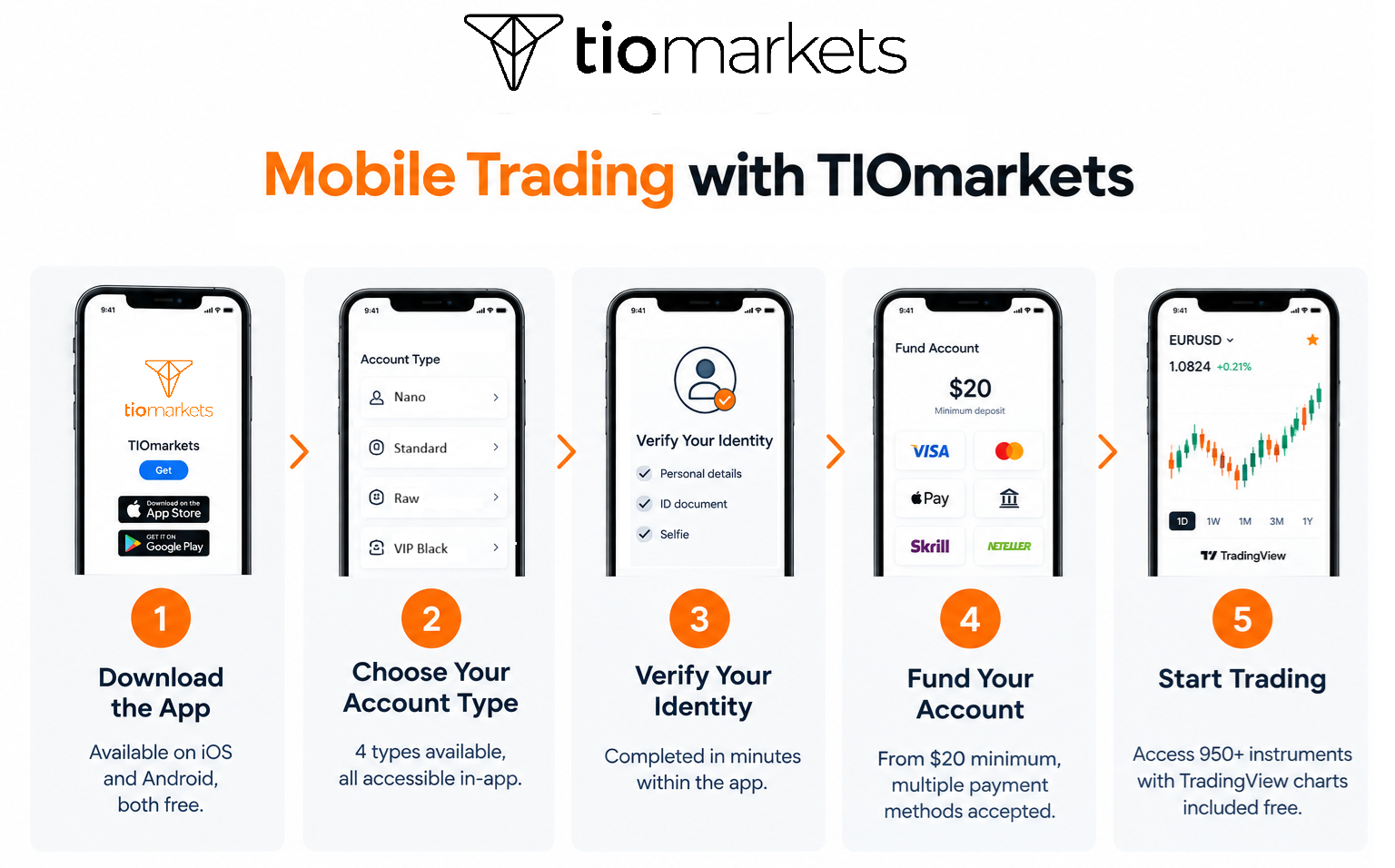
Step-by-Step: Mobile Trading with TIOmarkets
Here is how you can start your trading with a regulated broker that aims to offer a comprehensive mobile experience.
- Download the App | Available on iOS and Android, both free
- Choose Your Account Type | 4 types available, all accessible in-app
- Verify Your Identity | Completed in minutes within the app
- Fund Your Account | From $20 minimum, multiple payment methods accepted
- Start Trading | Access 950+ instruments with TradingView charts included free
Conclusion
Trading on mobile devices has fundamentally changed how individuals access and participate in financial markets. The technology provides genuine utility for position management, portfolio monitoring, and responding to market opportunities.
Platform selection should align with individual trading style, frequency, and specific requirements. Traders who primarily execute simple transactions and monitor existing positions may find mobile platforms sufficient for most needs, while those engaged in more complex strategies typically use mobile as a supplementary tool alongside desktop access.

FAQ
Risk disclaimer: CFDs are complex instruments and come with a high risk of losing money rapidly due to leverage. You should consider whether you understand how CFDs work and whether you can afford to take the high risk of losing your money. Never deposit more than you are prepared to lose. Professional client’s losses can exceed their deposit. Please see our risk warning policy and seek independent professional advice if you do not fully understand. This information is not directed or intended for distribution to or use by residents of certain countries/jurisdictions including, but not limited to, USA & Countries included in the OFAC sanction list. The Company holds the right to alter the aforementioned list of countries at its own discretion.
TIOmarkets offers an exclusively execution-only service. The views expressed are for information purposes only. None of the content provided constitutes any form of investment advice. The comments are made available purely for educational and marketing purposes and do NOT constitute advice or investment recommendation (and should not be considered as such) and do not in any way constitute an invitation to acquire any financial instrument or product. TIOmarkets and its affiliates and consultants are not liable for any damages that may be caused by individual comments or statements by TIOmarkets analysis and assumes no liability with respect to the completeness and correctness of the content presented. The investor is solely responsible for the risk of his/her investment decisions. The analyses and comments presented do not include any consideration of your personal investment objectives, financial circumstances, or needs. The content has not been prepared in accordance with any legal requirements for financial analysis and must, therefore, be viewed by the reader as marketing information. TIOmarkets prohibits duplication or publication without explicit approval.
Join us on social media



Authors BIO

Maria is a writer and content strategist with over 10 years of experience in the finance industry. She specializes in developing research-backed articles that help financial professionals navigate complex market topics with confidence. Her expertise spans forex, stocks, CFDs and global markets, creating insightful content that educates readers and supports informed decision-making.