


Trade on MT5 With AI Using an MCP Connector
BY Eleni Antoniou
|November 9, 2026You can trade on MT5 with AI through MetaTrader 5’s native Model Context Protocol (MCP) connector. Native MCP arrived in MetaTrader 5 (Build 6060) and allows AI agents built in LLMs, like ChatGPT and Claude, to work with platform data and tools. Depending on the permissions you choose, an agent can analyse markets, review your trading account, and submit or manage orders.
The MT5 terminal must be configured correctly, and trading permission must be enabled. Keep reading to learn how to connect and build a controlled test workflow with TIOmarkets MT5 trading platform.
Can You Trade on MT5 With AI
Yes, MetaQuotes added native MCP and agentic AI capabilities to MetaTrader 5 in Build 6060, released on 23 July 2026. MT5 can now expose supported tools to its built-in AI Assistant and to compatible external agents such as ChatGPT or Claude.
The important qualification is permission, in MT5, AI initiated trading can be disabled and allowed only after manual confirmation, or enabled for autonomous trading. An AI connection can therefore operate as a read only analyst to support your decision making as a supervised assistant or a permitted autonomous execution tool.
Starting with analysis and explicit approval gives you more opportunity to inspect and test what the agent is doing, before an order is executed.
What MCP Means in MetaTrader 5
Model Context Protocol (MCP) is an open interface that lets an AI client discover and use tools in another application. In practical terms, an MT5 MCP connector gives your AI agent structured access to selected platform capabilities.
MetaTrader 5 provides three MCP servers with different roles:
- Terminal: account information, open positions, order history, charts, indicators, Expert Advisors, strategy testing and supported trading operations.
- Market data: symbol information, price history, news, economic calendars and related market information.
- MetaEditor: MQL5 development, files, compilation and other tools used to build or inspect trading programs.
The available tool list can change depending on the MetaTrader 5 build and as it is updated. You can ask the connected agent to list its MT5 tools before assuming that a particular action is available.
MCP vs API vs Expert Advisor
There is more than one way to trade on MT5 with AI. To trade on MT5 with AI effectively, you should choose a connection that fits natural language interaction, a repeatable coded workflow or a strategy that runs inside the platform.
| Route | Best suited to | Main advantage | Important limitation |
| Built-in AI Assistant | Natural language analysis and platform tasks inside MT5 | Minimal setup with the default MQL5 Lite model | Actions still require suitable permissions and human review |
| Native MT5 MCP | Connecting a compatible external AI agent | Structured access to terminal, market-data and MetaEditor tools | The agent client must support MCP and local endpoints must be secured |
| Python integration | Developers building deterministic scripts, models or services | Direct access to data and trading functions such as order checks and order submission | You must design authentication, validation, logging and approval controls |
| MQL5 EA or web integration | Rules-based automation that runs within MT5 | Established event-driven execution and Strategy Tester support | You must design authentication, validation, logging and approval controls |
What You Can Do When on MT5 With AI Trading
With the relevant tools and permissions, an AI agent can help you:
- Retrieve quotes, candles, tick history and symbol details.
- Summarise account balance, equity, margin, open positions and trading history.
- Open charts, add indicators and inspect indicator parameters or visible values.
- Review Expert Advisor settings, prepare a Strategy Tester configuration, run a backtest or optimisation and retrieve the report.
- Generate, explain, compile or debug MQL5 code through MetaEditor tools.
- Submit market or pending orders, change stop-loss or take-profit levels, close positions or delete pending orders when trading access is permitted.
The remainder of this article will focus on the native MT5 MCP connector built into TIOmarkets trading platform.
How to Connect an AI Agent to MT5 With Native MCP
1 Download MT5 and Log in
Install or update the MT5 desktop terminal to the latest version. If you need the platform, register or log in to your TIOmarkets client area. Sign in to the platform with your trading account credentials and, for the built-in AI Assistant, your MQL5.community account. MT5 configures the free MQL5 Lite model by default.
2 Configure the AI Assistant if needed
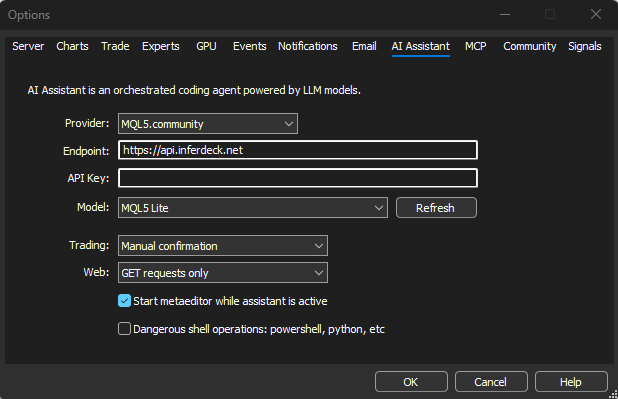
Navigate to the Tools menu at the top, then select Options and choose the AI Assistant tab. You can retain MQL5.community or select a supported provider and enter its endpoint, API key and model. An AI-provider key controls access to that provider; it is separate from the bearer token used by an external client to authenticate with the MT5 MCP server.
3 Set the permissions
Choose whether trading is disabled, requires explicit confirmation or is allowed. You can also limit web access and decide whether shell operations such as PowerShell or Python are available. For an initial test, disable trading and shell access unless the workflow genuinely needs them.
4 Enable and copy the MCP configuration
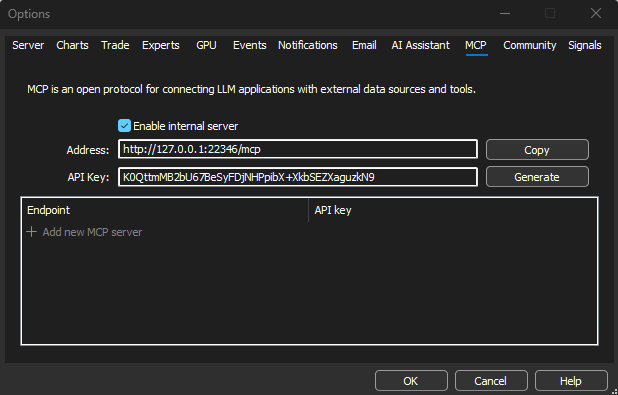
In Tools, Options, open the MCP tab. Enable the internal terminal server, confirm the local address and port, and generate a secure API token. MT5 can copy ready-to-use configuration for supported clients. The native configuration normally refers to the terminal, marketdata and metaeditor servers and authenticates with a bearer token.
5 Configure a compatible external client
Add the copied MCP settings to the client’s project configuration and restart the client if required. Codex and Claude Code have documented configuration formats. Other MCP-capable clients can connect through equivalent JSON or client-specific settings.
A regular ChatGPT conversation is not automatically an MT5 connector. To use an OpenAI model, you need an MCP capable OpenAI client or a custom application that can reach the MT5 tools. Never paste terminal tokens, trading passwords or provider keys into a public prompt or untrusted project.
6 Verify with read only tasks
Keep the MT5 platform running and ask your agent to list its available MetaTrader tools. Then test low risk requests, such as retrieving account information, listing open positions or loading recent chart history. Compare the response with the terminal before considering any trading actions.
7 Test supervised actions on demo
Use a TIOmarkets demo account and manual confirmation to test order size, symbol names, stop levels, rejection handling and logs. Demo execution may differ from live trading, but it is a suitable environment to get started without risking real funds.
Security Controls for MT5 AI Trading
When you trade on MT5 with AI, the main risk is the combination of sensitive data, broad permissions and an agent that can take actions and trade on your behalf. Use multiple control layers so one mistake does not become an unrestricted trade.
- Start on demo and read-only. Add write access only after the data path and tool calls are understood.
- Require confirmation. Review the symbol, direction, volume, stop loss, take profit and maximum loss before approval.
- Set hard limits outside the model. Enforce allowed symbols, maximum volume, maximum open exposure, trading hours and daily loss limits in code or platform rules.
- Use least privilege. Do not enable web access, MetaEditor or dangerous shell operations when the task does not need them.
- Protect credentials. Store API keys and bearer tokens in secure local configuration, rotate exposed tokens and avoid sharing account passwords with an AI provider.
- Log every action. Keep prompts, tool calls, order checks, confirmations, server responses and errors for investigation.
- Plan for failure. Define what happens after timeouts, duplicate requests, partial fills, disconnections and unexpected positions.
Limits of Trading on MT5 With AI
MCP connectors make platform tools easier for an agent to use, but it does not turn a language model into a reliable forecasting engine. Before you trade on MT5 with AI, account for the following limits:
- Language models can make generic assumptions, select the wrong tool or misread an ambiguous instruction.
- AI can make mistakes
- Backtests can contain data errors, unrealistic assumptions or overfitted parameters. Past performance is not a reliable indicator of future results.
- API and MCP calls add dependencies and latency to execution.
How to Start and Trade on MT5 With AI
Only consider live use after the workflow behaves predictably across normal and failure scenarios. Even then, keep exposure limited and monitor the terminal. Automation changes how an order is initiated but it does not remove market risk or your responsibility for the trading account.
You can begin with low risk operations to familiarise yourself with AI trading and to test trading strategies built with AI.
- Ask the AI to summarise a demo account and compare the result with MT5.
- Request chart or trade-history analysis without enabling any trading tools.
- Have the agent prepare an order proposal in a fixed format, but place nothing.
- Enable manual confirmation and test the smallest permitted size with defined stop levels.
- Create a separate small account just for AI trading.

FAQ
Risk disclaimer: CFDs are complex instruments and come with a high risk of losing money rapidly due to leverage. You should consider whether you understand how CFDs work and whether you can afford to take the high risk of losing your money. Never deposit more than you are prepared to lose. Professional client’s losses can exceed their deposit. Please see our risk warning policy and seek independent professional advice if you do not fully understand. This information is not directed or intended for distribution to or use by residents of certain countries/jurisdictions including, but not limited to, USA & Countries included in the OFAC sanction list. The Company holds the right to alter the aforementioned list of countries at its own discretion.
TIOmarkets offers an exclusively execution-only service. The views expressed are for information purposes only. None of the content provided constitutes any form of investment advice. The comments are made available purely for educational and marketing purposes and do NOT constitute advice or investment recommendation (and should not be considered as such) and do not in any way constitute an invitation to acquire any financial instrument or product. TIOmarkets and its affiliates and consultants are not liable for any damages that may be caused by individual comments or statements by TIOmarkets analysis and assumes no liability with respect to the completeness and correctness of the content presented. The investor is solely responsible for the risk of his/her investment decisions. The analyses and comments presented do not include any consideration of your personal investment objectives, financial circumstances, or needs. The content has not been prepared in accordance with any legal requirements for financial analysis and must, therefore, be viewed by the reader as marketing information. TIOmarkets prohibits duplication or publication without explicit approval.
Join us on social media


Authors BIO

Eleni is a financial markets enthusiast contributing to content covering forex, indices, commodities, and global market developments. She is passionate about researching market-related topics and helping make financial information more accessible to traders.





